


OpenAI is one of the world's leading AI research companies aiming to create human-level general-purpose artificial intelligence.
Thanks to the APIs offered by OpenAI, developers can easily utilize these powerful AI capabilities in their own applications. OpenAI APIs can be used in many different areas such as text generation, image processing, audio processing, embeddings, and many more.
Before we get into the details of OpenAI models and APIs, let's get a brief overview of APIs and their working principles.
What is an API and How do API Requests Work?
An API (Application Programming Interface) is a tool that makes the capabilities of software available to other applications.
In other words, an API allows software to open up its functionality to the outside world. For example, OpenAI APIs make the capabilities of powerful language models accessible to programmers.
So how do APIs work? APIs are based on a client-server architecture:
- The client (e.g. your application) makes an API call. This means sending a request to the server in JSON or XML format.
- The server (e.g. OpenAI) receives the request and performs the corresponding operation.
- The server then sends the result to the client, again in JSON or XML format.
- The client interprets the response and uses the results.
- Thus, APIs make it possible for different applications to communicate and interact with each other.
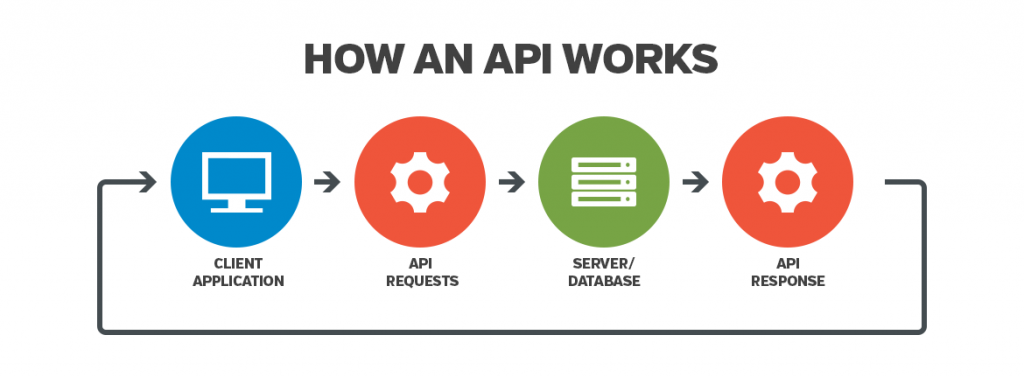
Now that we've covered the basics of how APIs work, let's look at the models available through the OpenAI API.
OpenAI Models
The OpenAI API has many models with different capabilities and can be used for different purposes. Let's take a brief look at the most popular of these models.
GPT-3
GPT-3 is OpenAI's older generation language model. GPT-3 is more limited in its ability to generate and understand text than GPT-3.5 and GPT-4.
GPT-3 has 4 sub-models: davinci, curie, cabbage, and ada. Davinci is the most powerful GPT-3 model.
The token limits of these GPT-3 models are as follows.
- davinci: 2.049 tokens
- curie: 2.049 tokens
- babbage: 2.049 tokens
- ada: 2,049 tokens
GPT-3 models are no longer receiving new training. The newer GPT-3.5 and GPT-4 models have replaced GPT-3.
GPT-3.5-TURBO
GPT-3.5 is the most powerful OpenAI model for text generation and understanding before GPT-4. It can take 4,097 tokens of input. There is also a version of GPT-3.5 with a 16K token limit.
GPT-3.5 models:
- gpt-3.5-turbo: Chat-oriented basic GPT-3.5 model
- gpt-3.5-turbo-16k: GPT-3.5 model with larger context window that can receive 16,385 token inputs
GPT-4
GPT-4 is the most advanced and latest OpenAI model for text generation and understanding. It can take 8,192 tokens of input.
GPT-4 models:
- gpt-4: Basic GPT-4 model focused on chat
- gpt-4-32k: GPT-4 model with a larger context window that can receive 32,768 token inputs
DALL-E
DALL-E is a visual AI model that can generate images from text descriptions. There is no maximum input length restriction.
The DALL-E model available through the API now comes in 2 updated versions, which are more realistic, more accurate, and produce images with 4 times the resolution of the original model.
Whisper
Whisper is an AI model that translates speech into text. It belongs to the GPT-3 family and has become very popular due to its ability to transfer voice to text with a very high accuracy rate. It is not limited to English only, its capability can be used in more than 50 languages. It can also translate audio from any language into English.
Like other OpenAI products, Whisper has an API.
Embeddings
Embedding models can convert text inputs into numeric vectors. The recommended model for embeddings is text-embedding-ada-002.
Other embedding model names:
- text-similarity-*-001
- text-search-*-*-*-001
- code-search-*-*-*-001
To use these models via API and integrate them into our own applications, we first need an API key from OpenAI. Here's how to get one.
How Can I Get an OpenAI API Key?
Here's what you need to do to get an OpenAI API key:
- Go to the OpenAI website and create a free account.
- Once your account is approved, log in and select the API tab from the left side menu.
- Create a new API key by clicking on the "Create new secret key" button.
- Copy your key on the page that opens. You will use this key in the "Authorization" header of your API requests.
Now you have the necessary key to use OpenAI APIs. You can send requests using your key.
OpenAI has a free quota for your first requests. After that, you will be charged according to your usage amount.
You can track your API usage and costs in the billing tab of your OpenAI account.
OpenAI APIs and Usage Areas
OpenAI offers many APIs to developers. Here are the most popular ones.
Completions API
Completions API is used to generate and complete text for GPT-based language models. It gives the model the input text received from the user and the model generates the continuation of this text.
Compatible models for Completions API:
- text-davinci-003
- text-davinci-002
- text-davinci-001
- text-curie-001
- text-babbage-001
- text-ada-001
- davinci
- curie
- babbage
- island
This makes text completion useful for many tasks, such as answering questions.
An example cURL command for the Completions API:
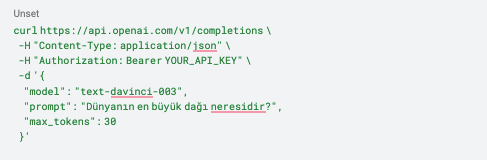
model: Name of the model to use.
prompt: Input text given for the model to complete the text.
max_tokens: The maximum number of tokens to generate.
Here's the kind of response the OpenAI API sends back for this request.
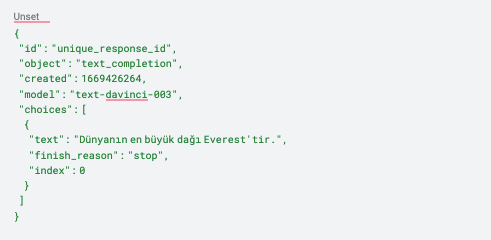
Completions API is optimized for GPT-3 based models.
Instead of using the GPT-3 model with the Completions API, I recommend using the chat completions API, where you can use GPT-3.5 and GPT-4 with more advanced capabilities.
Chat Completion API
Chat completion API enables conversational interaction between the user and the AI assistant. Messages are sent with user and system roles.
Compatible models for Chat completion API:
- gpt-4
- gpt-3.5-turbo
- gpt-3.5-turbo-16k
An example cURL command for the Chat Completions API:
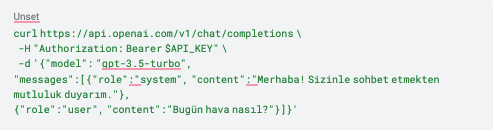
model: Name of the model to use.
messages: User and assistant messages.
Here's the response you'll get back from the API for this request.
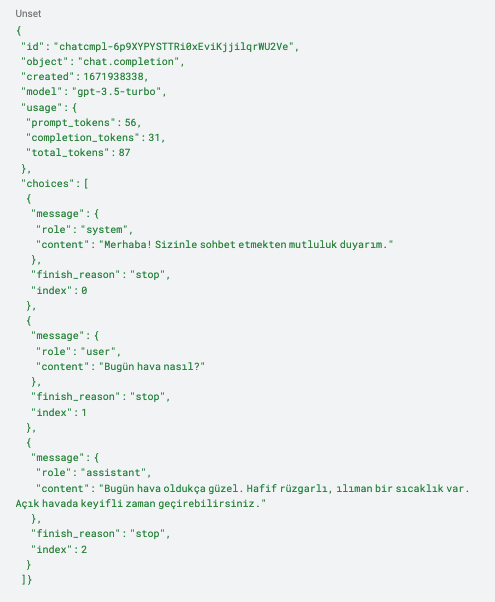
In addition to the message generated in response, metadata such as the reason for completion, the number of tokens used, etc. is also returned.
The Chat completion API is optimized for use with conversation-driven models such as GPT-3.5 and GPT-4. It delivers natural chat experiences.
Embeddings API
The Embeddings API converts text into vectors for similarity measurement and relationship detection.
Compatible models for the Embeddings API:
- text-embedding-ada-002
- text-similarity-*-001
- text-search-*-*-*-001
- code-search-*-*-*-001
An example cURL command for the Embeddings API:

input: Text to be converted to vector.
model: The name of the model to use.
The API returns a response like this for that request.
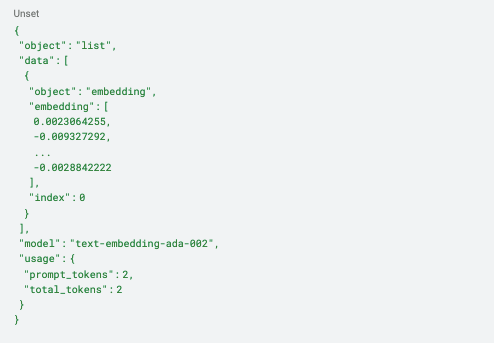
The generated vectors can be used for inter-text similarity calculations. It is ideal for many tasks such as search, classification, and clustering.
The text-embedding-ada-002 model is the best in terms of cost/performance.
Images API
The Images API generates images, including photographic ones, from a natural-language description you provide as input.
An example cURL command for the Images API:
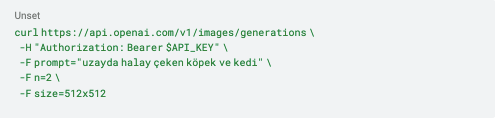
prompt: Text describing the image to be generated.
n: Number of images to be produced.
size: Image size.
Here's what the API returns for this request.
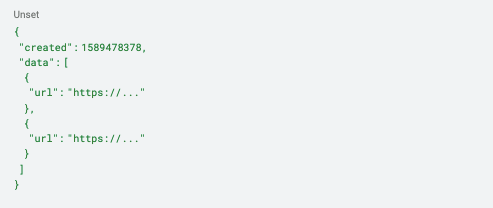
URLs and other metadata of the generated images are returned. It is possible to generate images of different sizes.
The Image API gives very successful results, especially with the DALL-E model. It is very suitable for creating images based on the user's imagination.
Moderation API
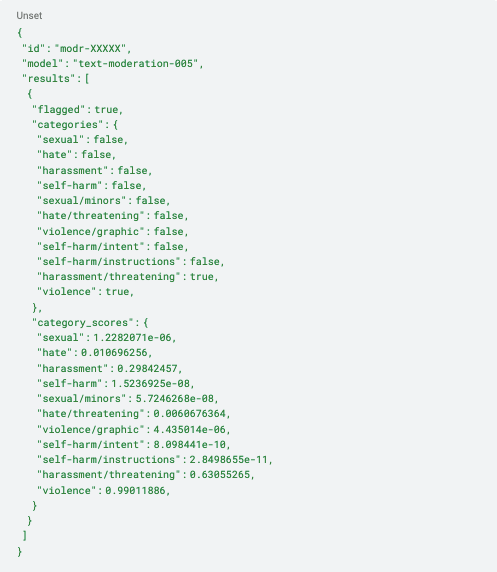
Moderation API provides moderation by detecting hate speech, threats, suicide, etc. in texts. It can be used to filter user content.
Compatible models for Moderation API:
- text-moderation-stable
- Text-moderation-latest
A sample cURL command for the Moderation API:

The API returns a response like the one below for this request.
Whisper API
It uses a speech-to-text model called Whisper to transcribe audio files into text, with the ability to handle multilingual speech.
An example cURL command for the Whisper API:
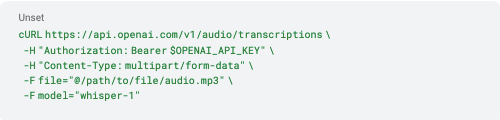
model: The name of the model to use.
file: Audio file
The API returns a response like the one below for this request.
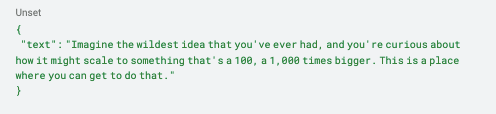
It uses the Whisper model, which provides very high accuracy in voice to text conversion. Many different languages are supported. Split and merge can be used for long audio recordings.
OpenAI Model & API Compatibility
You can find which APIs OpenAI models are compatible with in the table below.
| API | Endpoint | Models |
|---|---|---|
| Whisper | /v1/audio/transcriptions | whisper-1 |
| Whisper | /v1/audio/translations | whisper-1 |
| Completions | /v1/completions (Legacy) | text-davinci-003, text-davinci-002, text-davinci-001, text-curie-001, text-babbage-001, text-ada-001, davinci, curie, babbage, ada |
| Chat Completion | /v1/chat/completions | gpt-4, gpt-4-0613, gpt-4-32k, gpt-4-32k-0613, gpt-3.5-turbo, gpt-3.5-turbo-0613, gpt-3.5-turbo-16k, gpt-3.5-turbo-16k-0613 |
| Embeddings | /v1/embeddings | text-embedding-ada-002, text-similarity-*-001, text-search-*-*-001, code-search-*-*-001 |
| Moderation | /v1/moderations | text-moderation-stable, text-moderation-latest |
To summarize,
- OpenAI has several models with strong artificial intelligence capabilities. These models are specialized in different fields such as text, image, audio.
- Specially developed APIs are offered for these models. Thanks to the APIs, developers can easily use the models.
- Among the most popular models are GPT-3.5, GPT-4, DALL-E and Whisper.
- APIs such as Completions, Chat Completions, Images, Embeddings, Moderations, and Whisper are available for the models.
- OpenAI APIs and models have great potential for developing innovative applications.
You can easily access detailed information about OpenAI models and APIs from the addresses below.
I hope this has been useful. Here's hoping the automation you build with these APIs speeds up your daily work.


