


Pinterest works less like a social media platform and more like a powerful visual search engine. Beyond discovering new ideas, plenty of Pinterest users also turn to the platform to support their buying decisions. By sharing pins, website owners can both drive traffic and reach potential customers.
According to a 2022 Hootsuite study, Pinterest ranks as the 14th most used social media application in the world.
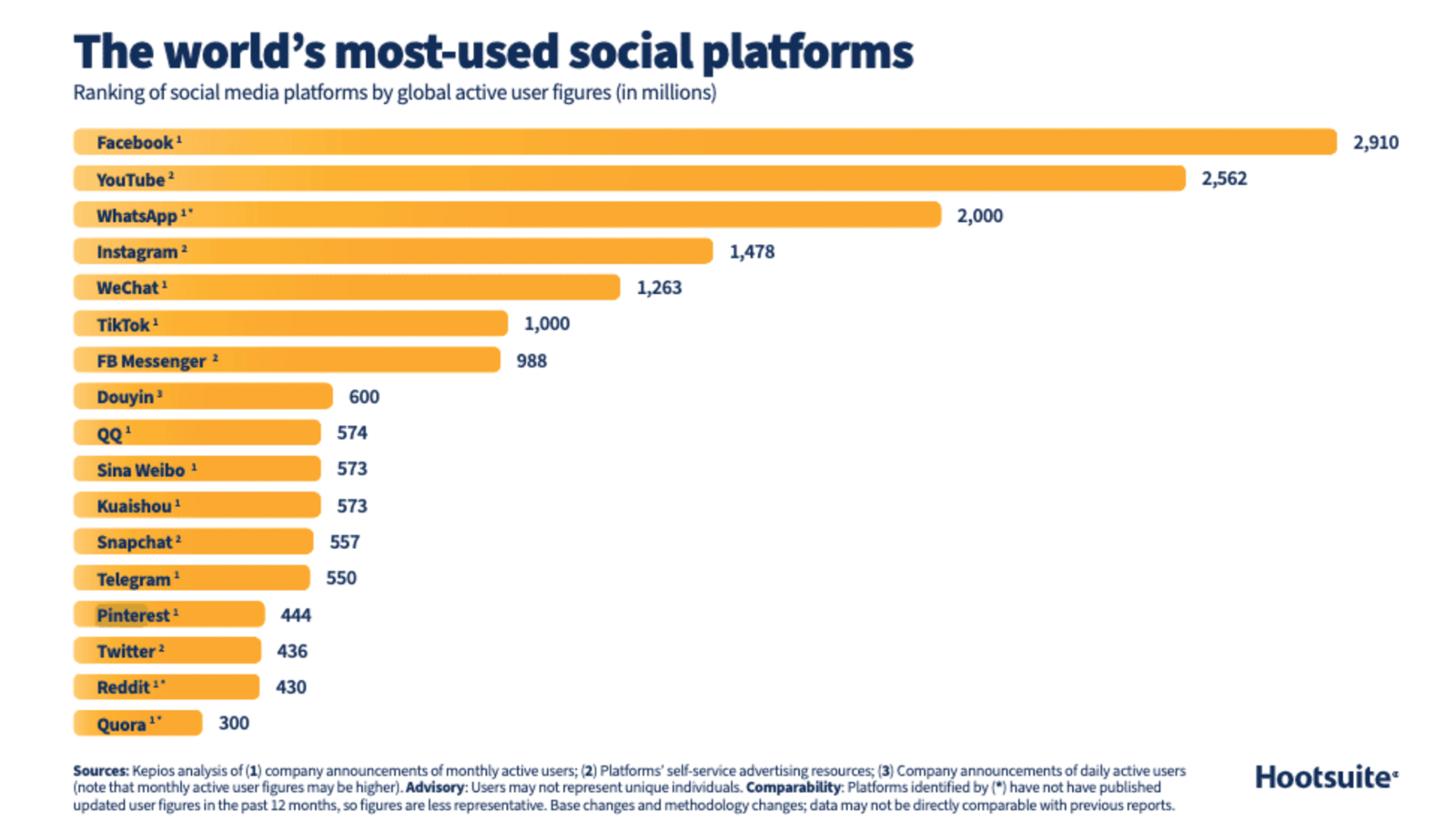
Standing out on Pinterest means reaching a wider audience, and that's where Pinterest SEO strategies come in. Let's look at what you can do for SEO on this platform, which had 450 million monthly active users in 2023.
What is Pinterest SEO?
Right now, there are 4 key factors for SEO on Pinterest. These are:
- Domain Quality: Pinterest ranks your pins based on your site's quality and the popularity of the pins linked to your website.
- Pin Quality: A metric that measures your pin's quality based on its popularity and engagement, such as the comments it has received.
- Pinner Quality: A metric based on the overall activity and engagement of your Pinterest account.
- Relevance: A metric based on how relevant the keywords and search intent used in the pin are.
Quality scores matter a lot here, because Pinterest's homepage runs on an algorithm called Smart Feed. This algorithm shows users posts that are relevant to them, and it ranks those posts based on their quality score.
In short, SEO metrics on Pinterest largely come down to interactions and shares.
Beyond these metrics, there are a few other points that Pinterest pays attention to when prioritizing content. These are
Writing in the biography section of the website and approval of the website
Pinterest prioritizes pins created by a website's owner, so getting your website approved can help your pins rank higher in search results.
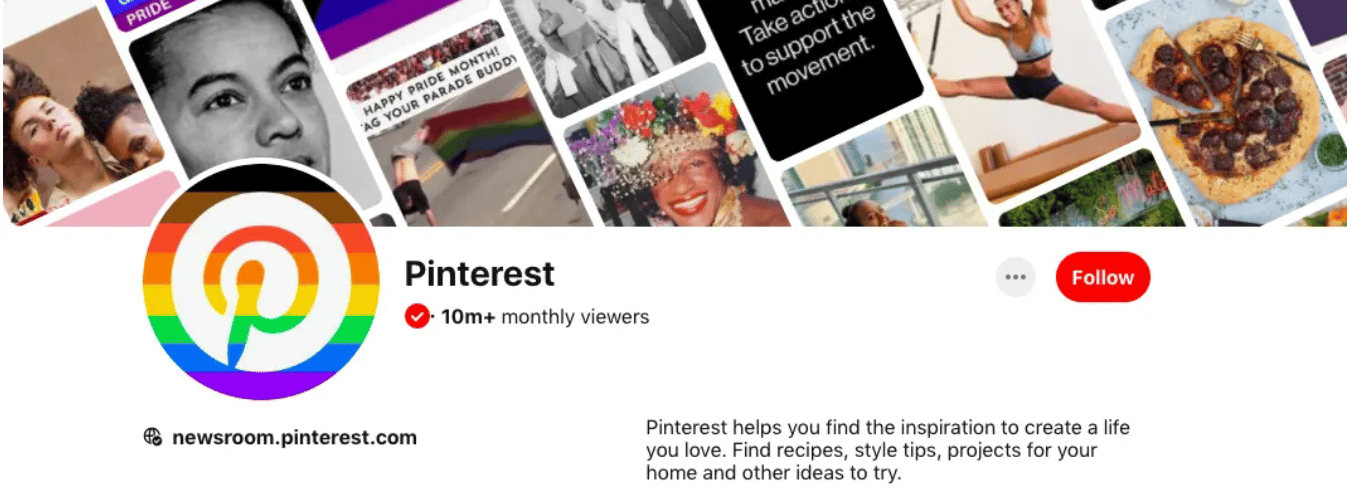
Make sure your website is verified on your Pinterest account. Here's an example of what a verified Pinterest account looks like.
Creating a pin
One specific thing to pay attention to when creating your pins is the image file name. Just like optimizing an image for Google, set the file name to a relevant keyword before you upload your images to Pinterest.
Image descriptions are another important tool for Pinterest SEO. Use descriptive, relevant keywords about the image you're pinning, and your pins become more likely to show up when a user searches for those keyword phrases on Pinterest.
You can also use hashtags in your pins to get more visibility.
Creating a dashboard
Board names can be up to 100 characters, but anything past 40 characters may get cut off depending on the device. That's why it's important to keep the name simple, clear, and a good match for your content.
Boards allow up to 500 characters in their description field. This field isn't really meant for users to see and read; it's there for Pinterest to measure relevance. The description field matters because it helps Pinterest detect relevance and target the right user, so take care to write a description that includes the long-tail keywords you want to target for each board.
A relevant, eye-catching cover photo also helps users understand what a board is about. Use cover photos with relevant image selections and the same design language for each board, and include the board's title in the photo itself for a better user experience.
Creating a board also offers a more accessible experience for your target audience by gathering similar or related content together.
You may want to use group boards to get more views. You can collaborate on a group board with an account whose Pinterest follower count you find useful.
Another benefit of interacting with other, similar accounts is that you become a recommended profile for their followers, which helps you reach more users.
Fixing pins to the created board
On Pinterest, pins appear in relation to the board they're pinned to. This is how Pinterest ensures that pins show up in the right searches.
Paying attention to the visual aspect ratio
Shared images should have an aspect ratio of 2:3. Pinterest may remove pins with a larger ratio than this from users' feeds.
For detailed information about Pinterest's recommended dimensions, you can use the link here.
Creation of video content
Video content, already popular on many other platforms, matters a lot for Pinterest too. Pinterest's algorithms prioritize video content.
According to Pinterest's statement made in 2021, Pinterest users watch approximately 1 billion videos every day.
Regular sharing of posts at regular intervals
Posting at regular intervals matters, and sharing during prime time helps too, since both increase your visibility.
Instead of 50 posts at once, you're better off doing 10 posts over 5 days on a regular basis. Evening hours and break times are the best times for sharing.
Keep your posting regular, and make sure to include video posts.
Initial Settings
Now that we've covered the points Pinterest pays attention to, let's look at what you can do when setting up a Pinterest account.
Creating a Business Account
If you want to actively use Pinterest to drive more traffic to your website, it's recommended that you create a business account on Pinterest. That also gives you the ability to edit your profile's header image.
With your Pinterest business account, you can access analytical data and see the views and clicks your posts are getting. You can also take advantage of the ad publishing features. The generally preferred type of advertisement is the featured pin.
Another important advantage of the business account is the ability to create rich pins. With rich pins, you can automatically sync the information on your website with your pins.
Profile Optimization
When you create a profile on Pinterest, you choose two different names: display name and account name. The account name is a standard requirement, but you should optimize the display name in the best way possible.
The bio section is an area that can make your profile stand out. You should include as many relevant keywords and a call to action as possible.
Previously, social media accounts could be linked to your Pinterest account, but the ability to overlay a social media account is no longer active. Instead, if you don't want to build your followers from scratch, you can share what's new on your Pinterest account with your users on social media platforms.
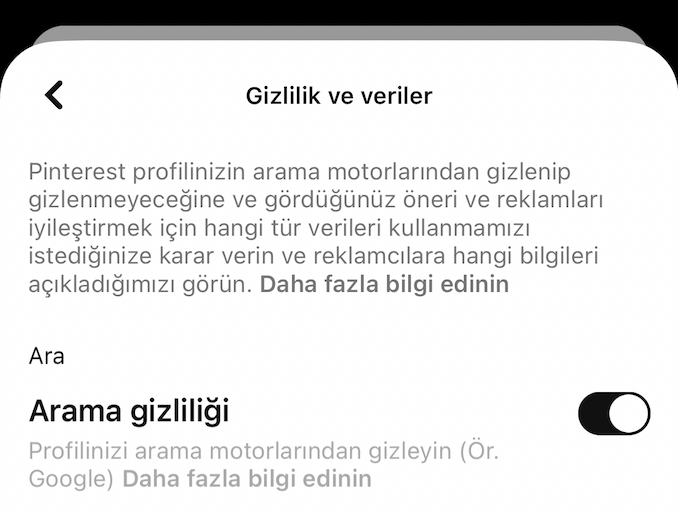
Perhaps the most important item in profile optimization is that your profile should be crawlable. If you want search engines to come to your Pinterest profile, make sure that the Search privacy field in the "Privacy and data" area of your Pinterest profile settings is unchecked.
Competitor Reviews
Using the Pinterest SEO metrics mentioned above and the things to consider when sharing on Pinterest, you can examine your competitors' profiles and plan your own actions. There are also several methods you can use when examining competitors. These are:
Reviewing the Competitor's Pinterest Profile
You can evaluate the image your competitor chose as their cover photo.
You can also check how many pins they've shared so far and how many followers they have.
You can examine the styles used in their pins (fonts, effects, etc.) to see what your competitor prioritizes differently than you do.
What the competitor includes in the pin description field of its posts, and whether they use hashtags, are also worth evaluating.
Finally, you can look at how often your competitor posts, and how often they share video content.
Reviews Performed with Ahrefs
Through tools such as Ahrefs, you can see how many different domains and backlinks your competitor's Pinterest account currently has. You can also see the organic keywords their Pinterest page ranks for, and shape your strategy accordingly.
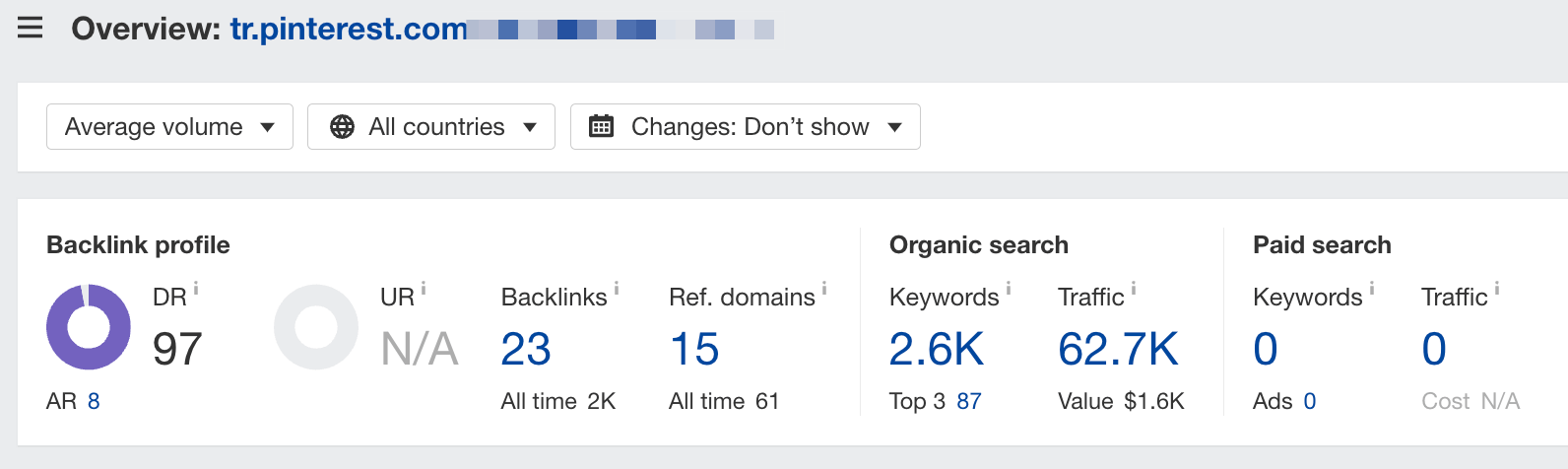
You can see which boards send the competitor the most traffic, along with those boards' titles and search volumes. Use what you find here to guide your strategy.
Reviews Performed with Similarweb
With Similarweb, you can check the share of Pinterest in the traffic your website and your competitor's website get from social media channels.
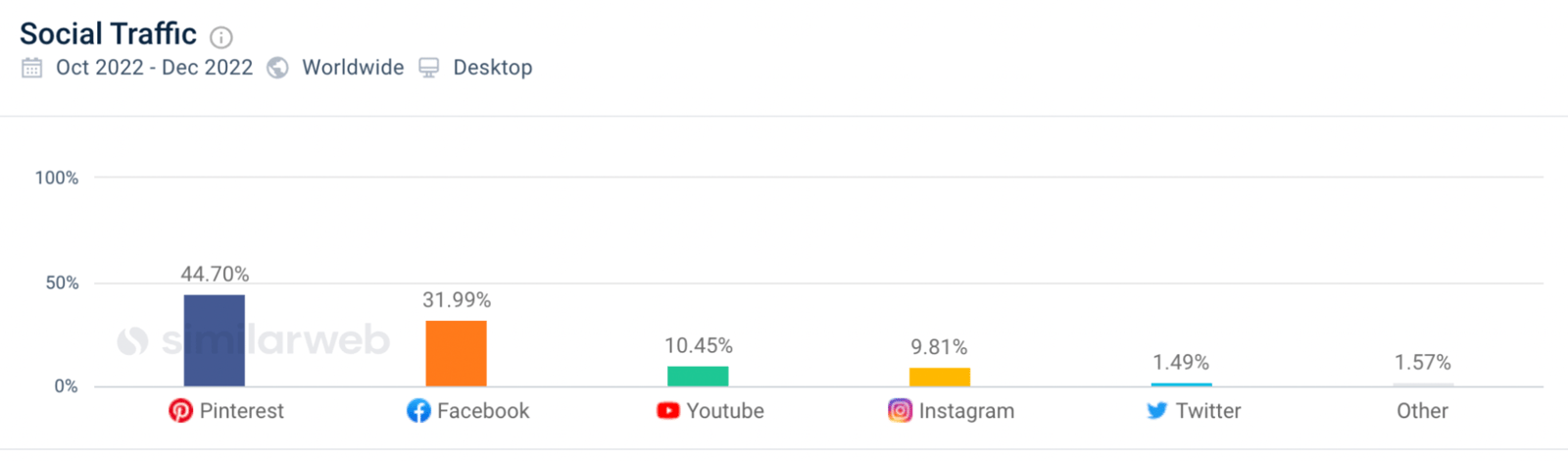
This is where you can measure how well your Pinterest SEO efforts are working.
Summary
Following the Pinterest SEO suggestions and competitor reviews listed above can bring you a range of gains.
For example, with your content listed on Google both through your Pinterest account and as a website, you can show up in the SERP with 2 different results for the same search. This gives you more space on the page than your competitors and has a positive effect on CTR.
In short, Pinterest SEO work lets you attract organic traffic to your site for free. From there, you can direct that traffic with calls to action however you like.
Beyond this, another important thing to know is that 85% of Pinterest users say they use the mobile app. So don't forget that making your own site mobile-friendly will give you an advantage.
I hope this was a useful rundown for all readers.
This content was created by Zülal Hoşgör, SEO Specialist at Zeo.
