


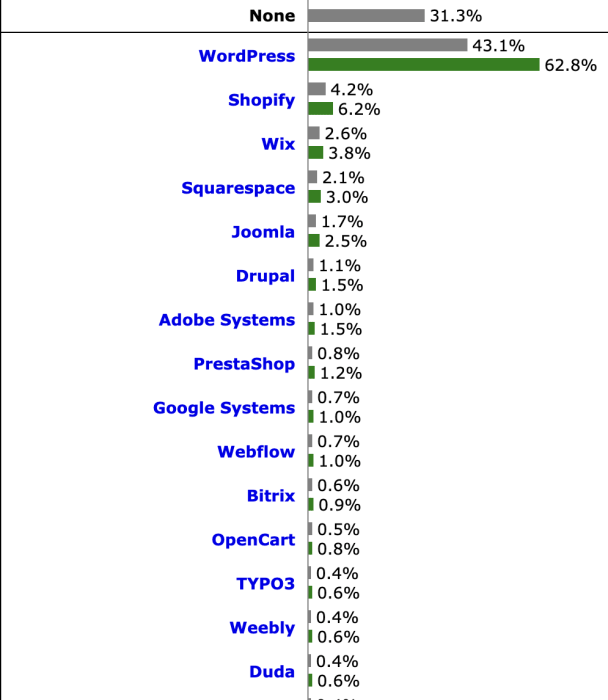
It is well known that Wordpress, which was launched in May 2003, is the most commonly used content management system today. According to W3Techs data, 43.1% of all websites in the world use Wordpress, and its market share among content management systems is 62.8%.
https://https://www.manaferra.com/wordpress-statistics/
If you're building a website on a platform this popular and still growing every day, having a fast website is basically a requirement. A lot of people might ignore website speed even though they focus on subjects such as design and content. A user connecting to a slow-loading website might leave before ever seeing your brilliant design and excellent content. That's why in this post, we wanted to shed light on the plugins that could be used to speed up your website. Before going into the details of these plugins, we should definitely mention website speed.
Why is Website Speed Important?
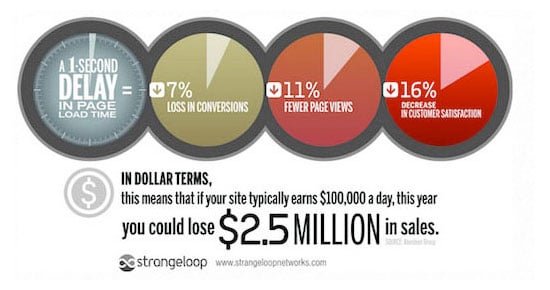
According to recent surveys, an individual's attention span has decreased from 12 seconds to 7 seconds. This means you should grab the attention of the users visiting your website as soon as possible, since you have very little time to work with. In a case study carried out by Strangeloop, a 1-second delay in page load time may lead to a decrease of up to 7% in conversions, 11% in page display, and 16% in customer satisfaction.
Google's updates also prove how important website speed is. Emphasizing the importance of users' ability to find answers to their questions fast, Google announced in July 2018 that mobile website speed became a ranking factor.
And with an announcement declared on 28 May 2020, the term Core Web Vitals stepped into our lives.
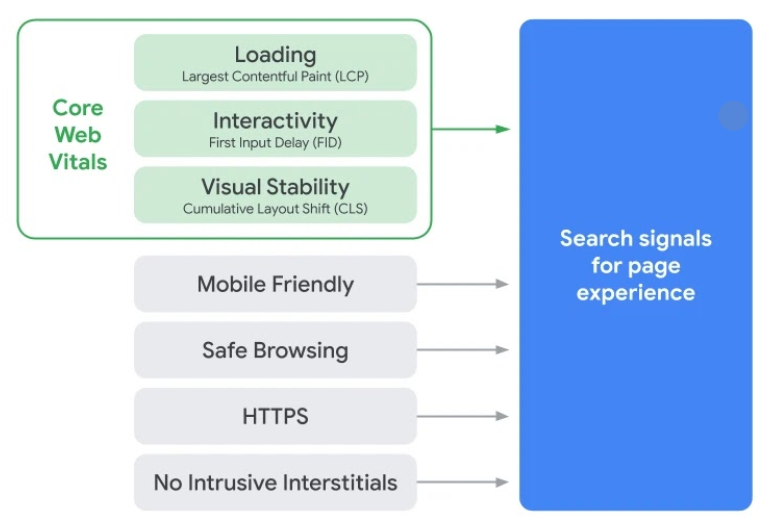
Website speed became a crucial factor with this update, which treats page experience, measured through Core Web Vitals metrics, as a ranking factor. Google, which had been planning this for a long time, rolled out the update with an announcement on June 15.

Google announced that it would roll the update out gradually over a very long time. So although there won't be major position changes right away because of the update, it's now an obligation to take action on website speed.
To sum up, if you want to give the users visiting your website a better experience and get more traffic and income, you need a fast website.
Why is your WordPress Website Slow?
The reasons why your Wordpress website loads slowly can be listed as follows:
■ Web Hosting: Hosting and server preferences are very important for a fast website. Low-quality hosting that doesn't fit your website and its traffic may cause slow load times.
■ Nonfunctional Plugins: Slow, outdated, and badly optimized extensions may harm your website's speed.
■ Wrong Theme Choice: Your Wordpress theme is another element that has an influence on your website performance. Using optimized themes for speed and size might lead to a decrease in your website's loading speed.
■ Old PHP Version: If the hosting company you work with uses an old PHP server, it may impact your Wordpress website performance. The host of your website must always use the latest PHP version in their servers. If you do not know which PHP server your website uses, you can find out with the help of the Display PHP Version plugin.
■ Page Size: Large images and non-optimized JS and CSS sources may slow down your pages and cause negative results for user experience.
■ External Command Files: Third-party command files may have a big effect on how fast your pages load.
The Best Wordpress Speed Plugins
As we all know, the most important reason Wordpress dominates up to 40% of the web is that it offers a wide range of plugins. Among these plugins, we tried to come up with the best ones that can speed up your website.
In this post, you will explore 10 different plugins that you can use to improve your website loading speed. You will find minifying plugins, caching plugins, lazy loading plugins, and some other plugins allowing you to make various specific adjustments to your website.
As a result, you can stop losing traffic, subscribers, and customers due to slow page loading times.
WP Rocket
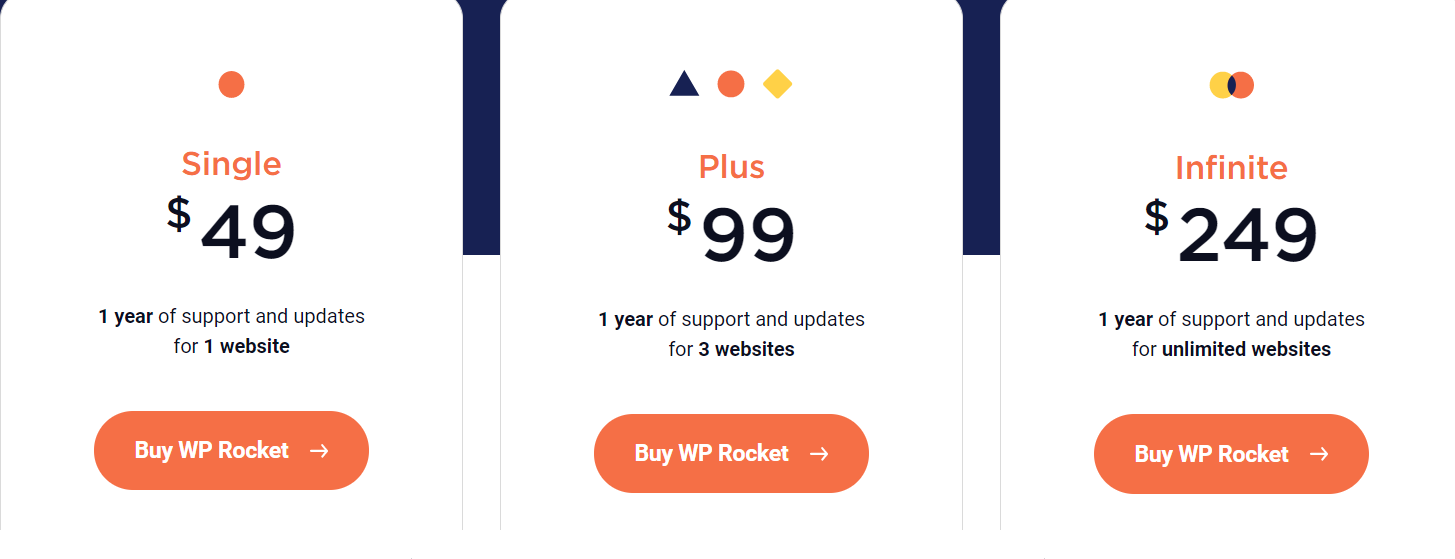
WP Rocket is a premium caching plugin. Beyond all its caching functions, you also get a bunch of unexpected features with this plugin, including database optimization and lazy load, so you no longer have to install separate plugins for each one. The only drawback of such a perfect caching plugin is that you have to pay for it. To use WP Rocket, you must spend a minimum of $49 annually.
Highlighted Features of the WP Rocket Plugin:
● It ensures caching of all pages.
● It has a caching feature for users coming from mobile devices.
● It helps loading cache memories of pages beforehand.
● It has a GZIP compression feature for decreasing the usage of bandwidth.
● It helps you integrate and minify JS and CSS files.
● It helps defer the loading of images with the Lazy Load feature.
● WP Rocket automatically perceives some plugins that you use for WebP. (These extensions; Imagify,Optimus, EWWW, Shortpixel Image Optimizer)
● It does not need the official Cloudflare plugin since it is totally compatible with the WP Rocket Cloudflare plugin. With direct access to your Cloudflare account, you can configure the plugin by receiving the required API key information.
● You can minimize the page loading time by reducing HTTP requests.
● It helps defer the loading of Javascript files.
● By creating critical CSS and turning CSS codes affecting the above-the-fold field into inline, it helps defer the loading of the rest of CSS codes.
● In WP Rocket, there is an option for cleaning the WordPress database as well.
● With its Heartbeat API feature, it provides you with an opportunity to create a connection to build a real-time synchronization between server and browser and for data transfers.
● It brings DNS requests beforehand to reduce the effect of the third-party code.
Litespeed Cache
Litespeed Cache is another Wordpress acceleration plugin you can use to manage your cache memory and improve your performance. LSCache, with features similar to Apache's, is an all-in-one acceleration solution that speeds up dynamic content and greatly reduces page loading time on a Litespeed server. Its most important feature is that it eases the load on your server resources by running the entire caching process at the server level.
If you'd like to get Lite Speed, you can use your NEWUSER10 discount code, created uniquely for Zeo Blog readers.
Highlighted Features of the Litespeed Cache Extension
● You may run an entire page caching process on the server.
● It provides browser cache memory support.
● It conducts database optimization.
● It provides an exclusive cache memory support.
● It has a Lazy Load feature.
● It helps you run a visual optimization.
● It helps you create the critical CSS automatically.
● It helps you minify CSS, Javascript, and HTML.
● It helps you combine CSS and Javascript.
● It has the HTTP/2 Push feature for the CSS and JS on supporting web servers.
● It provides a CDN support.
● It provides a WebP image format support.
Autoptimize
Autoptimize is a Wordpress speed optimization plugin you can use to improve your website performance and page speed. The free version already includes various features you can use to optimize your website: minifying the style and command files, turning the critical CSS into an inline form, deferring the loading of the integrated CSS, optimizing pictures, delaying offscreen images with lazy load, and optimizing Google writing fonts.
Autoptimize does not run a caching process for an HTML page. You can fill this gap using either WP Super Cache, or Cache Enabler, or WP Cloudflare Super Page Cache plugin.
Highlighted Features of the Autoptimize Extension
● With the "Optimize the Javascript code" and "optimize the CSS code" options, it is able to minify your Javascript and CSS files.
● The "compose JS files" and "compose CSS files" options provide you with an opportunity to integrate your Javascript and CSS files.
● With the "Gather inline JS codes" and "compose inline CSS" options, it integrates the JS and CSS codes existing in HTML with Autoptimize’s optimized Javascript file. This option might cause to an increase in the cache memory size of Autoptimize.
● With the "Scripts to be excluded from Autoptimize" option, you can exclude certain lines and command files you do not want to be optimized from integration by submitting a list of them separated with commas.
● When you activate the "Data for Images: Use URIs" option, it provides you with an opportunity to code tiny background images on your website as base64 to embed them into the CSS.
● It helps you add the CSS codes impacting the above-the-fold field with an inline form by creating a critical CSS. With the Autoptimize plugin, you can improve your website's speed using this feature. By creating the critical CSS with the Critical Path CSS Generator tool, all you need to do is paste the codes provided by the tool to the Autoptimize settings.
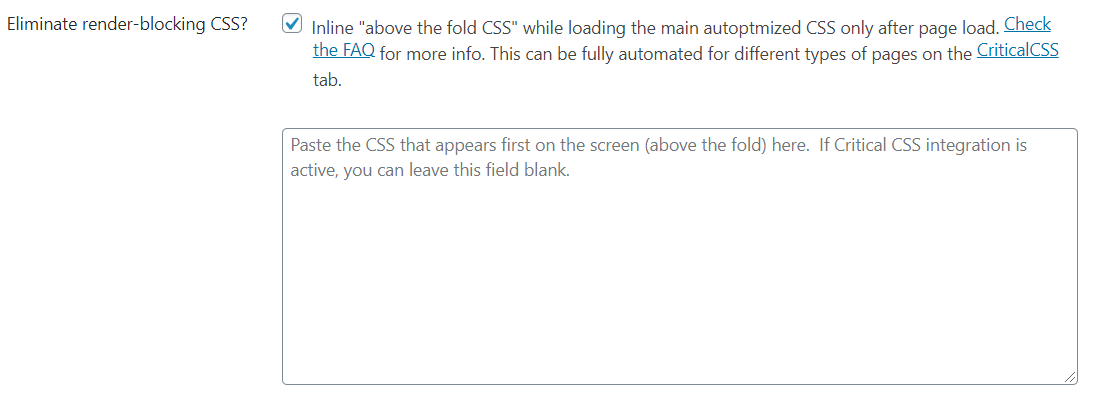
● When you optimize the "Optimize the HTML Code" option, it helps you minify the page size, removing the unnecessary blanks existing in HTML code.
● With the "Google Font Types" option in the extra optimization section, you can optimize font types with just a click.
● When you activate the "Remove Emojis" option, it helps minify your page size by removing the CSS and JS bound up with the Wordpress core emojis.
● With the "Optimize Pictures" option in the pictures tab, it optimizes pictures automatically and presents them on the global CDN of ShortPixel. In addition to the picture quality thanks to its integration with ShortPixel, it helps you create WEBP servers of images as well.
● It also has an option allowing you to use the preconnect directive for Third-Party sources. You can make an improvement by moving the third party domain names for which you are facing errors on Pagespeed to the "Use preconnect for 3rd party domain names" field.
● With its Preload directive, it grants you a preloading opportunity using the "Preload specific queries with preload" option.
Nitropack
NitroPack is a cache memory that creates good results for those who fail to get any good results from other plugins in Wordpress. As Cyrus said before, it is capable of increasing the score of a website from 38 up to 92 on Pagespeed.
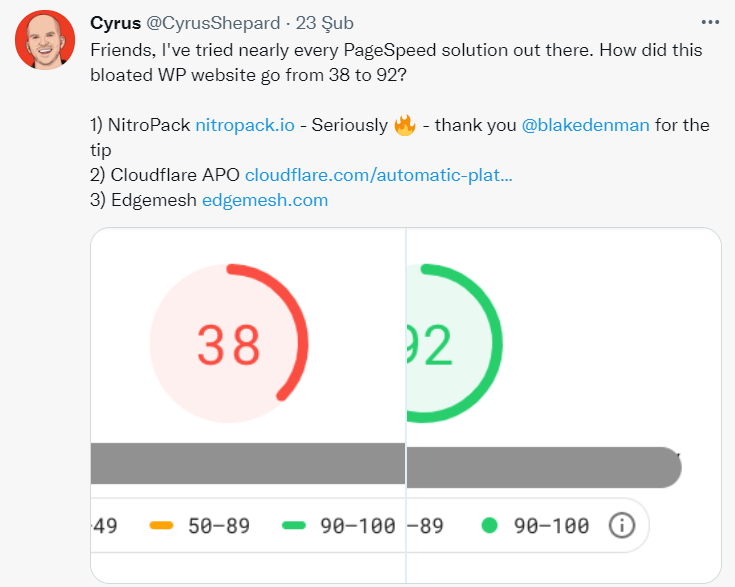
Nitropack helps simplify the process of speeding up your website and optimizes various other items too. It offers several packages, billed monthly, based on your average page viewing activity.
With the discount code "zeogency" unique to Zeo Agency, you can purchase a package with a 5% discount.
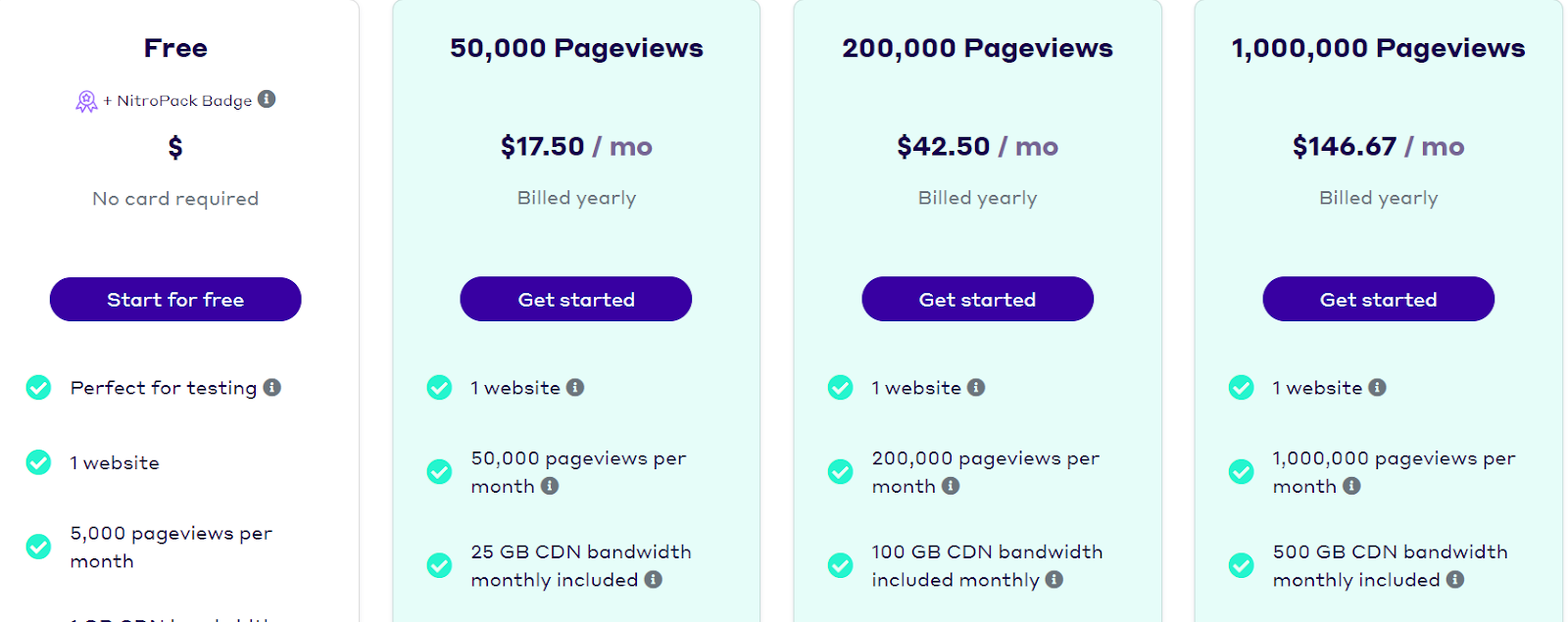
In my opinion, one of the biggest drawbacks of this plugin is that the free plan is only suitable for small-scale websites with 5000 views per month. In this plan, alongside features like HTML, CSS, and JS compression, an advanced caching policy, image optimization, and 1 GB of CDN bandwidth a month, you also get a badge called Powered by Nitropack in your website's footer. (Yet another drawback of the free plan.) That badge disappears from your website if you upgrade to the premium plan.
After deciding which package suits your website best, register with Nitropack, activate the plugin on the dashboard, and then click the Connect to Nitropack button on the window that pops up.
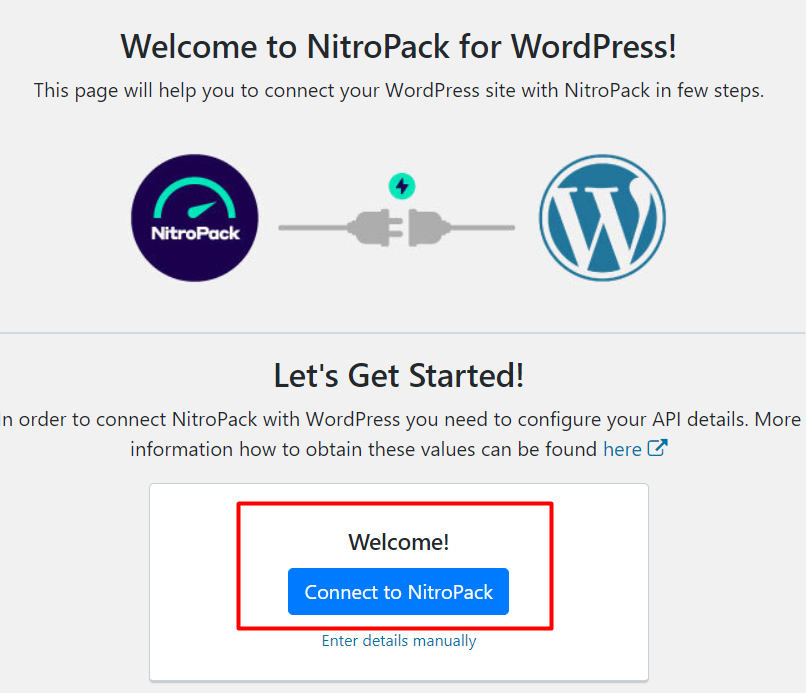
You must connect your pop-up API on Nitropack. After doing so, Nitropack starts running optimizations automatically depending on the set preferences.
Features of the NitroPack Plugin
● It optimizes your website automatically.
● It supports various platforms including Wordpress, Opencart, Magento, etc.
● It has various caching types.
● As it optimizes pictures automatically, no other plugin would be needed regarding visual optimization.
● It has a Global CDN feature, which provides an opportunity for an automatic configuration. If you have Nitropack, you won't need any other CDN provider.
● Other features include DNS prefetching, HTML, CSS, and JS minification/compression, deferring the JS loading process, and converting images to next-generation formats.
All of these changes may improve your TTFB, bring your Core Web Vitals up to the thresholds you need to hit, and offer solutions to your Pagespeed issues. After installing Nitropack, please do not forget to run tests on Pagespeed and Gtmetrix tools.
Summary
The purpose of this post was to explain how you can improve the speed of your website and which plugins you can use to do so. We hope we've provided some useful input for you. We wish you a very fast website and hope to see you on another blog post!


