


AMP has had a lot said about it over the years. People who love it, people who don't, people confused by it, people unsure whether to adopt it, people who gave up on it entirely: everyone's had an opinion on AMP for more than 2 years now. We wanted to add our own take: what AMP is, how you apply it, where its strength actually comes from, what it asks of you in return, and the problems we've seen through global case studies and real-world results. Our hope is to clear up some of the open questions and help you decide whether this technology makes sense for you.
What is AMP?
Accelerated Mobile Pages, AMP for short, is an open-source mobile technology that Google announced in 2015. It started showing up in search results in 2016, and it lets pages load faster. In the results themselves, AMP pages are marked with the Google AMP icon.
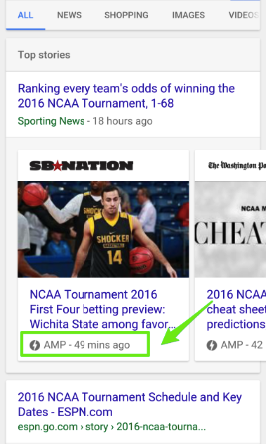
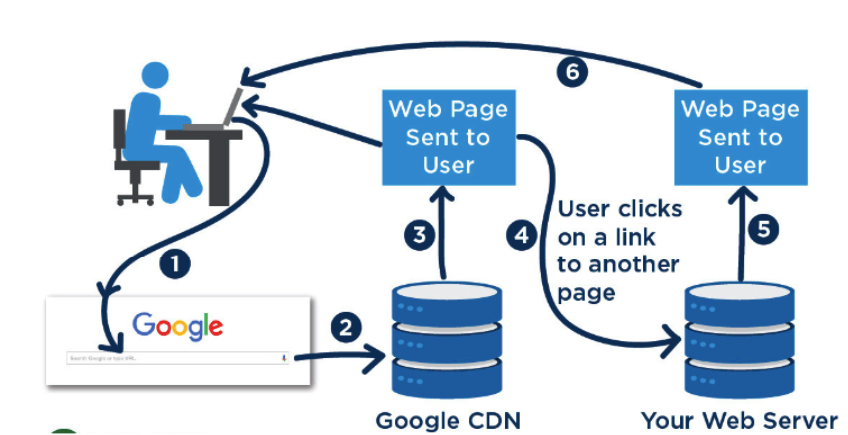
Beyond that basic definition, Google keeps your pages in its own cache so it can serve them faster. Normally, when a user clicks a page on Google, the browser sends a request to your server for all the files and code that page needs. With AMP, that whole process happens through Google instead: your server never receives the request, the page gets served from Google's own memory, and it opens faster as a result. Here's how it pulls that off, through three main components of AMP technology:
- AMP HTML
- AMP JavaScript
- AMP Cache
You might be wondering why AMP breaks down into components like AMP HTML and AMP JavaScript, so let's explain that before going into each one. Google puts a number of restrictions on web pages so it can serve their AMP versions quickly from its cache. It only allows JavaScript from its own defined library, to cut down the JavaScript load; it requires CSS to be inline with a single stylesheet (maximum 50 kb); and for static HTML, it requires the tags built specifically for AMP.
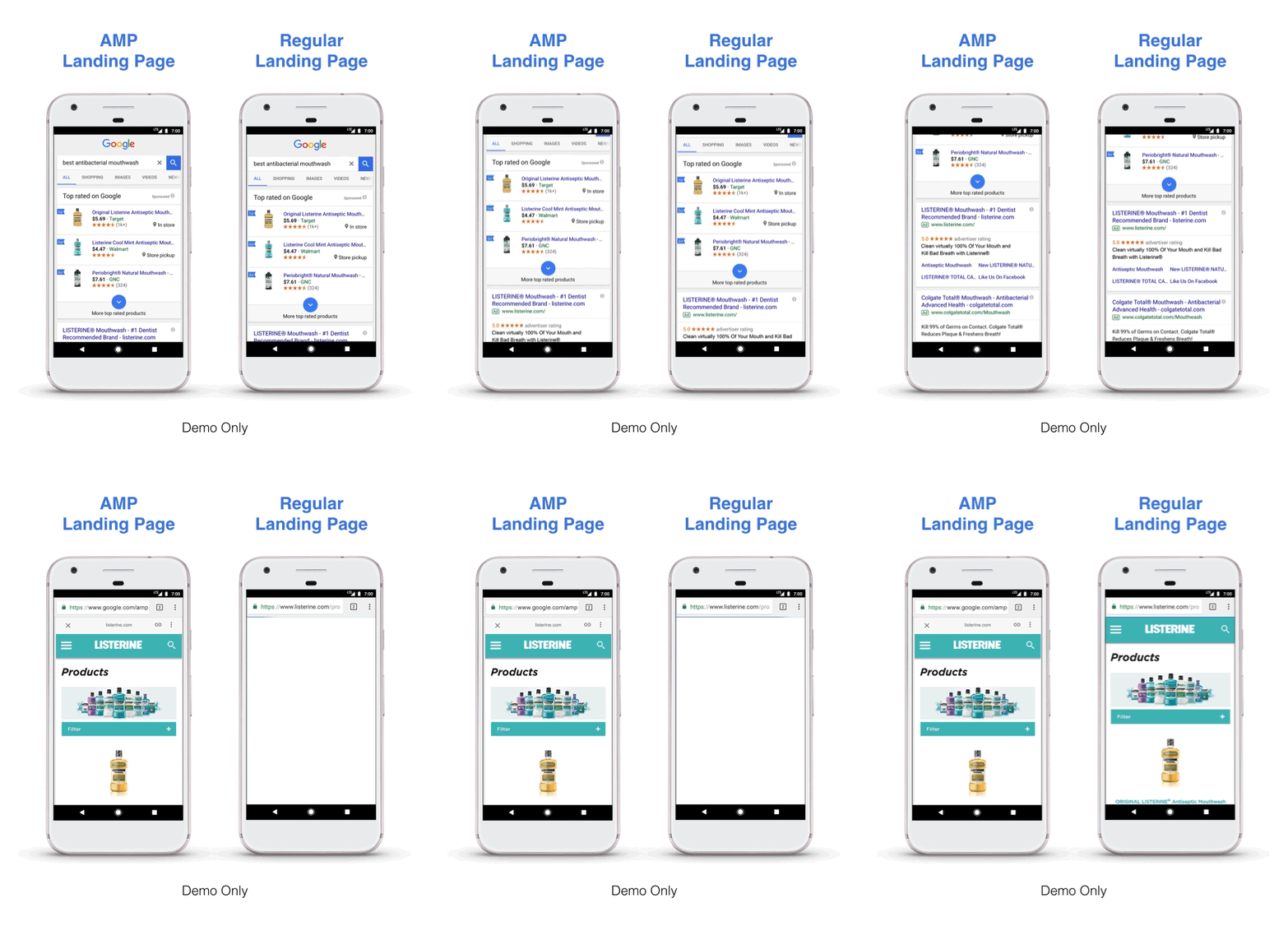
You may remember we walked through the critical processes behind opening a page in the first article of this series, and how a long Critical Rendering Path slows a site down. As a solution to all of that, Google's approach is to have you rewrite your pages in a simpler coding system it can fully understand, one it can serve quickly from its cache without added complexity. The three images below sum up the difference: with AMP, resources get radically simplified into a leaner structure, which is exactly what makes the site faster.
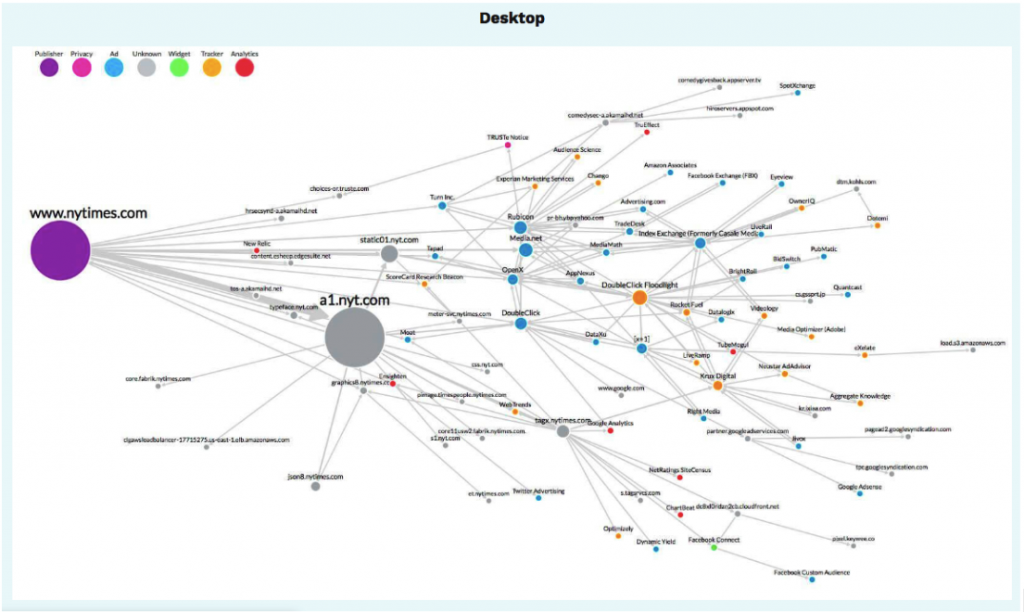
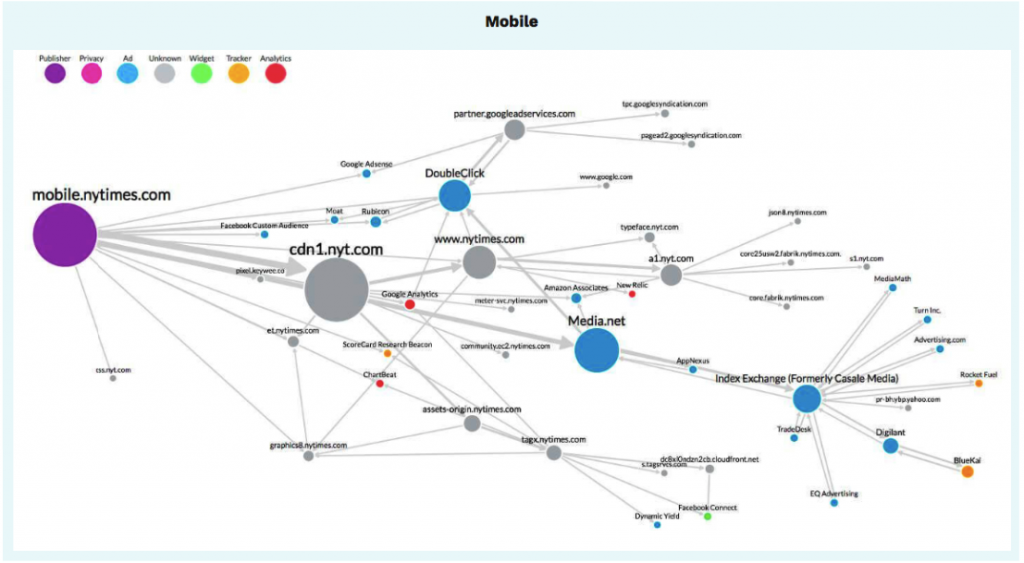
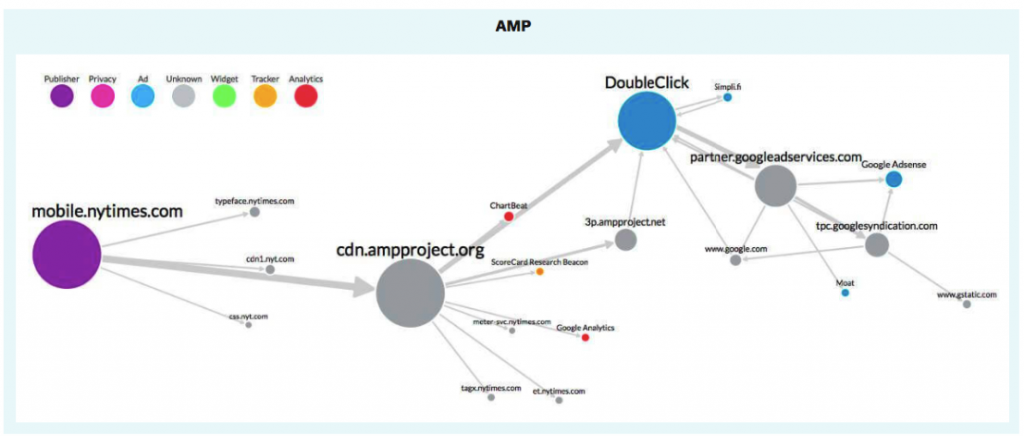
Source: Evidon
Now, let's go into the details of each component.
AMP HTML
AMP HTML has codes that must be included and others that aren't allowed. The following are the ones that must be present.
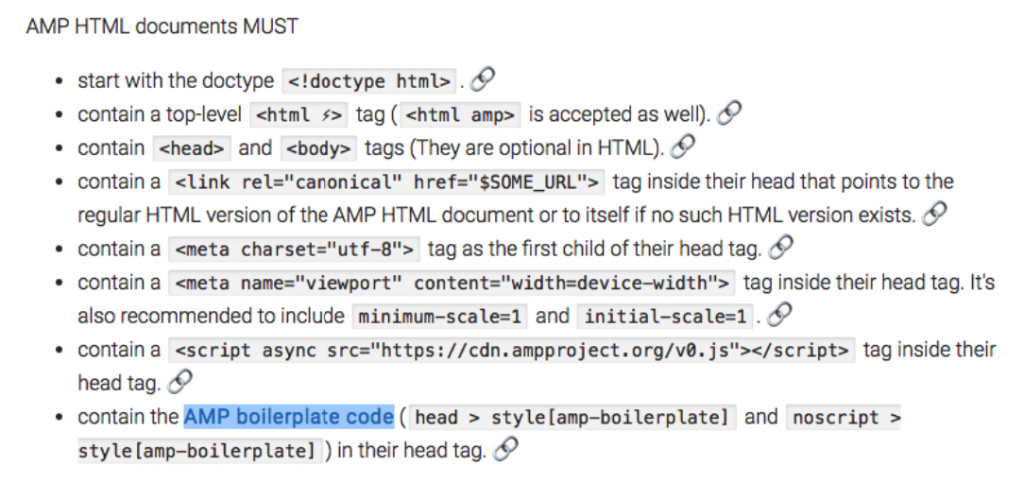
What you see above is the AMP boilerplate code, which might look unfamiliar. In short, it keeps the page from displaying until rendering is complete: unstyled content stays hidden from the user rather than flashing on screen, and the page only appears once rendering has finished. So what happens if the JavaScript library doesn't load in time for that render process?
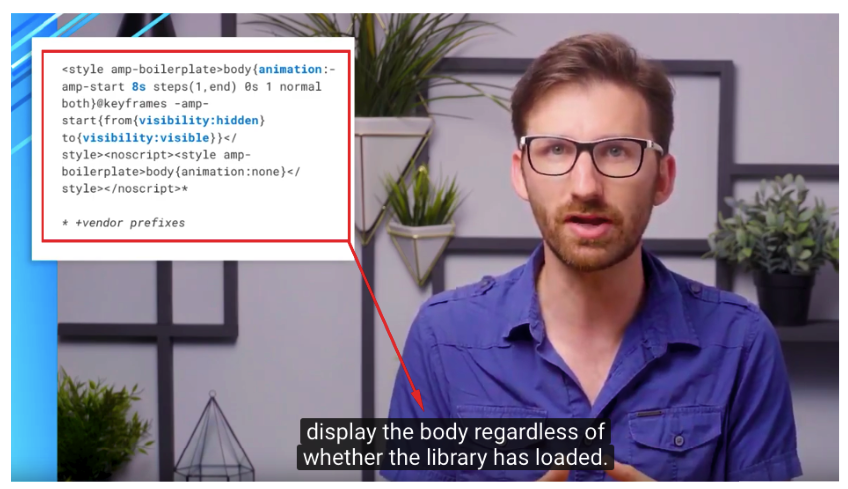
In the example above, if the JS library hasn't loaded within 8 seconds, an animation encoding kicks in that lets some styled content display anyway. Without that encoding, if the JavaScript library fails to load, the user just sees a blank page. You can watch the full video at this link. As you might expect, though, this code introduces a delay to FCP (First Contentful Paint). So yes, you might be setting up AMP for speed, but you won't necessarily get the speed you want without the right optimizations on top of it. Here are the HTML tags that aren't allowed, or rather, that have their own AMP equivalents:
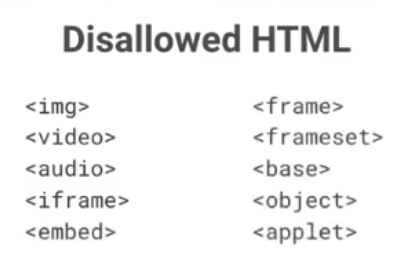
We need to use the AMP versions of these tags instead.
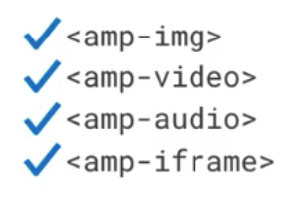
If you don't, your AMP pages won't validate.
AMP JavaScript
AMP JavaScript means you can't write your own JavaScript. You can use the JavaScript already defined in the AMP JavaScript library, but for now, that's as far as it goes. As we mentioned in the first article of this series, JavaScript can block rendering. AMP's whole goal is to get rid of the code that blocks that process and loads synchronously, loading it asynchronously instead so it doesn't interfere with building the DOM tree. That's how you get to use the JavaScript library within AMP's limits, through approaches like lazy loading and async loading that help your page open faster.
For example, on a regular page, layout doesn't happen until the DOM tree is built and all resources are rendered; only at the end of that process does the browser decide what shows up where on screen. In AMP, you have to specify the size of those resources upfront, so the browser already knows the size before it even loads them, and knows exactly where and how to place them. Good news! We said AMP doesn't allow custom JavaScript, but AMP Conference 2018 brought some good news on that front. Nothing's guaranteed yet, but there are strong signals that AMP will allow writing your own JavaScript in AMP documents sometime in 2019.
You can find the link to the video here.
AMP Cache
If you've built your page according to all the rules and it validates with the AMP Test, Google will start serving your page from its own CDN. If you've updated your content and want Google to pick up the changes quickly, you can refresh the cached version via the update-cache request. Right now, there are two AMP Cache providers: Google AMP Cache and Cloudflare AMP Cache. In September 2018, though, Bing announced its own AMP viewer and AMP Cache.
AMP Advantages
If we were to mention its advantages, First of all, AMP is not a necessity or ranking factor. There is no guarantee that when you create an AMP page it will come out first. However, you need to evaluate your competition area well and determine what your website needs. Your competitors may be using this technology in a page or group of pages that are important to you, using AMP may be inevitable especially if you are a news site for Google News, you may be far behind in site speed and you may want to implement AMP as a solution in this case. The main advantage of AMP is that it can be opened quite quickly compared to a normal page in terms of user experience.
On the other hand, it can be said that it is relieving the load on your server by serving it through Google.
AMP Disadvantages
The disadvantages have been a point of real debate for a long time, especially among SEO experts. The sharpest criticism is that AMP is Google's way of controlling a supposedly free and open internet, by setting its own rules and pushing websites to follow them. I'd strongly recommend reading Barry Adams’ AMP Can Go To Hell. Beyond that, the reason AMP is so fast in the first place is that Google restricts the range of code you can use, limiting you to the components in its defined library, and that cuts both ways: another real disadvantage is that these restrictions keep you from doing everything you might want on your pages. We mentioned that AMP may allow custom JavaScript in 2019, and I'm confident these restrictions will loosen further in the years ahead, but don't expect a huge jump as long as speed stays the top priority.
AMP Errors
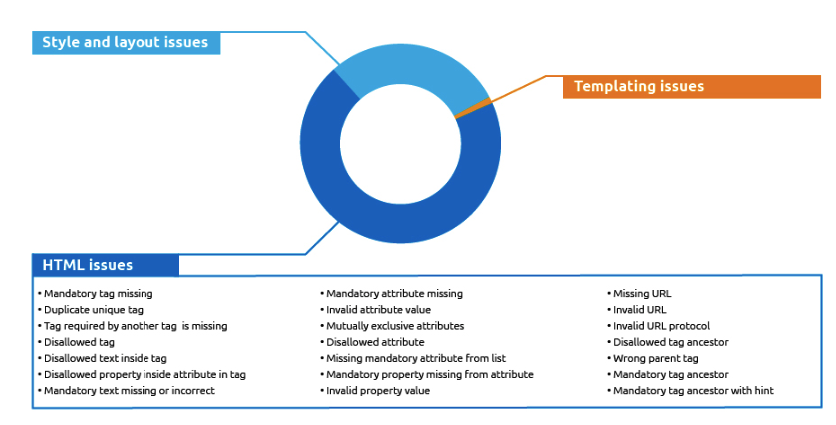
Most AMP validation errors come down to two things: missing mandatory HTML tags, or the use of tags and code that aren't allowed. Search Console flags these errors for you. You can also check the AMP Validator directly to see exactly why a page isn't validating and fix the issues from there. Another way to check is to add #development=1 to the end of your AMP page's URL, then open the Console tab in DevTools. You'll see a screen like the one below.
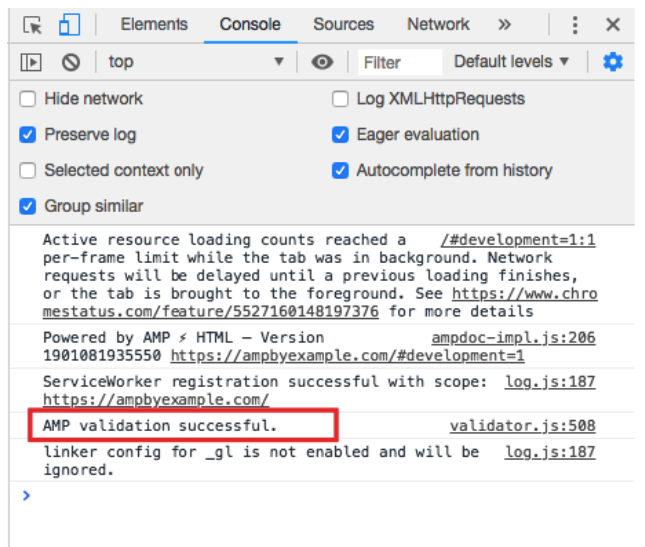
For example, if you add an image later without using the amp-img format, your page will throw an error. The same happens if there's a script on the page from outside the AMP library. In other words, Google AMP only accepts pages that follow its rules exactly, and only serves those through its CDN.
When Do I Need AMP?
If you run a news site, using AMP can be close to unavoidable. Beyond that, it would be misleading to say AMP is the right call whenever X or Y happens. Review your competitors, figure out which pages you might actually need, and you must TEST! When it comes to speed, optimize your site first, then test AMP on specific pages. You can also check out the first article in this series on Site Speed Optimization.
AMP Usage Rates
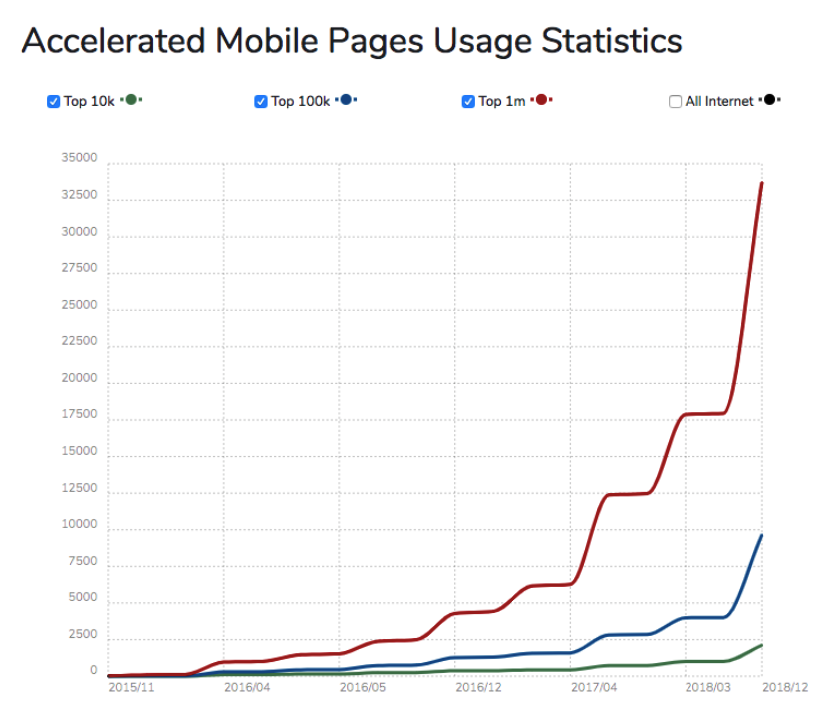
Let's look at how usage rates for this technology have shifted over the two years it's been talked about.
Source: BuiltWith
AMP usage hasn't sped up much among the top 10k sites, but the top 100k and top 1M charts show a real jump after 2018. Since speed is a ranking factor, that could reflect people turning to AMP as a speed fix, or it could just be that the uncertainty around AMP has faded over time, making it feel like a safer bet for anyone considering it. If we break the data down geographically, here's what we see.
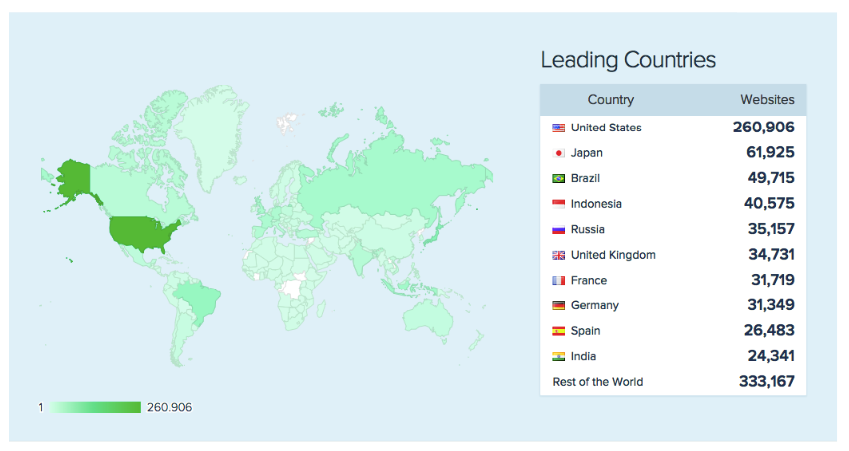
Source: Similartech
If you're wondering where Turkey fits into this, current data from BuiltWith shows 2069 active AMP website pages in Turkey. Finally, let's look at AMP usage rates by category.
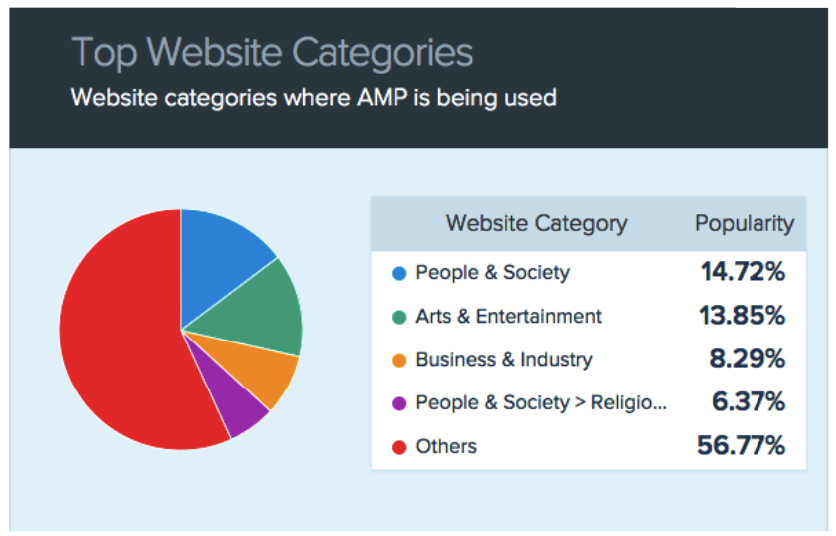
Source: Similartech
AMP Case Study
One of the standout case studies from the AMP Conference is Airbnb's experience with AMP. You can watch the presentation at this link. Briefly, Airbnb works with three page structures: the main pages (P1), the search pages where listings appear (P2), and the detail pages for each listing, or product pages (P3). Their first step was figuring out which page type made sense for AMP. They ruled out the P1 home page since it's their most important page, with high traffic and a design that changes often. The P3 product pages looked like a reasonable candidate too, given their low conversion rate, but technical problems ruled those out as well. In the end, they applied AMP to the P2 search pages.
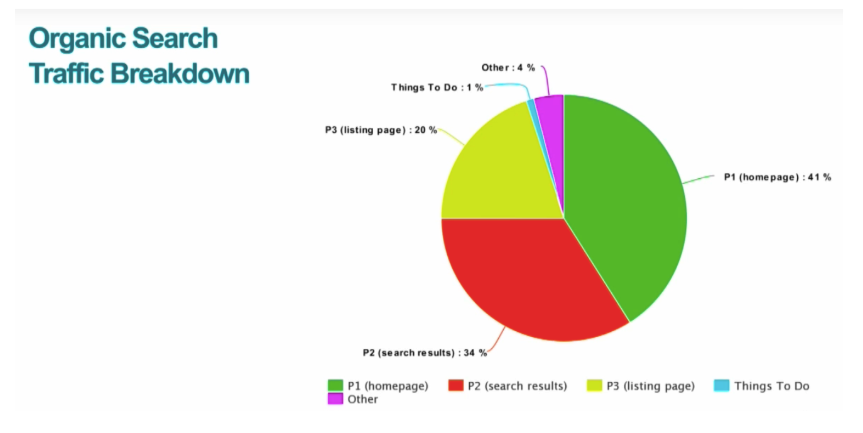
The biggest problem they ran into after launch was server-side rendering timeouts, hitting a notably high 16% of pages. When that timeout happens, all a user sees is a blank page.
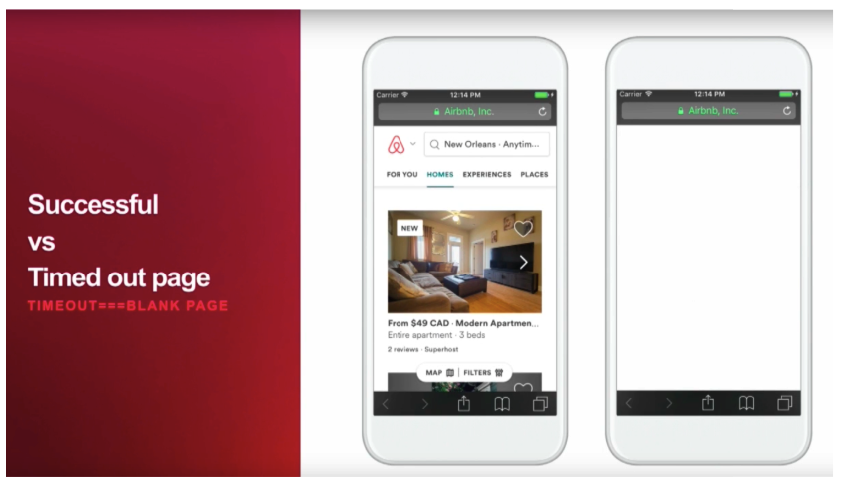
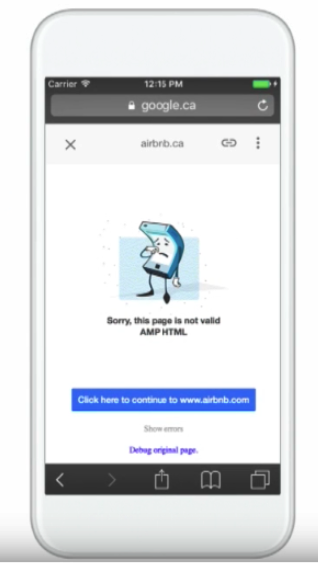
When a page comes up blank, Google is supposed to redirect to the canonical page. The Airbnb team says that redirect doesn't happen due to a Google bug, and that the page ends up looking like this.
Their fix was a 30-minute CDN cache setup, which brought that 16% error rate down to zero. For the other problems they ran into, and how they solved them, it's worth watching the full video. I picked this example specifically because it's a case study from the AMP Conference :) that takes a critical look at AMP rather than just praising it. That said, there are also plenty of case studies where AMP implementation went smoothly without major issues.
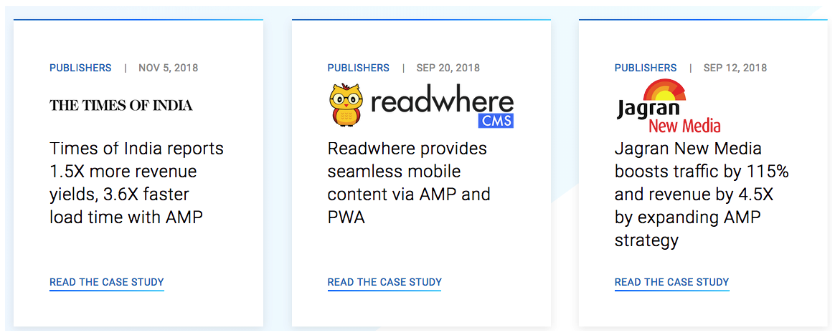
You can find more of those over at the amp project site. If you've decided to give AMP a try, let's move on to our installation guide.
AMP Setup (Wordpress)
In this section, we'll cover how to quickly install AMP if WordPress is your main platform, starting with the plugins we'd recommend most for this setup.
1) Downloading and Installing AMP Plugin
Start by downloading and installing the AMP Plug plugin from Automattic. On its own, it only makes posts AMP-compatible, not pages, but it's still a required install. That's why we also download a second plugin: AMP for WP, which adds Google AdSense integration, rel=canonical tag support, drag-and-drop page configuration, and more. Finally, we download and install the Glue for Yoast SEO & AMP plugin, though keep in mind that Yoast SEO needs to be installed and active for it to work.

2) Adding Google Analytics Tracking Code
Copy your existing Google Analytics tracking code and paste it into the Analytics section under AMPforWP Options in WordPress.
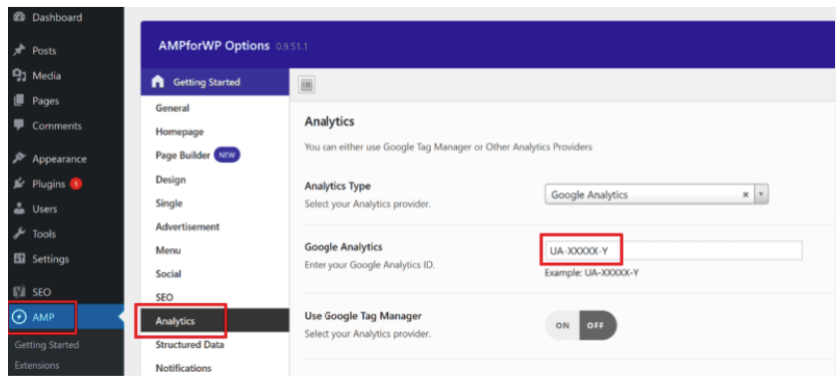
3) Plugin Configurations
Follow the path Yoast SEO - AMP - Post Type, and you'll see the following options.
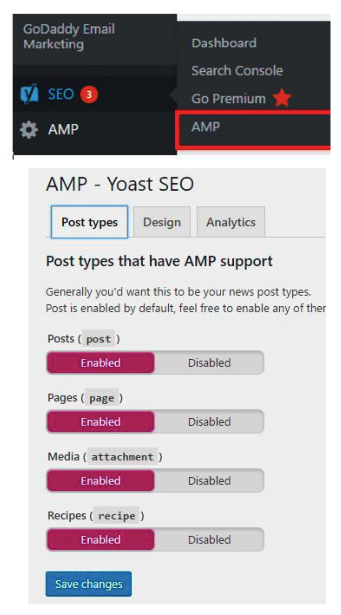
Here, you can choose which pages to make AMP, and customize their look in the Design section.
4) Google AMP Test
At this point, we've created our AMP URLs. Before Google adds these pages to its cache, though, they need to validate, so we need to test each URL we create. For that, we head over to Google's own testing site, which you can reach at this link.
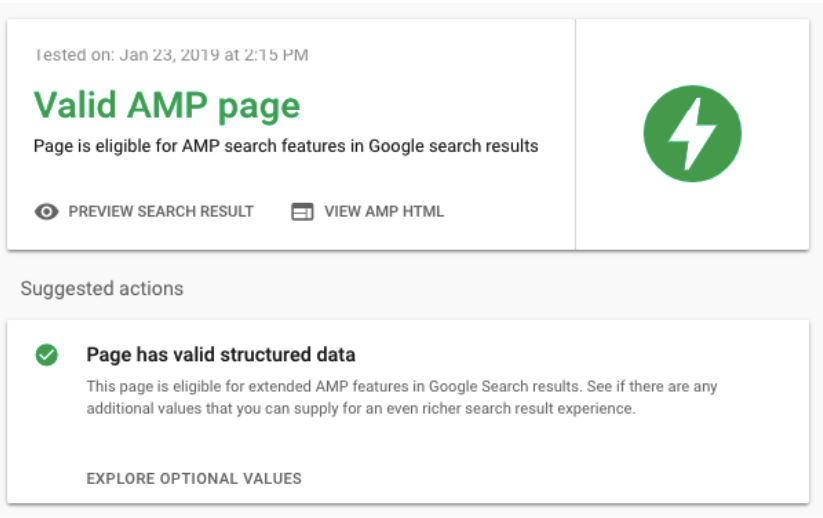 You can also use AMP Validator to see exactly why a page isn't validating.
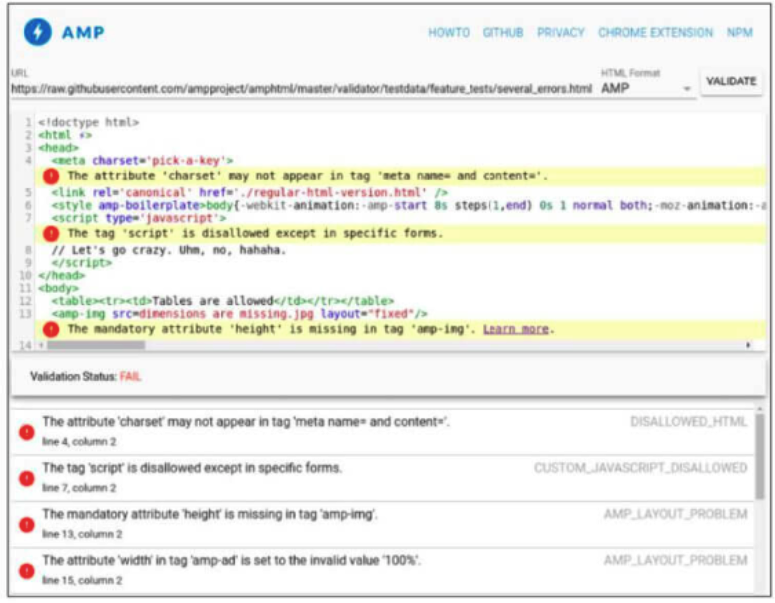
5) Presenting AMP Pages to Google
The AMP Test page has a Submit to Google button, but clicking it doesn't guarantee your pages get discovered and indexed. What actually matters is specifying the canonical page on your AMP page, and marking the AMP page from its canonical counterpart.
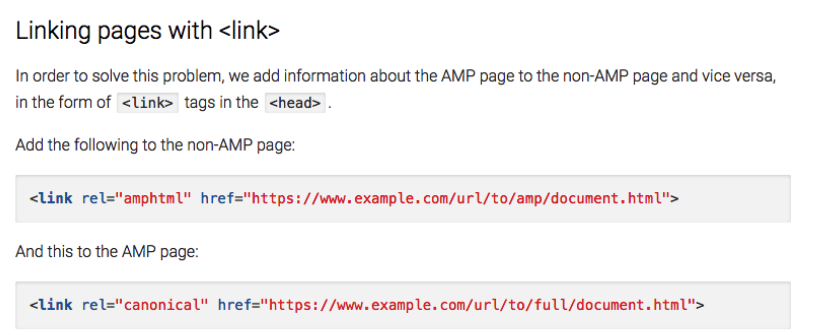
That's it!
AMP Analytics
To read AMP data correctly, the setup has to be right in the first place. Unfortunately, measurement is one of the most common problems people run into with AMP. Bounce rate, new users, returning users, and plenty of other metrics can all mislead you if Analytics isn't configured properly.
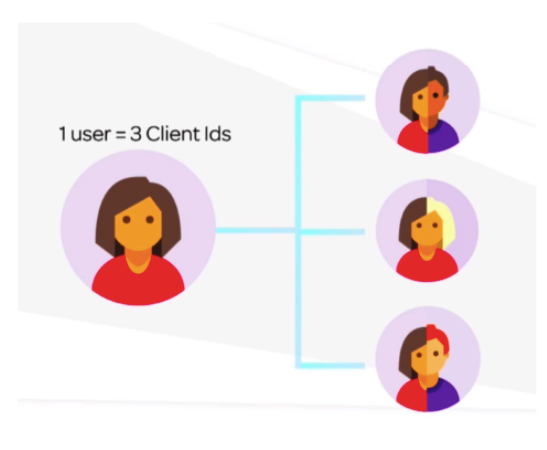
When someone clicks an AMP page from Google search results, their browser will show google.com as the domain, since, as we mentioned, Google is serving that page. But if they then click through to somewhere else on that page, they'll land on the site's own domain instead, and the address bar will show the site itself, not Google. That's why it matters how Analytics counts sessions and how many times a user gets counted, and it's often measured incorrectly.
The Google AMP Client ID API lets you identify each user uniquely and accurately track how they visit your site. Here's a summary of the basic tagging you'll need to enable the AMP Client ID on your AMP pages:
1) AMP Pages
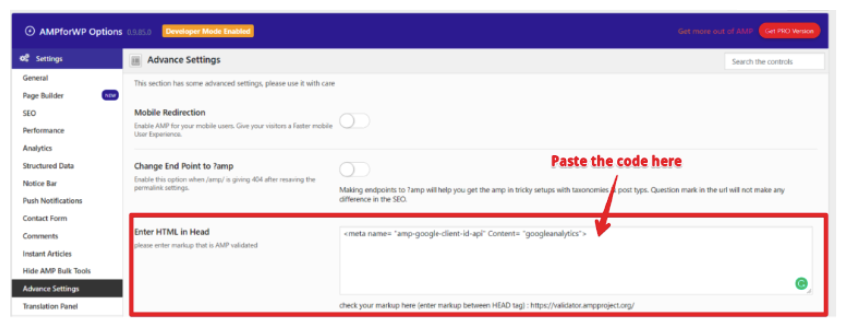
<meta name= "amp-google-client-id-api" Content= "googleanalytics"> We need to have the code above in the head section of every AMP page. In WordPress, go to AMPforWP Settings, then Advanced Settings, and paste it there.
2) Non-AMP Pages
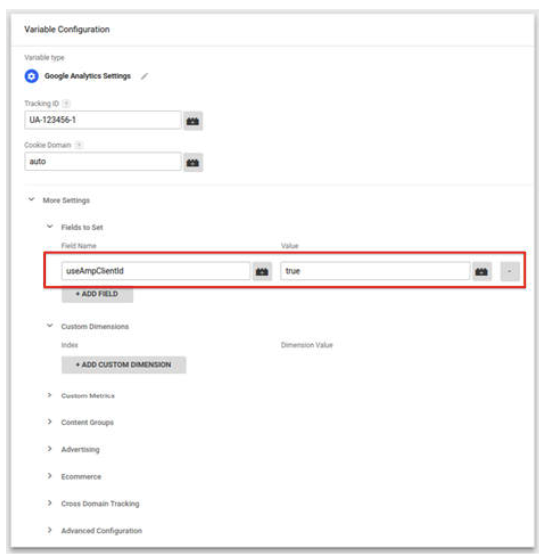
You'll need to add the following code to the head section of your other pages. ga(‘create’, ‘UA-23199282-1’, ‘auto’, {‘useAmpClientId’: true}); If you're using Google Tag Manager, scroll down to Tag Configuration, then Fields to Set.
Set useAmpClientId to true. Save the new label configuration.
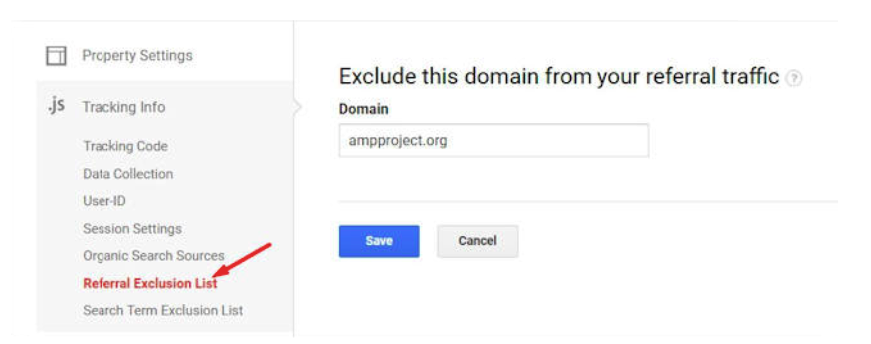
3) Adding ampproject.org address to Execution List
In your Google Analytics account, go to the Referral Execution List and add ampproject.org.
4) Page tracking of AMP page views
First, you'll need the following code in the head of your page's source. <script async custom-element = ”amp-analytics” src = ”https://cdn.ampproject.org/v0/amp-analytics-0.1.js”> </script>
From there, we can generate tracking codes for page views and other events.
Here's the code that should be on every AMP page for page views; <amp-analytics type=”googleanalytics”> <script type=”application/json”> { “vars”: { “account”: “UA-YYYY-Y” - Enter your own code! }, “triggers”: { “defaultPageview”: { “on”: “visible”, “request”: “pageview”, “vars”: { “title”: “Name of the Article” } } } } </script> </amp-analytics>For ClickOnHeader; <amp-analytics type=”googleanalytics”> <script type=”application/json”> { “vars”: { “account”: “UA-XXXXX-Y” – Enter your own code! }, “triggers”: { “trackClickOnHeader” : { “on”: “click”, “selector”: “#header”, “request”: “event”, “vars”: { “eventCategory”: “ui-components”, “eventAction”: “header-click” } } } } </script> </amp-analytics>
To set this up correctly, it's well worth reviewing the support documents.
As we wrap up... AMP keeps improving every year, and there's a large team working behind the scenes on it. So even if you don't plan to use AMP today, it's worth keeping this technology on your radar and following how it develops. And finally, trust the power of testing!


