


The links coming into a website are one of the hotter topics in SEO. Backlinks, in particular, are widely believed to boost a site's organic visibility. But we don't run into a strategy around the links going out of a website nearly as often. In reality, outbound links matter a great deal for building a proper link structure and defining your site's hierarchy. On top of that, the links leaving your site should be a core part of your content strategy. That way, you can build a solid structure for both your SEO work and your user experience.
What are Outbound Links?
The term "outbound links" refers to linking from your website to another domain. They are, in effect, the external links leaving your site. If a link points to a page on the same website, it's an internal link instead. If we assume the parts highlighted in red in the image below are linked over the relevant anchor text, we can tell whether a link is internal or outbound by checking the domain the link points to.
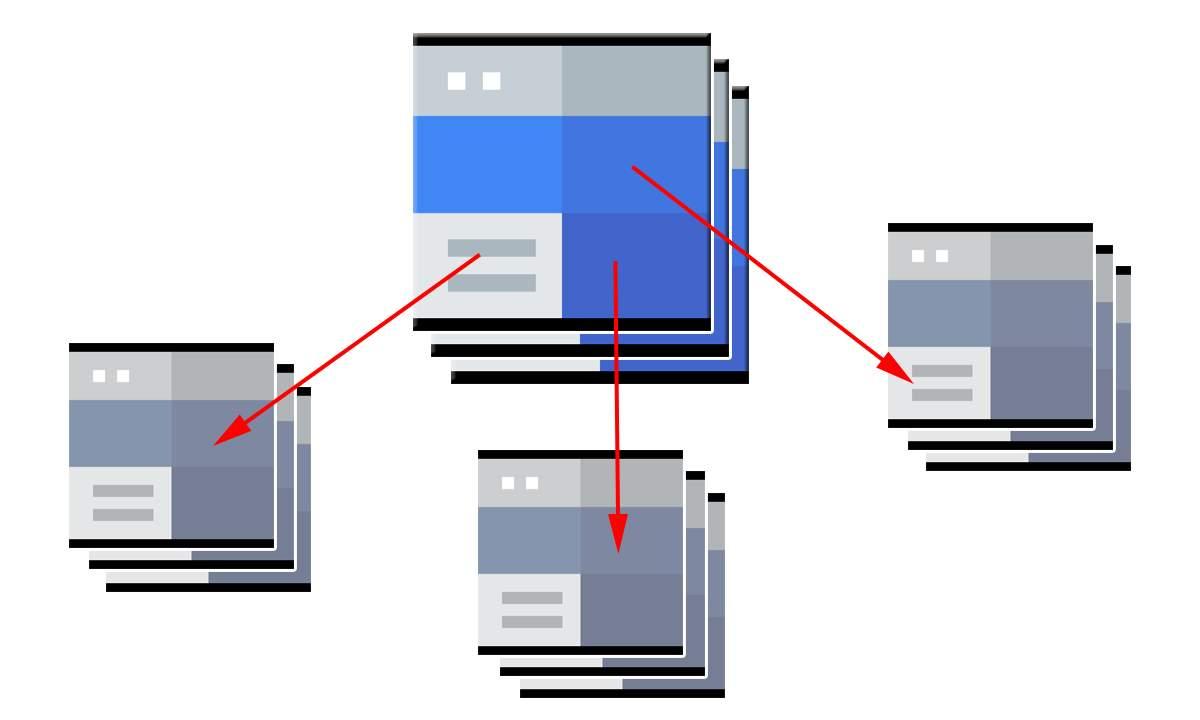
It's worth paying attention to the links leaving your site. When we point a user to a link, we're essentially helping them connect with another website after they leave ours, so we should include the domain information they'd want to see. And having outbound links open in a new tab can keep the user from leaving your site entirely. To do this, we can specify how the URL opens on a given outbound link. For example, if we add zeo.org as an outbound link and want it to open in a new tab, we can add to the site's source code.
External Links and Internal Links
Before we get into outbound links in detail, let's look at a website's link hierarchy. There are two structures here, external links and internal links, and it's important to tell them apart.
External links cover every URL outside your site's own domain, and they split into two categories: the backlinks coming into your site, and the outbound links leaving it. Most people and organizations in SEO are far more familiar with backlinks. Think of backlinks as links created by the domains or URLs recommending your website.
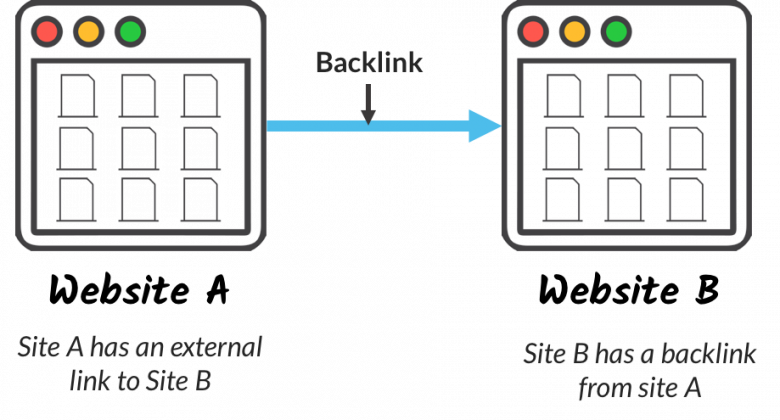
Outbound links, on the other hand, are the process of linking out from your site to a different domain. They're essentially the opposite of a backlink, which is a link coming into your site.
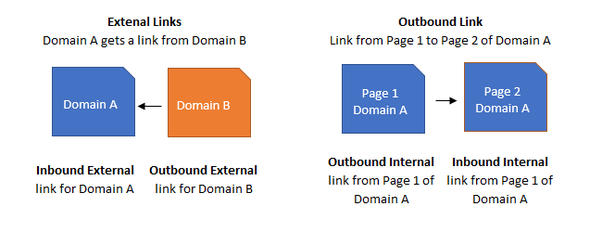
Both outbound and external links contribute to your website in various ways. External links play an important role in shaping your category hierarchy and adding to your organic visibility across your site's structure. Outbound links, for their part, are a valuable tool for pointing your target audience in the right direction. And depending on the link type, they can be useful for the linked website too.
Link Types to Be Used as the Outbound Links
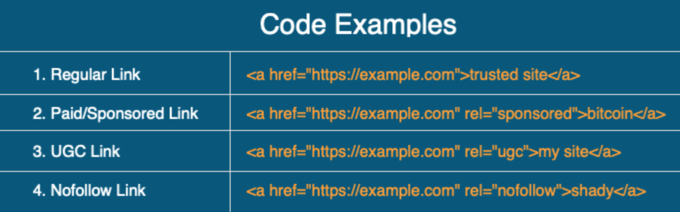
There are a few link types we can use to indicate the status of the links leaving our site, and they let us keep control over those links. For instance, we can use the nofollow attribute when we don't have authority information about a link that's useful to users, and the sponsored link rel attribute when we're linking because of promotional content on the site. Let's look at what these link types mean.
Dofollow Link
A dofollow link tells search engine bots that the linked URL offers practical, useful information. Outbound links of this type can have a positive or negative effect on the linked site. We want to stress how much dofollow links matter when they come from sites that are meaningful and similar in content. Also, if no link rel value is included, outbound links are treated as dofollow by default.
Nofollow Link
A nofollow link means it's unclear whether the linked site is useful, practical, or authoritative, even though the outbound link has been presented to search engine bots. In other words, you're linking to the site while saying you can't be held responsible for any spam or negative situation tied to it.
UGC Link
The UGC link was launched by Google in 2019 and refers to user-generated content. It's used for links in blog or article comments, forum posts, and links users generate on a site. In effect, it helps a site owner keep control over the potential links users might create, if they choose to.
Sponsored Link
Like UGC, the sponsored link launched with the 2019 update, for use on sponsored content. We can use the sponsored link type for links that are advertisements added to a site under a sponsorship agreement.
That said, website owners who buy links may not be happy with this link type, since the rel sponsored attribute has the same effect as nofollow. In that case, those owners might feel the link won't help their site and decide against it.
Do Outbound Links Affect the SEO Process?
When you add links to a page with the <a href HTML block, using the rel attribute matters a great deal for the outbound link's effect. If the link points to an authoritative, well-known site like Google, Facebook, or Twitter, we can use the dofollow type, which tells search engine bots you've referenced a useful link. It also helps users trust your site while strengthening the meaning behind your content. Since unnatural links don't hold a user's attention, they add nothing to that meaning.
If we know nothing about the linked site, we can use nofollow and still give users a useful link, just to make a meaningful contribution to the content. This way, we can define the status of the links leaving our site and choose the right link type. It keeps us in control of our outbound links.
We can track all the links on a website with tools like Deepcrawl, Oncrawl, Serpstat, and Screaming Frog, and we can add outbound links to Analytics through Google Tag Manager.
Now let's get to the implementation part, which is the more fun bit.
How to Track Outbound Links with GTM?
We can send outbound link tracking to Analytics through a quick event setup in GTM. On that note, we've covered setting up events with GTM before. If you're not familiar with it, we recommend checking out our content on both Google Tag Manager and event setup. Let's get started with tracking outbound links through Analytics.
First, sign in to the Tag Manager tool Google offers for free, and click the preview button in the top right corner of your website's account to run Google Tag Manager.
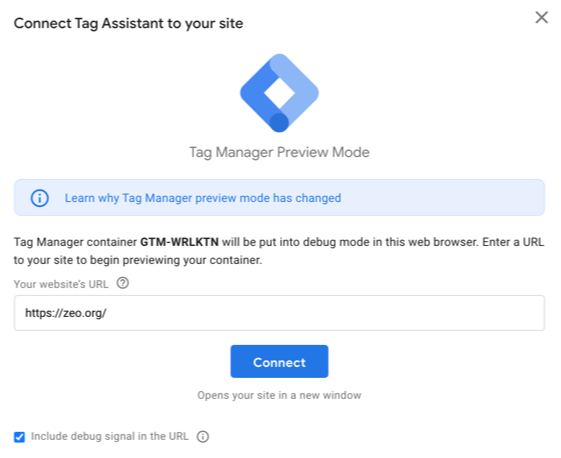
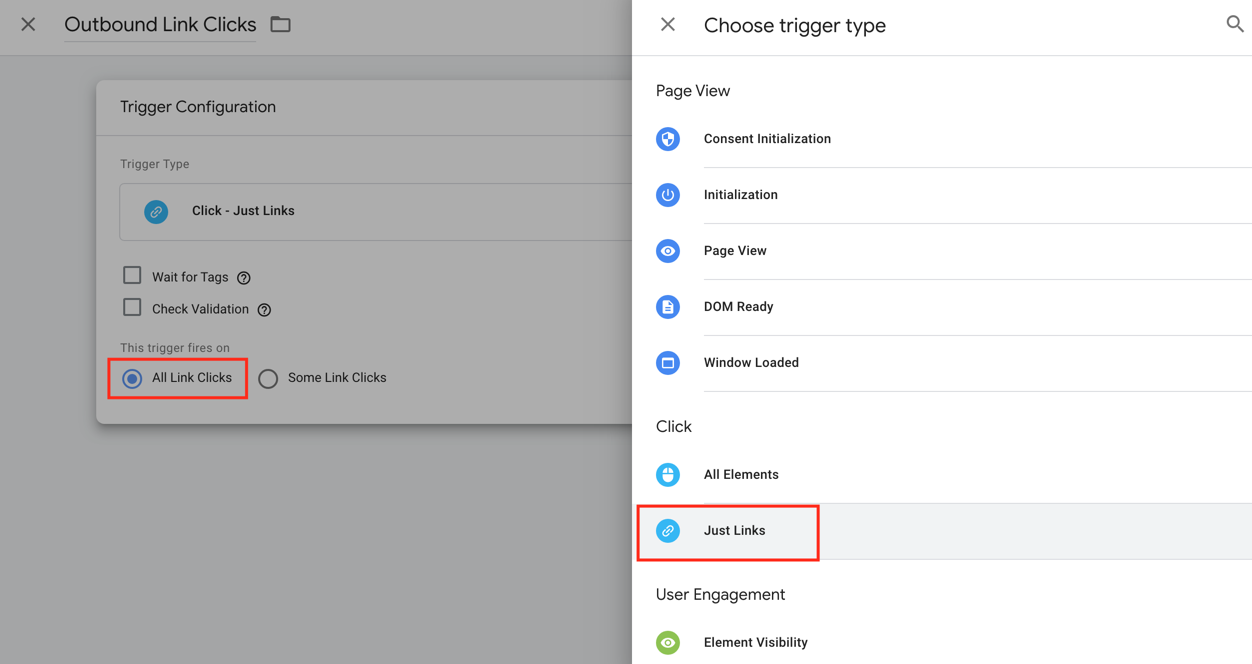
Once GTM is running, we can start pulling data with each click. Since we're dealing with links here, we can create a trigger to check whether the links can be tracked. To do that, click triggers in the left menu. On the page that opens, create a trigger and choose its type. After selecting just links in the click section, make sure you've also selected all link clicks. Choosing just links helps track the links inside <a href in the source code. Once that's done, save the trigger.
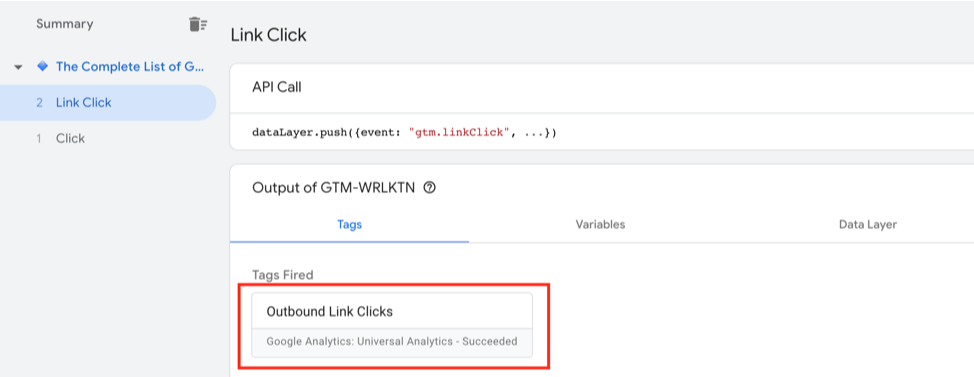
Now you can check the trigger's status by clicking any link in preview mode. Doing so gives you access to the variable data for every link click, and from there you can carry out the process needed to track outbound links in GTM.
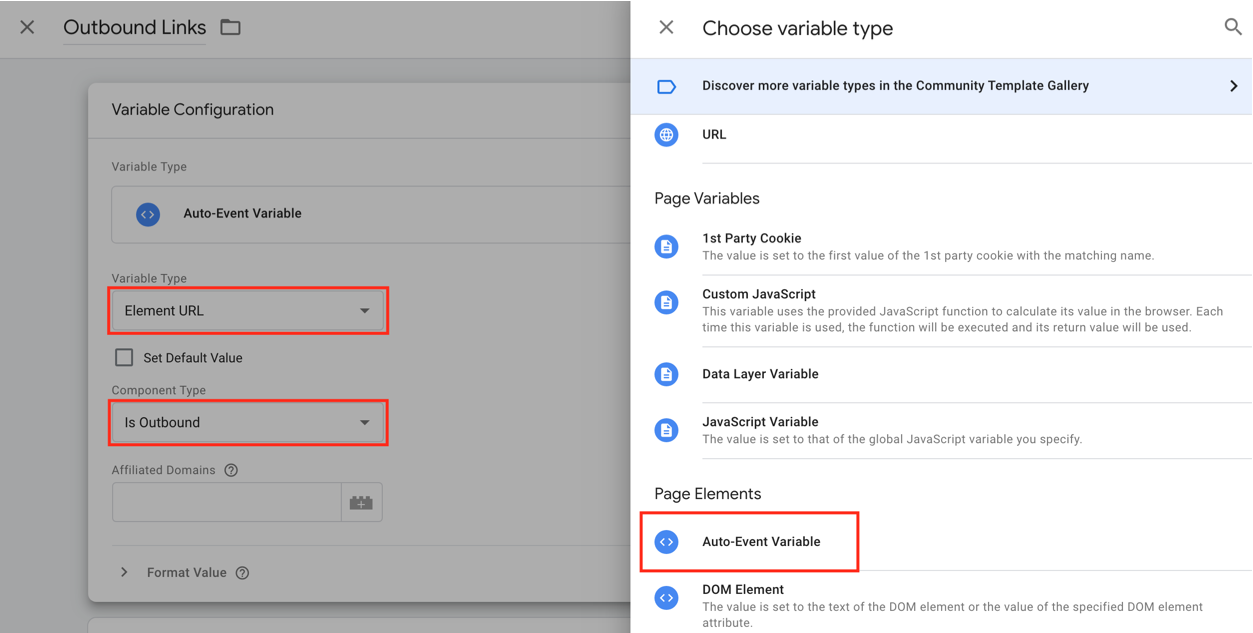
To do that, click the variables menu on the left and go to the user-defined variables at the bottom of the window. We'll create a new variable here to use in our setup. Create a user-defined variable, then in the menu, select the auto-event variable as the variable type in the page elements section. After that, select Element URL as the variable type and Is Outbound as the component type. These choices set our preferences for the type and component used to track outbound links.
Then click the trigger menu on the left and select just links as the trigger type.
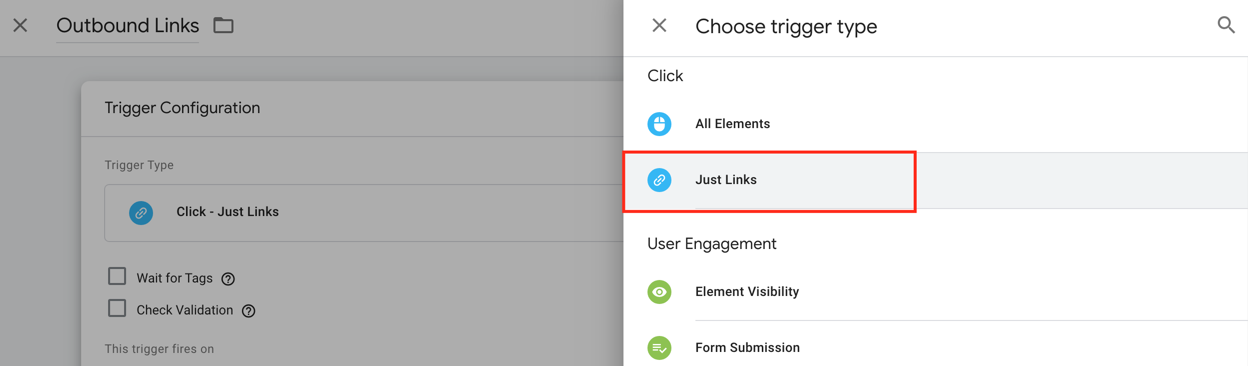
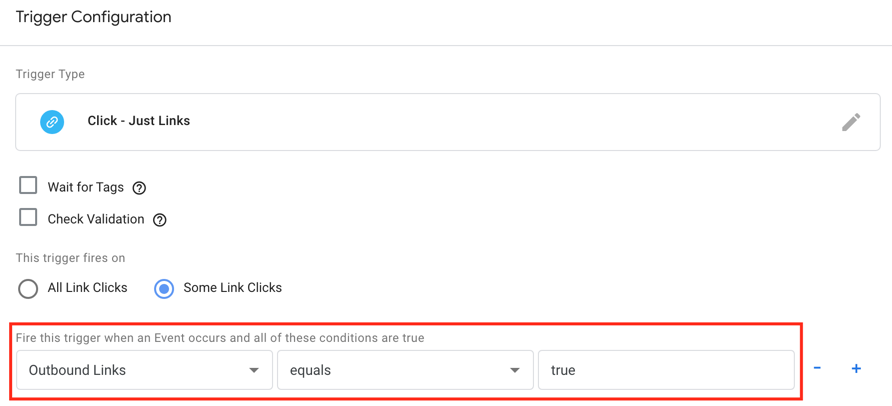
Choose some link clicks, then select the user-defined Outbound Links variable you created. Then specify that the trigger should fire when it equals the text value given as true.
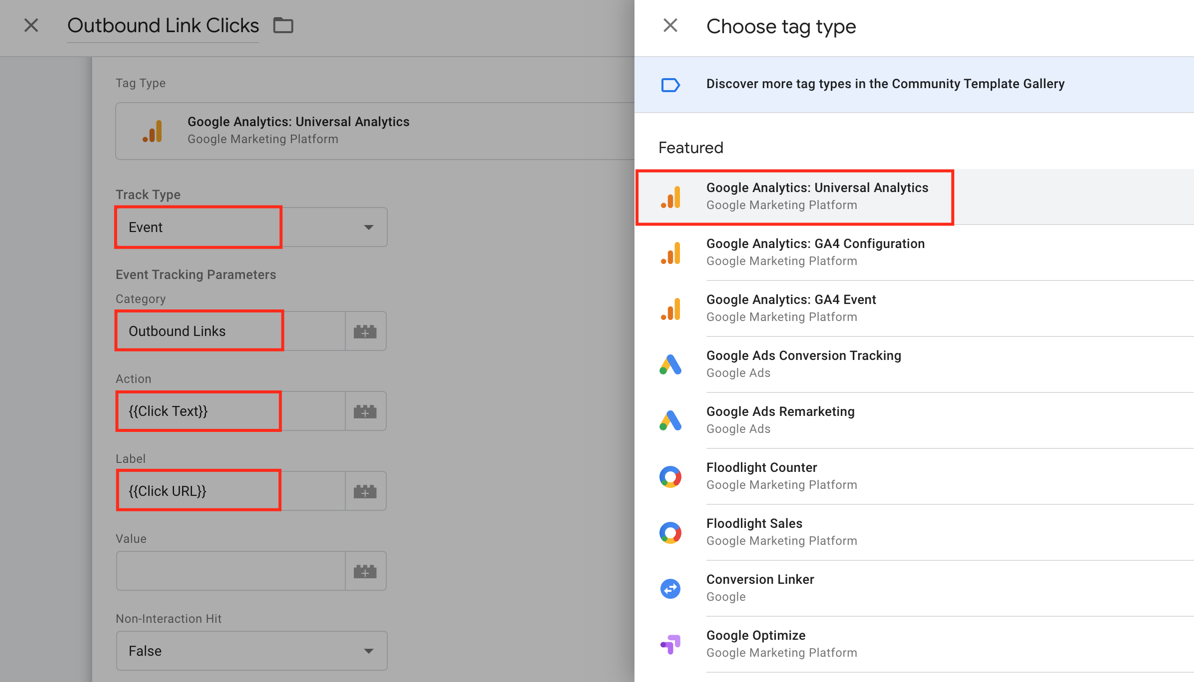
Now you should create a tag and send the data. To do that, click the tags menu on the left and specify the tag settings. Here, choose according to the Analytics setup you use and select the account where the data will be collected. Pick event as the track type, and add the category, action, and label information for the outbound data that will appear in the events section in Analytics. You can see the relevant clicked words and clicked URL information for the action and label below. If you'd rather not track that information, you can add text or another variable to Analytics instead.
After configuring the event, connect the tag to the trigger that contains the Outbound Links variable set to fire when it equals true, and then save the tag.

Now it's time to test it with Tag Manager and check whether the data is making it to Analytics. To do that, we click an outbound link on zeo.org with preview mode open in Tag Manager. Checking Tag Manager, we can see the tag has fired, so it's working perfectly. And when we check the Outbound Links variable we created to confirm, we see that it's true.
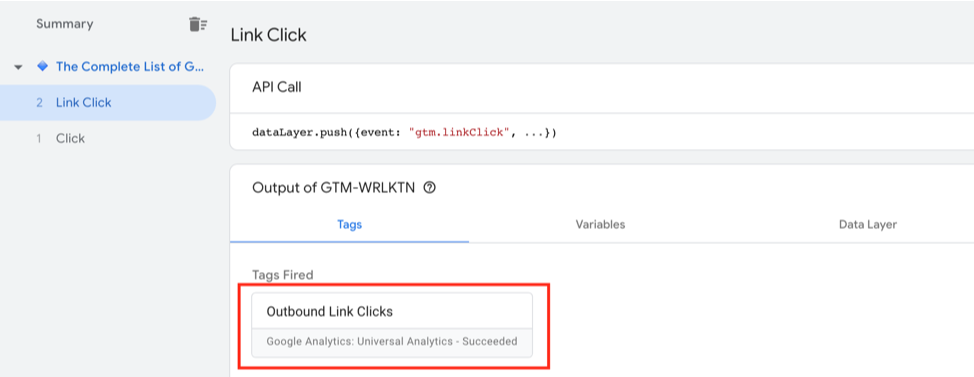
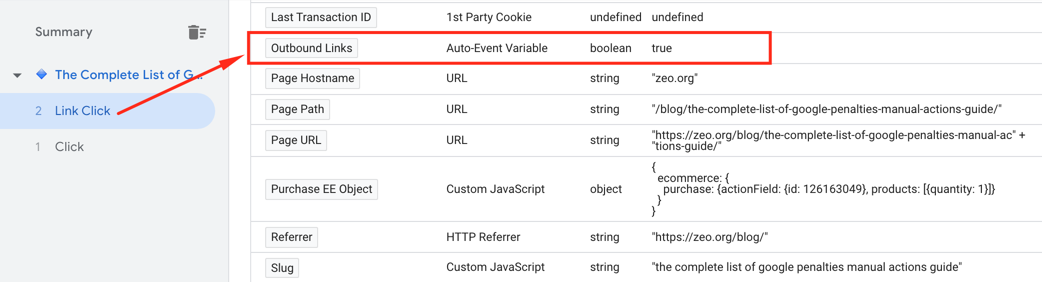
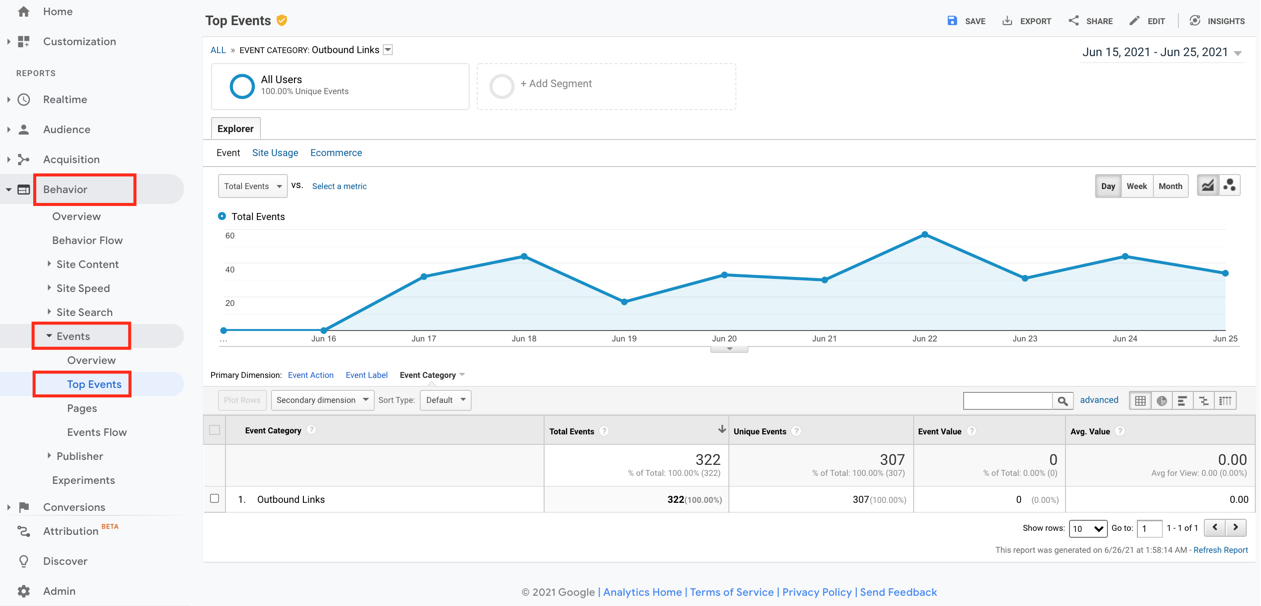
Everything runs smoothly thanks to the steps we took in GTM. Now let's check whether the data is being sent from GTM to Analytics. To do that, we go to the relevant Analytics container and the events section, where we can see the event category we created is right there.
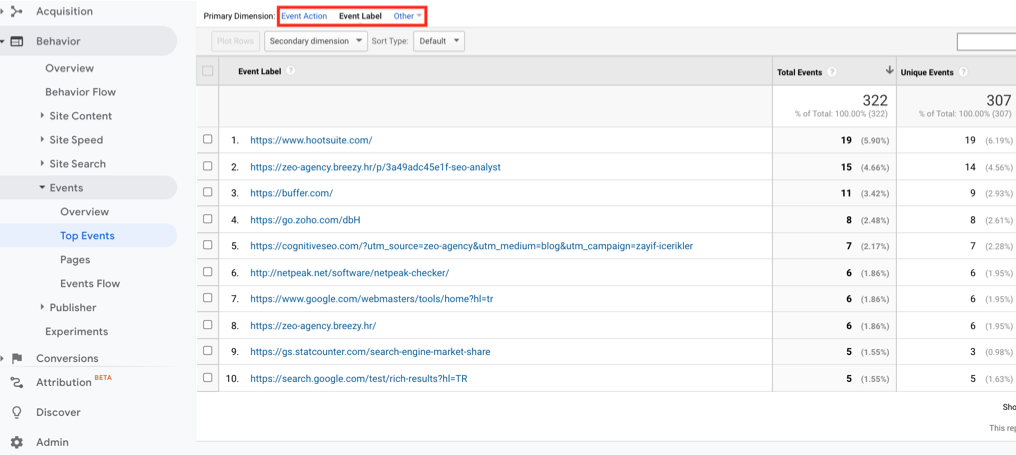
To access the outbound links captured in this process, choose the event label dimension in the events section.
In conclusion
Outbound links, along with the links on a website, really are an inseparable part of our SEO strategy. Even though outbound links don't directly influence a website, they matter a great deal because they add value for both users and the content. This is exactly why the rel attribute should be used, especially for outbound links. We can define the status of external links by weighing criteria like familiarity, authority, and security, and we can use SEO tools to find them. On top of that, we can add outbound links to Analytics through Google Tag Manager.


