


Artificial intelligence technologies are developing fast, and Large Language Models (LLM) are changing how users find information. AI-powered systems like ChatGPT, Google Gemini, Claude, and Perplexity are built to process complex web content and give users faster, more accurate, contextualized answers. Along the way, though, complex HTML structures, unnecessary code, and robots.txt blocking on websites can get in an AI system's way. That's where the llms.txt file, which has recently become a hot topic, comes in.
In this guide, we'll cover what llms.txt is, how it works, how it differs from robots.txt, how to create and integrate it correctly, and why you should monitor it regularly. Let's take a look at llms.txt.
What is Llms.txt File?
Llms.txt is a special text file that helps websites get understood more effectively by artificial intelligence systems and large language models. Sitting in the root directory of your website, this file helps AI systems such as ChatGPT, Google Gemini, Claude, and Perplexity process your site's content more accurately and efficiently.
Emergence of Llms.txt
The Llms.txt format is thought to have emerged because traditional web standards weren't built with artificial intelligence systems in mind. This standard, proposed by Jeremy Howard in September 2024, aims to help artificial intelligence systems make more efficient use of web content. That's rooted in the fact that HTML pages' complex structure and large size make it hard for AI systems to make sense of the content. The recent buzz around the llms.txt file may also be linked to Answer.AI's efforts to raise brand awareness. Where this standard goes from here is still an open question, and there's no word yet on whether Google supports this file.
What Does Llms.txt Do?
The Llms.txt file helps large language models understand and process your website more easily. It summarizes your website's important content to guide AI models, helping them give more accurate, effective responses to user queries.
As you probably know, web content is HTML, and it often comes with complex structures, navigation menus, ads, JavaScript, and so on. That makes it hard for large language models to access and make sense of the content. The Llms.txt file aims to cut through that complexity and give AI models simple, clear, processable data instead.
What are the Differences Between Llms.txt and Robots.txt?
Llms.txt and robots.txt are files that help optimize websites, but for different purposes. Both sit in the website's root directory and use a machine-readable structure, but today their intended use and target audience differ. Down the line, it may become possible to fold llms.txt into the robots.txt file. Let's look at the main differences between these two files, grouped by category.
1. Purpose of these Files
- Llms.txt:
**-**Helps large language models understand your website's content more accurately.
- Presents your site's most important content to artificial intelligence systems in a simple, clear format.
- Goal: Artificial intelligence optimization (GEO - Generative Engine Optimization) and knowledge presentation.
- Robots.txt:
- Controls how search engine bots crawl your site.
- Allows or blocks certain pages or indexes from being crawled or indexed.
- Goal: To make pages easier to discover by providing a crawlable structure within the scope of search engine optimization.
2. Target Audience of the Files
- Llms.txt:
- Targets large language model-based AI systems such as ChatGPT, Google Gemini, Claude, and Bing AI.
- Robots.txt:
- It targets search engine bots such as Google, Bing, and Yandex.
3. Target audience of the files
- Llms.txt:
- It's written in Markdown format, so both humans and machines can read it easily.
Example:
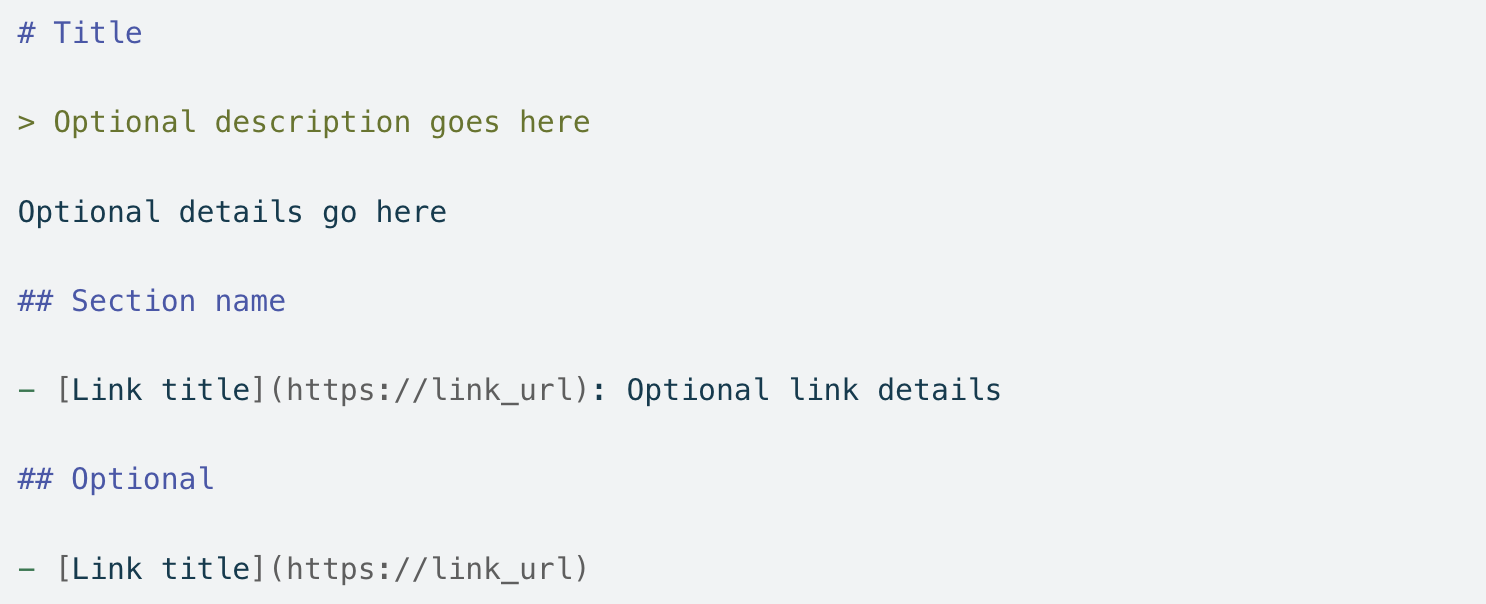
- The Markdown format lets AI systems process content faster.
- Robots.txt:
- It's written as a simple text file and offers bot-specific browsing rules.
Example:
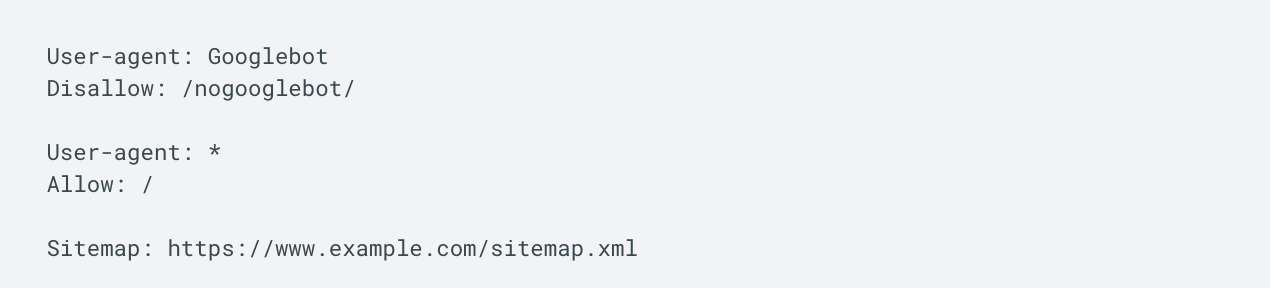
- Tells bots which pages can be crawled or are blocked.
4. How These Files Relate to SEO
- Llms.txt:
- By supporting artificial intelligence optimization (GEO), it helps LLM-based systems explore your site and increase its visibility.
- Robots.txt:
- It's part of SEO, and it guides how search engines crawl your site by controlling their access.
Things to Consider When Creating a Llms.txt File
What you consider when creating the Llms.txt file matters a lot for getting it processed correctly and effectively by artificial intelligence systems. Writing the file in Markdown format, and keeping the content clear, organized, and easy to follow, is what lets large language models understand this file without friction. Let's look at the basic elements you should keep in mind when creating a llms.txt file.
- Markdown formatını kullanarak sade ve anlaşılır bir dosya oluşturun.
- Use the Markdown format to keep the file simple and clear.
- Include only important content, and skip unnecessary details.
- Avoid complex structures such as HTML or JavaScript.
- Include up-to-date, accurate, descriptive information.
- Present optional and secondary content in a separate section.
- Make sure the information doesn't conflict with what's in robots.txt.
- Refresh your llms.txt file whenever your website is updated.
Tired of reading?
You can also listen to this blog post as a podcast we created with Google NotebookLM on Spotify.
Contents of Llms.txt File
The content of the llms.txt file is meant to present your website's most important information, pages, and documents to large language models in a clear, organized way. Getting the content right makes it easier for AI to understand your site and helps it produce more accurate answers to user queries. The content of the llms.txt file should include the following sections.
- H1 Title: Must include the project or site name.
- Excerpt Block: Contains a summary of the project and key information.
- Detailed Information: Paragraphs or lists with more information about the project.
- Link Lists: URLs to relevant documents or resources, each optionally paired with a short description.
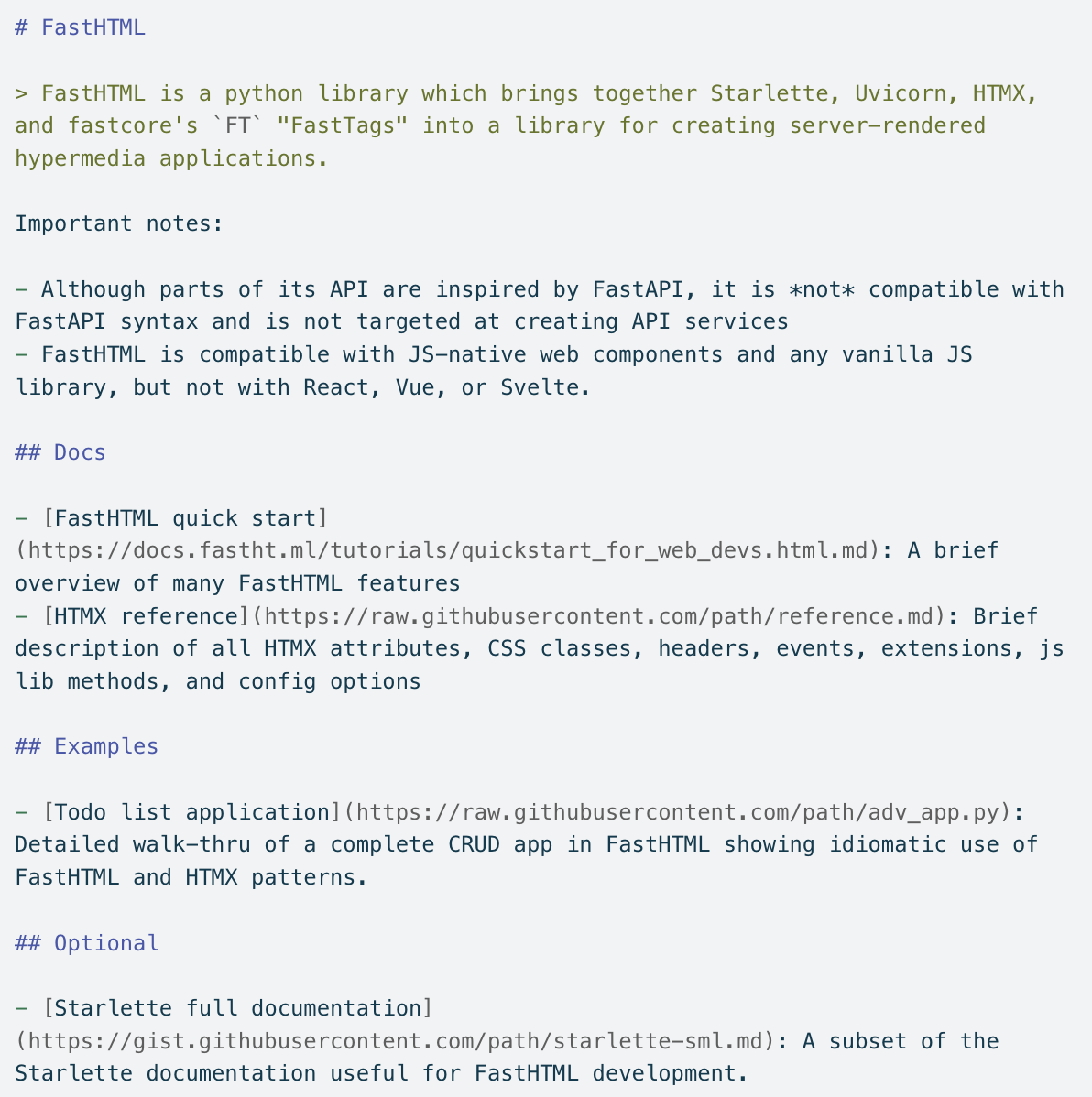
You can also add extra information using directives of your own.
How to Integrate Llms.txt File?
Integrating the Llms.txt file into your website means preparing the file in the correct format, uploading it to the right directory, and testing that it's accessible. You can follow the steps below to integrate the Llms.txt file successfully.
- Prepare the llms.txt file in Markdown format.
- Upload the file to the root directory of your website.
- Add a reference to the robots.txt file.
- Check that the file is accessible in the browser.
- Set the permissions AI bots need to detect the file.
- Update llms.txt regularly and test it with validation tools.
How to Create Llms.txt in WordPress?
If you own a WordPress site, you can add the llms.txt file manually to the public_html folder. If you can't do that, you can also create an llms.txt file with the help of a WordPress plugin.
Why is it important to follow up on incoming requests after the Llms.txt process?
Once you've integrated the llms.txt file into your website, monitoring requests from AI-powered systems is critical for understanding whether the file is working and what impact it's having. This goes beyond just checking that the file exists. It also lets you see how the information in the file is being used, which AI bots are accessing it, and how it's affecting traffic to your site.
This content was created by Mert Vahit Demir, SEO Manager at Zeo.
Resources
https://medium.com/towards-data-science/llms-txt-414d5121bcb3


