


Nowadays, SEO work goes well beyond the standard checklist, and much more detailed, comprehensive studies are the norm. What we'll cover today falls squarely within that scope.
I'll walk you through the steps we need to apply on the HTTP Headers side of our site, and how you can apply them yourself.
In fact, what are called security headers within HTTP Headers get overlooked by most SEO experts during website audits.
Some argue that website security isn't something SEO needs to worry about, but when your site gets attacked, a serious drop in organic traffic quickly becomes your biggest problem.
What are HTTP Headers?
An HTTP Header is the response a web server sends to a browser trying to access a web page.
Typically, these headers convey technical information such as how a browser should behave when caching content, the type of content, the software running on the server, the accessibility of the page, and much more.
Among these headers, security headers let us impose restrictions and instructions that prevent unwanted security events.
Why We Should Use and Adapt Additional Security Headers for Our Site?
The first reason to harden our site with these additional HTTP response headers is simply to make it more secure. The headers summarized below give the browser more information about how we want our site to behave.
By using these headers on our site, we protect our site and our visitors from unnecessary security risks.
The 6 Most Important Security Headings
- Strict-Transport-Security
- CSP (Content-Security-Policy)
- X-Content-Type-Options
- Referrer-Policy
- Permissions-Policy
- X-Frame-Options
What is Strict-Transport-Security**?**
At its core, it's a security header that forces HTTP requests to open as HTTPS when a site loads.
Many websites rely only on a 301 redirect from HTTP to HTTPS, but that alone isn't enough, it's still open to attack.
For example, if someone types siteadi.com directly to reach a website, or types HTTP out of habit, there's still an opening for an attack even after the redirect happens.
In that kind of attack, a visitor's connection to the website can be compromised, and everything exchanged between the visitor and the website, including login details or other sensitive information, can become visible to the attacker.
Using the Strict Transport Security (HSTS) header tells the browser it should only access the entire website over a secure HTTPS connection.
What is CSP (Content-Security-Policy)?
CSP is a content security policy. It protects a website and its visitors from XSS attacks and data attacks.
XSS refers to malicious hackers exploiting security vulnerabilities to install malicious scripts on a website.
The CSP header lets you define a whitelist of approved content sources for your site.
What are X-Content-Type-Options**?**
This security header prevents the exploitation of certain vulnerabilities that can arise through malicious user-generated content.
It's very easy to configure and really has only one valid value, nosniff.
It stops Google Chrome and IE from trying to sniff the content type of a different response reported by the server, which reduces the risk of user-uploaded content and exposure to random downloads.
What is Referrer-Policy?
This header lets a website publisher, you, in this case, control what information gets sent when a visitor clicks a link to another website.
When a visitor clicks a link and moves to another site, their browser tells that site which page sent the visit.
With this header, you can limit what information gets sent.
What is Permissions-Policy?
It lets a site control which features and APIs are available in the browser. This is a newer header aimed at site security.
What are X-Frame-Options?
This security header is genuinely one of the most important ones.
The X-Frame-Options Header protects against clickjacking attacks. Clickjacking lets an attacker load the target site inside an iframe on a page they control, reduce its visibility, and trick the visitor into thinking they're doing something else, so that clicking a button or link actually triggers an action on the target site.
The X-Frame-Options security header is used to prevent these kinds of situations.
How to Check Security Headers?
There's a very easy way to check the security topics detailed above.
By visiting this site, you can run a test against your own site.
A sample test result looks like this:
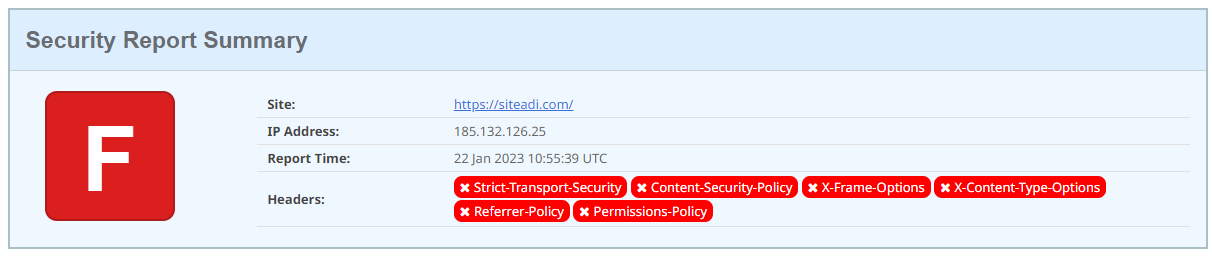
Which header configurations aren't included on your site is shown in the figure above, and detailed further down the page:
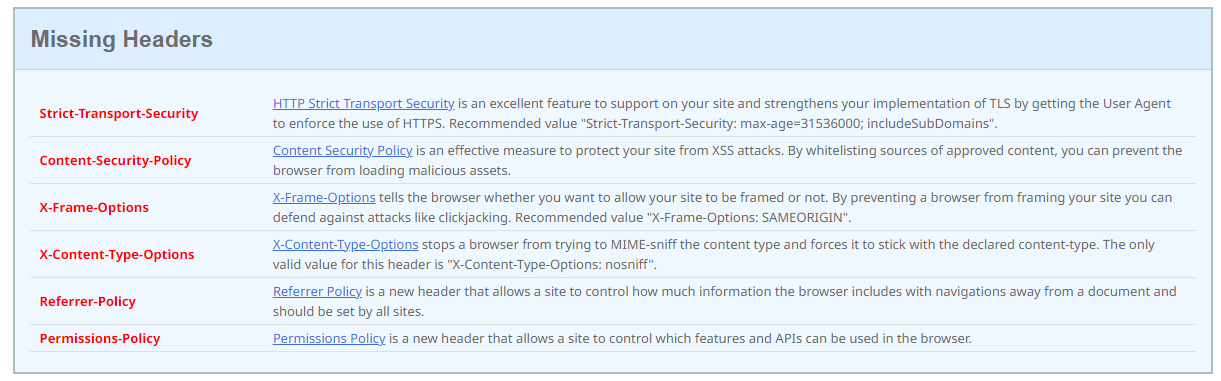
Now it's time to look at how to configure these header types for your site.
How to Implement Security Headers on Your Site?
HSTS Setup (Strict-Transport-Security Setup)
Every URL on the site needs HSTS defined. You can add the following code to the htaccess file to make that happen:
<IfModule mod_headers.c> Header set Strict-Transport-Security "max-age=31536000; includeSubDomains; preload" env=HTTPS </IfModule>
If the code above doesn't work, you can try different code examples from this page:
https://stackoverflow.com/questions/24144552/how-to-set-hsts-header-from-htaccess-only-on-https
Missing X-Content-Type-Options
The header code above, which is both a security and SEO factor, should be applied to every page.
Sample Code:
Header set X-Content-Type-Options "nosniff"
You can find the detailed source here.
Missing Referrer-Policy
It's recommended not to send referrer information to sites that don't use HTTPS. To do this, add the following code under the <head> element:
<meta name="referrer" content="no-referrer-when-downgrade">or into htaccess:
Referrer-Policy: no-referrer-when-downgrade
Different referrer alternatives and MOZ's research on this topic:https://moz.com/blog/meta-referrer-tag
Missing Permission Policy
Permissions-Policy: geolocation=(self "https://example.com"), microphone=()
To solve the Permissions Policy header problem, you can add the example code above to the site in web.config format.
More information and a detailed resource can be found here:
https://github.com/w3c/webappsec-permissions-policy/blob/main/permissions-policy-explainer.md
X-Frame-Options
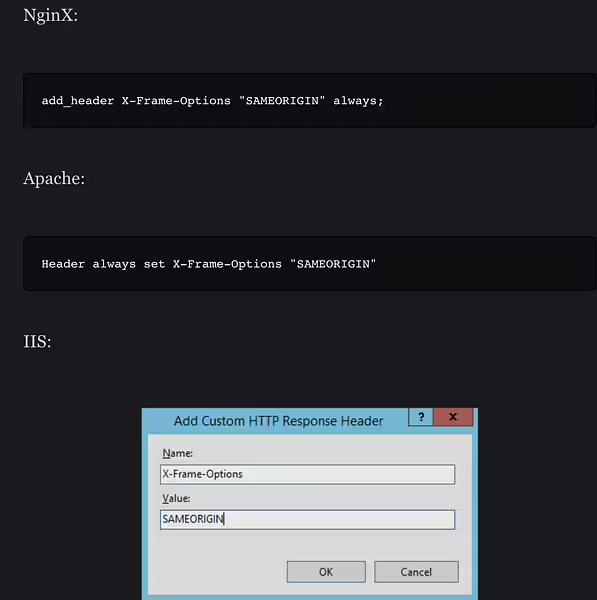
X-Frame-Options: SAMEORIGIN
Sample Code with All and More
<IfModule mod_headers.c>
Header set Strict-Transport-Security "max-age=31536000; includeSubDomains; preload" env=HTTPS
Header set X-XSS-Protection "1; mode=block"
Header always append X-Frame-Options SAMEORIGIN
Header set X-Content-Type-Options nosniff
Header always set Referrer-Policy: "no-referrer-when-downgrade"
Header always set Permissions-Policy "geolocation=(),midi=(),sync-xhr=(),microphone=(),camera=(),magnetometer=(),gyroscope=(),fullscreen=(self),payment=()"
Header always set Expect-CT "max-age=7776000, enforce"
Header always set Content-Security-Policy "upgrade-insecure-requests"
</IfModule>Important:
Test the code above before adding it to your site. If it stops any system from working, you may need to adjust it for your own setup. In that case, you can rely on the resources we've provided here.
In this article, I've tried to convey HTTP security headers in a useful way. I hope it turns into a resource you'll come back to for your own sites.


