


Shopify SEO 101: Understanding the Impact of SEO
Google scans web pages to determine which ones will be most helpful to people searching on Google, then ranks them by relevance. Search engine optimization (SEO) is the process of improving the quality and quantity of organic traffic to a particular website. Its aim is to place your website higher on the results page.
There are four types of SEO, each requiring a different skill set:
- On-page SEO
- Off-page SEO
- Local SEO
- Technical SEO
Website owners often work with third-party companies to create SEO-friendly web pages and increase website traffic.
Why Should You Trust Shopify?
Shopify is an all-inclusive e-commerce platform that lets you build, grow, and run a company. Merchants use Shopify to create online stores and sell through various channels, including web pages, mobile applications, social media accounts, and online marketplaces.
- 1.75 million businesses use Shopify around the world.
- The Shopify app store has over 3200 applications that help shop owners personalize their stores.
- Shopify employs about 10,000 people.
- 5.6 million online stores use Shopify.
- Over 2.1 million daily active users visit Shopify stores.
Why SEO Is Important for Shopify?
Based on Google search statistics, Google handles 63,000 search inquiries every second. That amounts to 5.6 billion searches each day and nearly two trillion each year. More than half of the world's population uses Google. Every year, the Google search engine analyzes 16% to 20% of new keywords, and at least 91% of the internet searches come from Google.
SEO is crucial for your website because it improves visibility in search rankings, which can bring more visitors and create opportunities to turn users into customers. It is also an effective way to increase brand awareness and establish yourself as an authoritative and trustworthy expert in your field. Page authority (PA) is becoming more important to web users because authority suggests that your website is reliable, relevant, and has something to offer. SEO is also essential because producing great content makes your site more user-friendly and promotes a positive user experience.
Why Is Shopify a Great Choice for SEO?
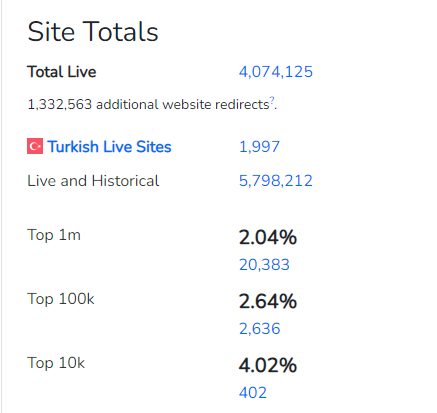
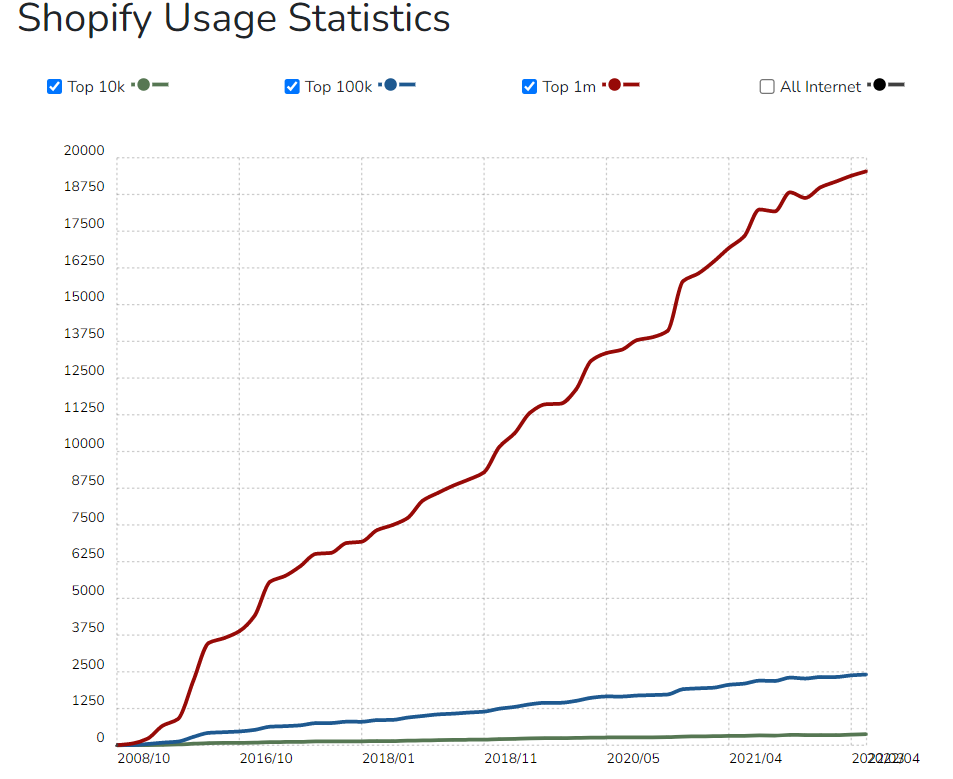
BuiltWith usage statistics show that 4.02% of the top 10,000 sites and 2.64% of the top 100,000 sites use Shopify. 44% of users begin shopping online through a search engine, and 37.5% of all traffic to e-commerce websites comes from search engines.
Most e-commerce platforms offer features that help shop owners optimize their online stores for search engines such as Google and Bing. SEO considers many elements, including user experience, website speed, and meta tags, so you need a platform that performs well across these areas and provides access to sophisticated SEO tools.
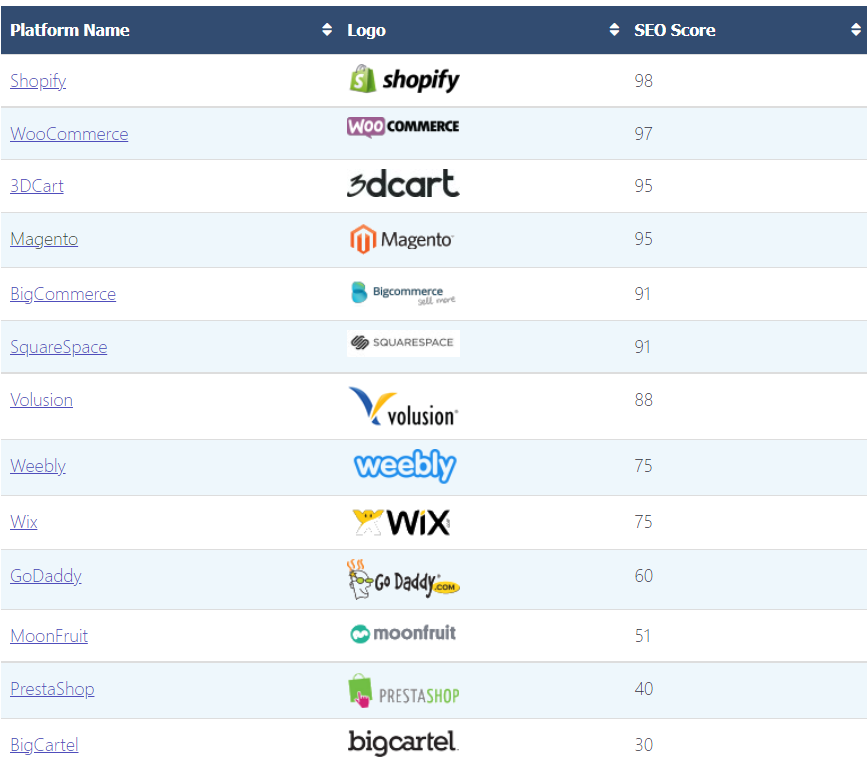
Shopify's competitors offer different features for e-commerce platforms:
- WooCommerce is an alternative to Shopify. It is an open-source extension designed to turn WordPress websites and blogs into e-commerce websites, and it is user-friendly for website owners who are familiar with WordPress.
- 3dcart is an e-commerce software platform with a range of features that make building and running an online store quick and easy. 3dcart provides third-party integrations and free templates that you can use to customize your website.
- Magento is an open-source platform by Adobe that offers backend features for small businesses, along with customization options and access to third-party apps for SEO optimization.
- BigCommerce is a NASDAQ-listed e-commerce platform that offers businesses software, online store building, SEO optimization, marketing, and security services.
- Squarespace is a website development and administration firm where users can build web pages with pre-built website templates.
Competitor analysis, also known as competitive analysis, involves identifying your business competitors and examining their marketing strategies to evaluate your company's advantages and disadvantages. This can help you learn more about their products, sales rates, and marketing strategies.
Competitor analysis can also help you to obtain brief information about the competitors to redirect visitors to a more specific landing page. Analysing your competitors' landing pages will help you find hints about what's good for SEO and not. For example, you can notice different keywords or phrases you don't use or elements you don't have in your website layout to adjust your strategy for successfully competing in your field of expertise.
What Do You Need to Know for Shopify SEO? What Is Shopify SEO?
People use search engines such as Google or Bing to find information on different topics. These search engines use a range of information to rank the results for each query. Search engine algorithms determine which websites are most relevant to the query and rank the results accordingly. To introduce your Shopify store to a wider audience, review its SEO options and use them effectively. Shopify provides learning materials such as articles and video tutorials.
Shopify also offers apps that help you automate SEO activities, identify SEO issues, and optimize your shop for search. It also includes the basic SEO options every store owner needs. Making a Shopify store SEO-friendly is no different from optimizing a store on another e-commerce platform. Technical SEO, keyword research, link building, and other SEO principles are the same. However, the way you implement these strategies differs because Shopify has its own template engine and provides apps through Shopify Marketplace to help shop owners put SEO strategies into practice.
Information Architecture: Setting Up Category Hierarchy for Your Shopify Store
Shopify is a commerce platform that can launch e-commerce sites across multiple channels, including websites and social media platforms. Its cloud-based software and up-to-date data help businesses manage products, inventory, payments, and shipping. Online stores can significantly increase sales by helping companies reach more people.
Online shopping has changed today's business world, but it can be the wrong choice if it is not used properly. For example, traditional marketing strategies may not help you reach more customers and can eventually lead to losing existing ones. Online shoppers want to find the product they need with one click and without spending much time. Many people prefer online shopping to traditional shopping because it offers more options and lets them filter items to narrow their search for the product that best meets their needs. This shift has transformed traditional marketing strategies into digital marketing strategies and introduced a new perspective.
Creating a successful digital marketing strategy requires attention to several important areas, including the right category hierarchy, suitable keywords, and an optimized internal linking structure.
Using Keyword Research to Optimize Category Names
Keyword research is a crucial step in optimizing category names. Finding the most suitable keywords helps you optimize product and category pages while learning more about your customers.
Why Do We Do Keyword Research?
Your products can become visible in search only when you use the right keywords to help people find them. To identify the keywords that will distinguish your brand in online searches, you need to conduct thorough keyword research. This is the first step in developing a successful website because it helps businesses reach target customers by identifying and analyzing the search terms people use online for a particular purpose. Keyword research is similar to market research because it helps you understand your customers by examining their search habits and finding the most common keywords for reaching relevant audiences.
To make your brand visible to potential customers, you need to understand how people search for the products, services, or information you offer. Identifying frequently used keywords for a particular subject and using them on your site can help your pages rank ahead of competitors in search results and map your keywords to the right pages.
How to Optimize Product/Category Pages for SEO
After a user enters a keyword, Google scans its vast database and displays the most relevant information. With so much content and so many websites available, using the right keywords and placing your service or product in the correct category is crucial for increasing your visibility on Google.
For example, searching for the keyword “online shopping” returns millions of websites. To improve your ranking in SERP, narrow the search parameters by creating niche subcategories that open new ranking opportunities on Google and lead customers to your website. The first step is to find the most searched keywords for a particular subject. Next, make sure you use the correct categories for the service or product you provide. For example, if your site sells pet products, it needs a relevant category so that a customer looking for dog food can find your site.
You can increase site traffic by expanding your search parameters with more specific niche subcategories. For example, keywords such as sterilized dog food, senior dog food, adult dog food, wet dog food, and diet dog food can show that you offer products for different customer needs and increase your visibility in the search engine.
Using Keyword Research Tools to Name Category & Product Names
SEO (Search Engine Optimization) aims to place your website at the top of search engine result pages. A crucial part of SEO optimization is using the right keywords in the right amounts. To attract more visitors, find the most frequently used keywords for a subject and use them in suitable amounts on your website. You should also identify search engine trends and organize your website content around them. Finding the right keywords can feel daunting at first, but several keyword research tools show how often particular words are used.
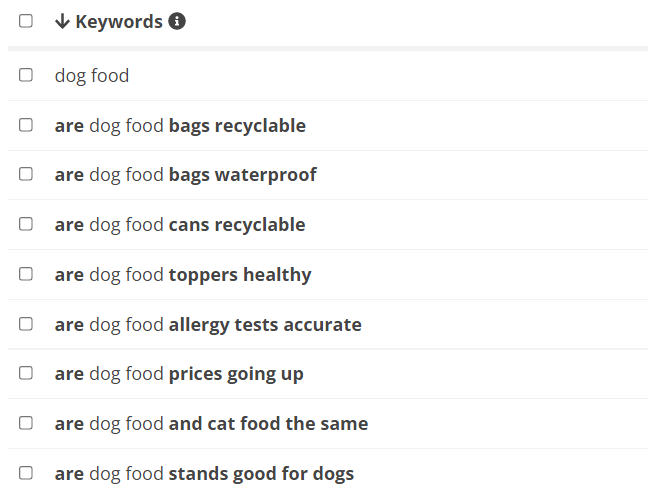
One example is keywordtool.io. This tool lets you search for keywords related to your service or product in any language. Its suggestions are based on several parameters, including search frequency and region for a particular keyword. For example, when we search for “dog food”, the tool shows data on how often the keyword is used, along with related questions, prepositions, words, and average trend values. The term “dog food” was most often searched with the keywords "royal canin dog food" and "best dog food", respectively.
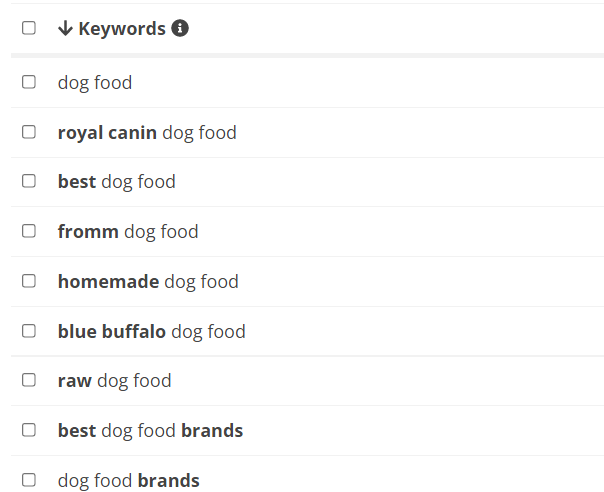
The most searched questions about dog food are “are dog food bags recyclable” and “are dog food bags waterproof”.
The most used prepositions with this keyword are “dog food about” and “dog food on amazon”.
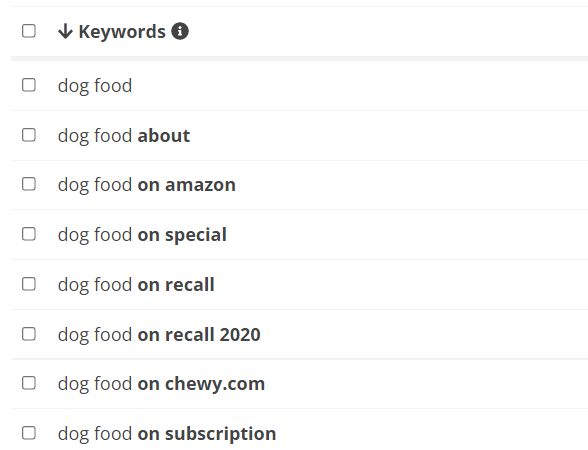
Using relevant keywords from this list in your website content can help increase your website traffic accordingly.
Finding the Related Keywords on Other Stores Like Amazon
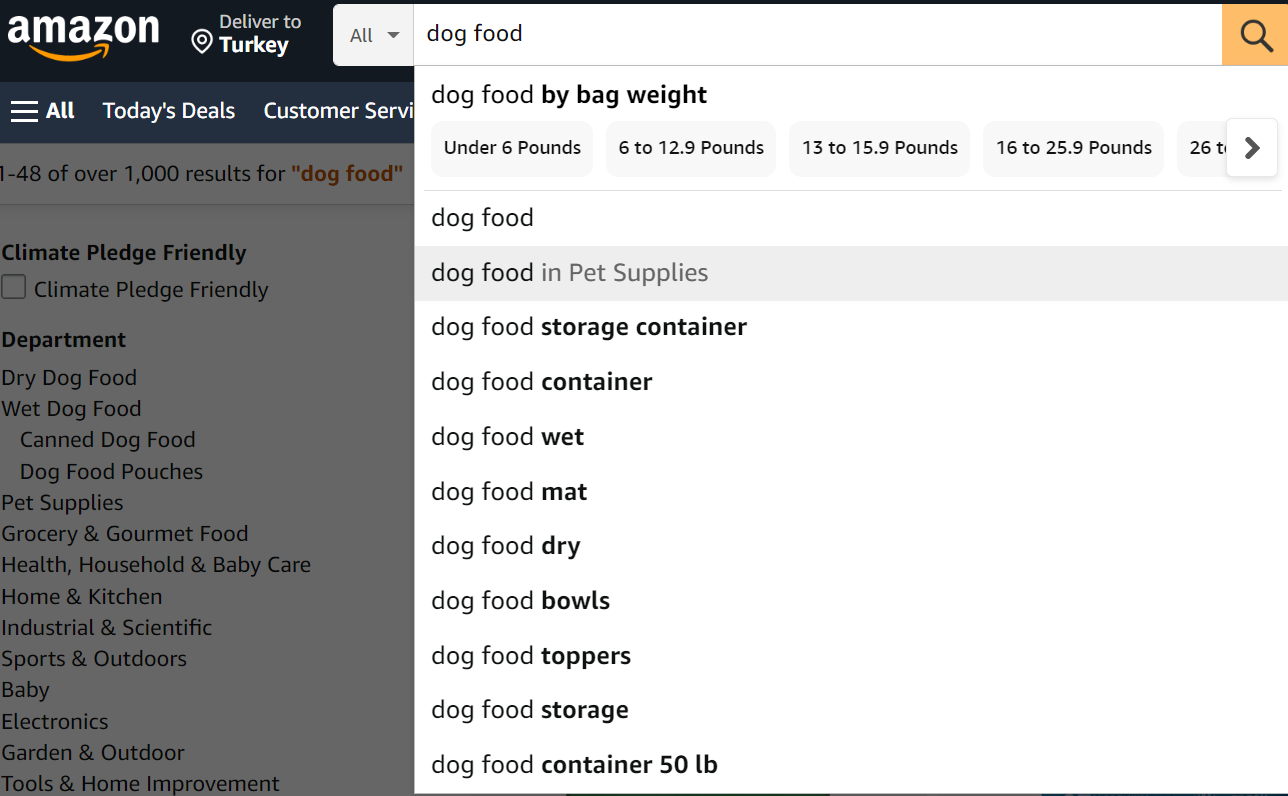
Amazon, one of the largest online shopping sites in the world, uses keywords to connect sellers with customers and offers keyword ideas that you can use for your website. You can browse categories by entering a keyword in Amazon's search box. You can also use Amazon's special tools to identify keywords or products that suit your target audience, allowing Amazon to match your ads with relevant search terms and products. Amazon’s instant search suggestions can help you determine which keywords customers use frequently. For example, if you search for “dog food”, Amazon suggests terms such as “dog food wet” “dog food dry” and “dog food bowls”.
Internal Linking Strategy: Linking the Relevant Ones
Google's algorithm follows links when ranking website content in search results. Using relevant links on your website can increase your visibility in those results. Keywords and internal links can help your website reach its target users. An internal link points from one page on your website to another relevant page, helping users find what they are searching for in both search engines and your website content. These links can direct users to related products and articles so they can find more content on the topics they need.
What Is Internal Linking Optimization?
To help Google rank your website appropriately, adopt internal linking strategies that reflect the relevance of your pages to search results and the hierarchy between those pages. Your internal links should be user-friendly so visitors can navigate your website content easily. Too many internal links can confuse users and reduce your website's visibility for relevant pages. Relevance is another important part of internal link optimization. For example, someone visiting an online shop's dog food page should not see links to cat food or bird food pages. Links to wet dog food or sterilized dog food would be more appropriate because the user is interested in dog food.
How Can We Use Internal Linking for E-Commerce Platforms?
Linking to your main product or category pages from the website menu helps increase traffic to those pages and allows Google's algorithm to analyze your website hierarchy. When a page is linked from the main menu, Google sees it as highly relevant and displays it in search results more often. This does not mean every page should appear in the main menu. The website menu should include top category and product pages, with relevant internal links to other pages such as dog food and sterilized dog food.
If your website contains many products or pages, a navigation scheme that maps the user's position on the site can show how those pages relate to one another. For a user-friendly website structure, make sure that when someone views "sterilized dog food" and wants to see other products, the website directs them to the "sterilized dog food" category rather than the "dog food" category. Another SEO-compatible internal linking method for e-commerce platforms is to connect products with related blog content. When a product has no subcategory, or when you cannot find a suitable product category, you can provide detailed information about it by linking to relevant blog content.
How to Analyze Internal Linking Problems with External Tools
External tools such as Screaming Frog and Sitebulb can help improve your SEO by collecting data and detecting common linking problems and SEO issues. These website crawlers can audit broken links, identify meta descriptions and page content that are not SEO-friendly, and automatically generate website maps that reflect your content hierarchy and links.
Technical SEO: Making Your Shopify Store Easily Crawlable for Google Bots
Search Engine Optimization (SEO) is a modern way to increase the popularity and visibility of your service by creating a website aligned with search engine algorithms, improving website quality and traffic. An SEO-friendly website can increase your company's success and help you maintain a cutting-edge e-marketing strategy with specialized tools. Although SEO can transform your website's visibility in search results, several common technical issues can hamper its search engine rankings:
- Duplicate Content
- Poor link optimization
- Poor website layout
- Lack of SEO-friendly images
- Improper Redirects
- Slow loading pages
- Irrelevant keywords
- Missing meta descriptions
Essentials: Robots.txt & Sitemap.xml Files
Google's algorithm aims to provide users with the most accurate results and display the parts of your website that it considers relevant to a category. Search bots scan web pages and add them to the appropriate indexes. You should therefore decide which parts of your website search engine bots should highlight. A text file called robots.txt can help with this. Robots.txt, or the robots exclusion protocol, contains instructions telling website crawlers which pages or files they are not allowed to crawl. When crawling a website, Google bots avoid the pages listed in the robots.txt file.
Sitemap.xml is another important file for website crawling. It helps Google crawl effectively by guiding bots toward the pages they should index. Sitemap.xml describes your website structure and page hierarchy to Google and ranks pages according to their importance. This gives search engines more information about your pages, which affects indexing speed and how the website appears in search results while making indexed pages easier to monitor.
Shopify automatically generates and updates a sitemap.xml file with links to all your products, primary product images, pages, and blog posts. It also provides users with a default robots.txt file. However, Shopify allows users to edit robots.txt manually when they need changes that match their e-marketing plans.
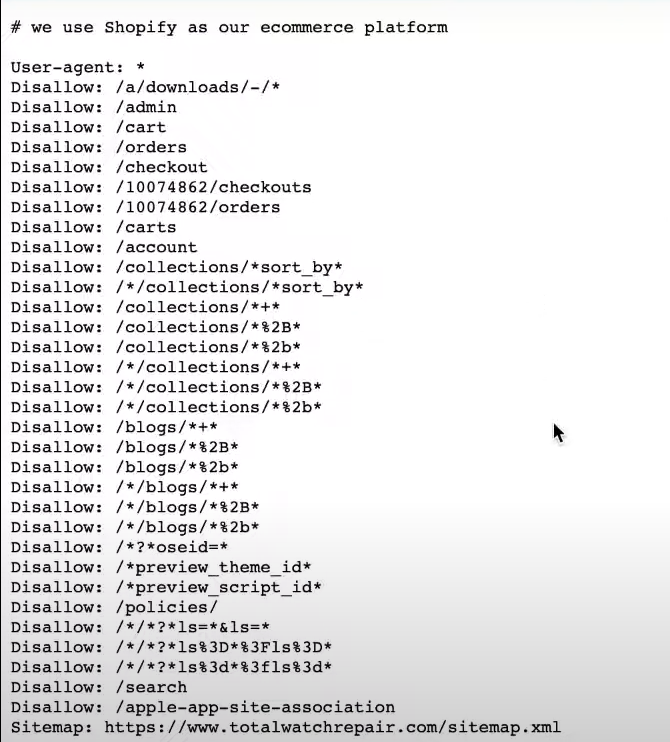
To do this, go to the admin page and choose the “Themes” section of the online store menu containing your live menu.
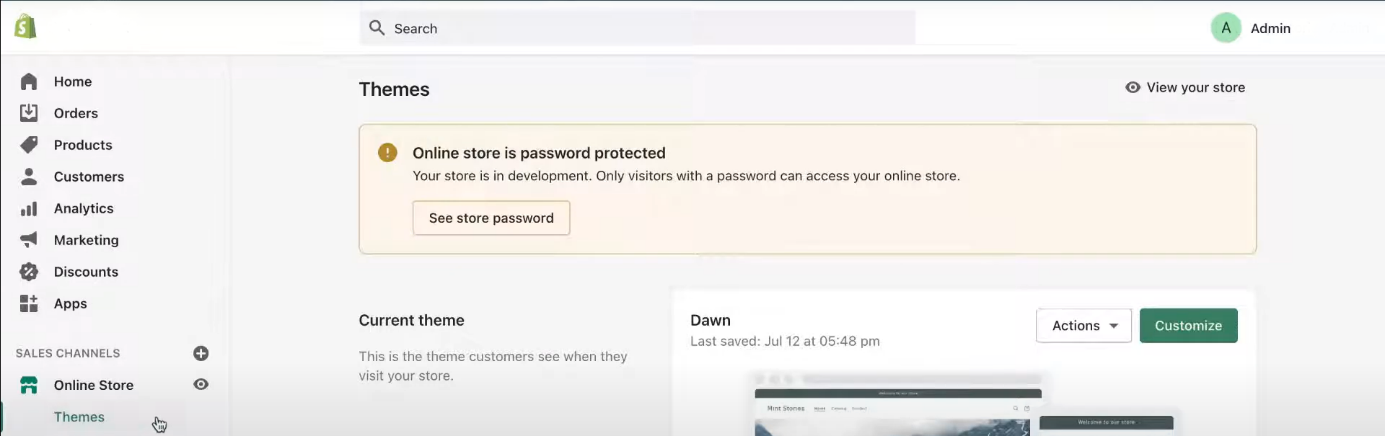
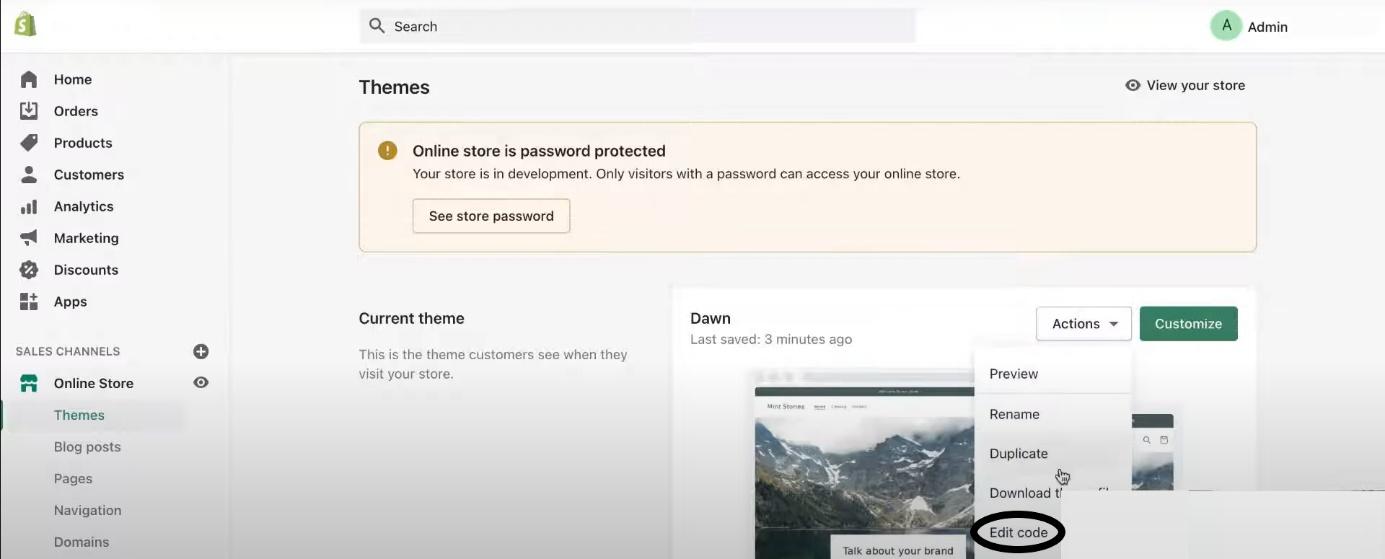
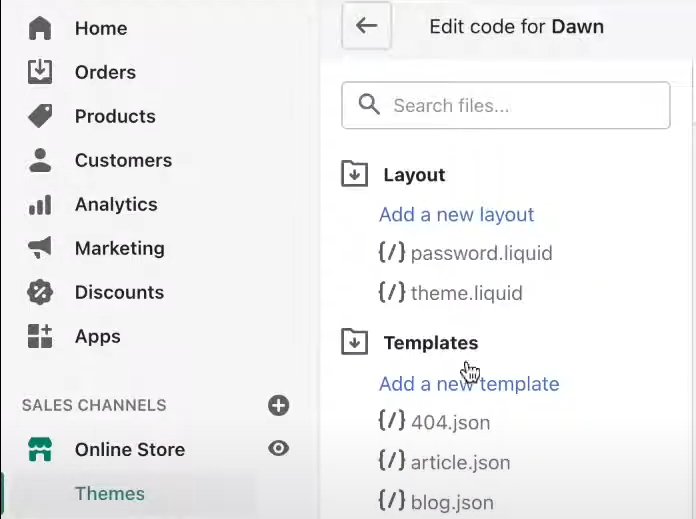
Click “Actions”, “Edit Code” and “Templates” to edit robots.txt.
Add a new template and select robots.txt from the existing templates. Then click “Create Template”. Shopify will direct you to a page containing the editable default code it generates.
Keep a few points in mind when setting up robots.txt and sitemap.xml. If you have already created a sitemap, its URL will probably be http://www.example.com/sitemap.xml. You still need to make sure it is in the correct location. Enter the URL in a browser and confirm that it does not return a 404 error.
To check whether you have a default robots.txt file, enter http://www.example.com/robots.txt and make sure it supports your main goal. Then add the location of your sitemap to the robots.txt file so the search engine algorithm can understand your site structure properly.
Duplicate Content: Similar Variant Products May Harm Your SEO!
Duplicate content is one of the most common issues SEO analysts face because Google may not know which page is the original and which one should rank higher in search results. This can reduce your website's traffic and visibility. In some cases, Google refuses to index certain pages. To address this issue, make sure your pages do not exceed your crawl budget. The crawl budget is the number of pages Google crawls and indexes on a website. If your pages exceed that budget, Google cannot find and index some of them, resulting in less website traffic.
Many free and paid SEO tools can detect duplicate content by running thousands of searches on Google. Siteliner, Copyscape, Sitebulb, and Screaming Frog are the most widely used tools. Screaming Frog is always available as a free option and can help solve many SEO problems, including finding broken links and generating site maps.
There are two types of duplicate content to avoid: internal and external. Internal duplicate content means that your site has more than one page that is fully or partially identical to another page on the same site. External duplicate content means that your website contains a similar or identical page from another domain, which may belong to you or someone else.
To fix this issue, detect duplicate content and consolidate it under a single URL. Alternatively, remove the duplicate content to prevent it from reducing your search ranking and traffic.
Pagination organizes relevant or similar content across different pages, splitting products, blog posts, and search results so users can find what they need on a website. Large amounts of data cannot fit on a single page because too much information may confuse users. Bots choose which content to crawl or index, so after pagination, you should prioritize the crucial pages on your home page. On an e-commerce site, products may share the same structure, and similar content can result in duplication. Pagination can distinguish products with similar content and show the search engine that they represent different products. Product variations can also create duplicate content, and the best way to address this is to canonicalize all variations of the main product.
Canonical tags are HTML code that indicates the source of content, making them crucial for SEO. These tags show search engines the original content source in search results. Canonical tags are an SEO-friendly option because you can add them to a page without accessing the server configuration, and they can improve page rankings in search results without much effort.
Canonical tags are important in creating a Shopify store because the Shopify platform allows a single product page located in multiple URLs with identical or similar content. In other words, the Shopify website enables every product to have multiple URLs. For example, the accessories page can be the main page for men's and women's accessories, and canonical tags help prevent confusion in similar contents for different pages. Shopify co-founder and CEO Tobias Lütke developed a liquid template creating and modifying Shopify themes and creating a bridge between an HTML file and a Shopify store by allowing users to access variables. The liquid template allows users to access all the details relating to a product, such as the product name or images.
SEO Friendly URLs: Making URLs Understandable for Both Bots and Human
An SEO-friendly URL accurately describes a website using the right keywords for search engines and users. SEO-friendly URLs improve user experience by explaining what the page is about. URL is one of the SEO ranking elements; Google has optimized URL structure and researchers suggest that shorter URLs rank first in search results.
Use focus keywords in your URL to tell Google what your website is about and help it appear in search results. This narrows your website parameters by giving users precise keywords to search. For example, a URL such as https://www.example.com/index.pht?iu\_wta\*2369 gives no indication of the website's content and is not SEO-friendly. A URL such as https://www.shopify.com/tour/website-design is more SEO-friendly because it hints at the content.
SEO-friendly URLs can also improve the click-through rate (CTR), website traffic, and search visibility. CTR is a digital marketing term for the number of users who visit a website from an advertisement or search result.
Shopify provides free SEO tools that let you edit a URL to make it SEO-friendly. To edit your URL on Shopify, follow these steps:
- Go to the Shopify admin page
- Click the page you want to edit
- Click “Edit Website SEO” on the “Search Engine Listing Preview” section
- Edit or change the URL from the “URL and Handle” section
After editing your website URL, inform Google about the change to make sure your website appears in search results. When website content is moved to another location, deleted, or given a new URL, use URL redirects to send users and search engines to the new page. Without a redirect, users who visit your website will see an error. However, using the wrong type of redirect could reduce search engine rankings. There are eight types of redirects, and the most commonly used one is the HTTP redirect.
Page Speed Optimization: Every Millisecond Counts
Page speed is the time between a browser requesting a website and the website rendering. It is crucial to user satisfaction because slow pages can drive users away. Google also uses page speed as a ranking factor, so poor performance can negatively affect your search rankings. Speed has been a ranking signal for desktop search since 2010. In 2018, Google announced that page speed is also a ranking factor in mobile search.
According to an independent search result, 1/4 of users abandon a website that takes more than four seconds to fully load. More than half choose a different website, leading to fewer sales. Even a one-second delay can reduce conversions by 4.42% per second.
You can measure page speed with online tools such as Test My Site and Page Speed Insights. Core Web Vitals are the basic metrics Google uses to evaluate a web page's user experience and monitor improvements made to create an SEO-friendly website. Core Web Vitals are also a Google ranking factor. Google asks website owners to monitor and improve three Core Web Vital metrics to provide a better user experience: CLS (Cumulative Layout Shift), LCP (Largest Contentful Paint), and FID (First Input Delay).
LCP is a speed metric that measures loading time from when a page starts loading until the user sees the page content after 2.5 seconds. FID measures how long the system takes to respond after a user clicks on a website. Google recommends a FID limit of 100 milliseconds. CLS measures unexpected changes or shifts in the website layout.
Optimizing Images: The Heaviest Part of the Internet
Images are crucial to an SEO-friendly website. They make content more accessible and appealing to users, give search engines contextual information, and help optimize page speed. Images cover nearly 75% of a webpage, so image optimization is particularly important because it affects page speed, which Google uses as a ranking factor. According to research by Website Builder Expert, content with images gets 94% more views, and 86% of businesses predict that visuals will be a crucial part of their marketing strategy.
Keep these points in mind when choosing images for your content:
- Use brief, explicit image names and relevant keywords to improve your search engine rankings.
- Optimize your alt attributes, meaning alternative text for images, with relevant keywords to support web accessibility and add SEO value to your website.
- Choose the right image dimensions to show multiple angles of your product.
- Pay attention to image loading time, as 50% of users won't wait for images to load, which can lead to lost income.
- Choose the right image format for your website layout: JPEG, GIF, or PNG. JPEG gives the best quality, while GIFs are the best choice for thumbnails.
A content delivery network (CDN) is a system of servers in data centres around the world that delivers downloadable content to users with high performance and without interruption. A CDN can increase page load speeds and solve bandwidth issues. Shopify provides its users with a CDN that helps online stores load quickly.
Shopify also offers image optimizer apps that can optimize your store and improve the user experience. We compiled the top Shopify image optimization apps based on user reviews and ratings.
- AVADA SEO Suite
- Image Optimizer
- Minifier SEO Image Optimizer
- Image Optimizer+ Compression
- Image Slider, Product Carousel
You can also use online image compression tools such as tinyPNG to manually reduce image file sizes so they load faster on your website. Another option is to set images to lazy load in HTML, which delays loading or constructing media until it is needed. You can do this with browser-level lazy loading, cross-section observer, or scroll and resize event processors. Here are the top 3 apps trusted by Shopify for installing lazy load:
- Lazify
- Swift
- Fuzz
Using Cloudflare to Optimize Your Images
Cloudflare is an American company that provides services including DNS (Domain Name System), content delivery network (CDN), Load Balancing, Accelerated Mobile Page (AMP), Web Application Firewall (WAF), and other tools that make websites faster and more secure. Its image optimization capabilities include Cloudflare Polish, which automatically optimizes website images and reduces their size through compression to improve page speed. Another important tool is Image Resizing, which lets you resize images, adjust their quality, and change their formats to fit your website layout.
Cloudflare’s HTTP2 improves page loading time by retrieving multiple sources in a single network request. Cloudflare also provides Brotli compression, which compresses faster and helps website pages load more quickly, resulting in a better user experience over time.
Optimizing JS & CSS Assets for Faster Load
Cascading Style Sheets CSS is a basic web technology used with HTML and JavaScript to style websites visually. CSS allows website owners to control colours, fonts, and other visual elements. Website developers use a programming language called JavaScript JS alongside CSS. This code can slow your website and lower its search result ranking. Code minification can help prevent this by removing characters that do not serve a function, which increases loading speed.
AMP (Accelerated Mobile Pages) is a project designed to provide users with a faster mobile experience. AMP pages differ from standard website pages because they load faster. Integrating AMP into Shopify is crucial because it improves SEO metrics such as page load speed, which is considered a ranking factor, and can increase a Shopify store's search rankings and visibility. You can integrate AMP into Shopify through apps from the Shopify app store, such as AMP by Shop Sheriff and AMP by Ampify Me.
Third-party JavaScript and Shopify applications let you add the functions you want to your website through ready-made templates. Coding these functions from scratch is challenging and requires a professional software developer. If you do not have a professional software team, you can easily integrate functions that have already been coded into third-party software.
Shopify themes affect SEO, website performance, and user experience. Shopify themes with average page speed scores are listed below:
- Avone
- Light
- Mono
- Spring
- Debut
The Shopify App Store also offers Page Speed optimization apps that can improve the user experience:
- AVADA SEO Suite
- Page Speed Optimizer
- Plug in Speed Optimizer
- Hyperseed- Advanced Speed
- Page Speed Optimizer Pro - SEO
New Technologies: AMP for Shopify Stores
Accelerated Mobile Pages AMP is an open-source project launched by Google to optimize mobile web pages for maximum speed. The AMP format restricts JavaScript and HTML/CSS to provide higher performance on mobile and desktop and maximize page loading speed.
Google promotes AMP because internet providers need to deliver search result content at maximum speed to maintain user satisfaction in the modern technological era. AMP is not a ranking factor, but it implicitly affects rankings by increasing page speed.
AMP claims to deliver 4x speed improvements and significant increases in website traffic. 1.4 million websites adopted AMP technology. Google stopped featuring AMP badges in search results, and a study by Kinsta stated that AMP was reduced by nearly 59%. To enable AMP in Shopify, install an app from the Shopify store, such as AMPP by Shop Sheriff or AMP by Ampify Me.
JAMstack and Shopify Headless Commerce
JAMstack is a way to build websites and apps using JavaScript, APIs, and Markup (JAM). The first websites were HTML files requested by a browser, but as technology developed, these files were no longer enough. JAMstack loads webpages faster than standard servers. It separates the backend and frontend, which makes it more secure than other approaches. It also gives developers complete flexibility. These features lead experts to consider JAMstack the future of the web.
Website search and browsing applications can have difficulty accessing the text content of these applications because most of the content becomes available only after the browser runs it.
Shopify's Headless E-commerce API helps website owners separate back end infrastructure from front end infrastructure, giving them more control over the website and improving the developer and user experience. Shopify stores use headless commerce because it turns every screen into a digital showcase and gives developers freedom by accelerating the Shopify store editing process with on-the-go tools. It also allows them to edit visual elements through flexible settings rather than only through ready-made templates.
When a JAMstack website pre-renders the markup, server-side code does not need to run when a user requests a web page. Static site generator (SSG) tools are designed for this purpose. Website owners can build their e-commerce platform with Shopify APIs and generate SEO-friendly web pages. When a user views a product listing, site owners do not need to query a database for product data because JAMstack has already handled it. Website owners can also integrate their design into Shopify’s CMS.
New Tech: Using Cloudflare Zaraz for Shopify instead of Google Tag Manager
Google Tag Manager helps website owners manage JavaScript and HTML tags without a developer. With Tag Manager, you can add Google Ads and other marketing tags to your website and edit them quickly.
Although it may seem easy to use, it has many disadvantages. For example, if you make a mistake while editing, updates will stop, and you will need to inspect the code to find the error. This requires HTML and JavaScript knowledge, which works against the tool's original purpose.
Cloudflare Zaraz is a state-of-the-art tag management service that improves page speed by processing third-party tag integrations. It may seem like an alternative to Google Tag Manager, but software developers began looking for alternatives because so many tags need to be installed. Cloudflare Zaraz can improve website speed by using on-demand servers worldwide to execute code quickly for the user. Google Tag Manager requires technical knowledge for this, while Zaraz is a simple tool that anyone can use easily. By implementing Zaraz, you can increase your speed from 10 to 30. You can visit the Zaraz website to analyze your website speed performance.
Managing Out-Of-Stock Product
Pages for permanently and temporarily unavailable products can adversely affect your search rankings and, eventually, your sales rate. Customers are less satisfied when they cannot find the product they want. To address this, you can limit the visibility of out-of-stock pages by listing them lower on the page. For temporarily out-of-stock products, arrange e-mail or SMS notifications to keep waiting customers informed about current stock levels. For permanently out-of-stock products, find substitutes and recommend them to customers with internal links. You can also offer pre-orders to build trust and discourage customers from choosing other brands.
On-page SEO: Optimizing On-page SEO Elements for Shopify
On-page SEO means optimizing website pages to increase organic traffic and improve rankings and user experience. Unlike off-page SEO, which focuses on elements outside the website, on-page SEO involves publishing high-quality content with relevant headlines, meta descriptions, and HTML tags.
Site owners should consider several common on-page-SEO problems:
- Duplicate content
- Broken internal and external links
- Lack of header and meta tags
- Missing image alt attributes
Title & Description: The Real Showcase of Your Site in Google
Meta tags summarize your website data, helping search engines understand page content and rank it accordingly. Search engines use these tags to understand what a website is about, categorize it, and index and rank it in relevant search results. In short, meta tags are crucial to successful search engine optimization. The basic meta tags are:
- Title tags
- Header tag
- Meta description tag
- Image tag
- Keywords
A title tag is the HTML element that defines a web page. Title tags are crucial for SEO because they help search engines and users understand the content. To write an SEO-friendly title tag, site owners should conduct keyword research, pay attention to length, and avoid duplicate tags.
Keyword meta tags were once crucial for SEO because they affected website rankings in search results. Over time, however, website owners abused them by adding many irrelevant keywords to rank higher. This disrupted the Google algorithm's ability to decide which website should appear higher in relevant search results. As a result, Google officially announced that keyword meta tags no longer influence search result rankings.
Clickthrough rate (CTR) is used to measure how well meta tags perform. CTR is the ratio of clicks to impressions that your website receives. It gauges how keywords, images, and ads affect your search ranking. A high CTR means users find your website relevant and that it ranks highly in search results.
There are several ways to increase CTR. First, write short, simple titles with descriptive and relevant keywords. Second, optimize the meta description by telling users what your page covers, answering questions about the topic, and using relevant keywords. For example, e-commerce websites with high CTR use important keywords such as discount, pay by instalments, showing variants, high quality, etc.
Titles and descriptions can be game-changers for SEO when used correctly. Follow these steps to change your Shopify store title and description for better search rankings and traffic:
- Go to the “Shopify Admin” section
- Click “Online Store” and “Preferences”
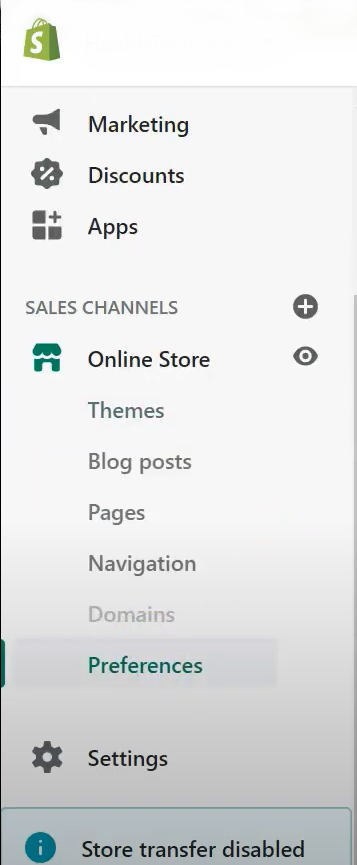
- Change your homepage title and homepage meta description
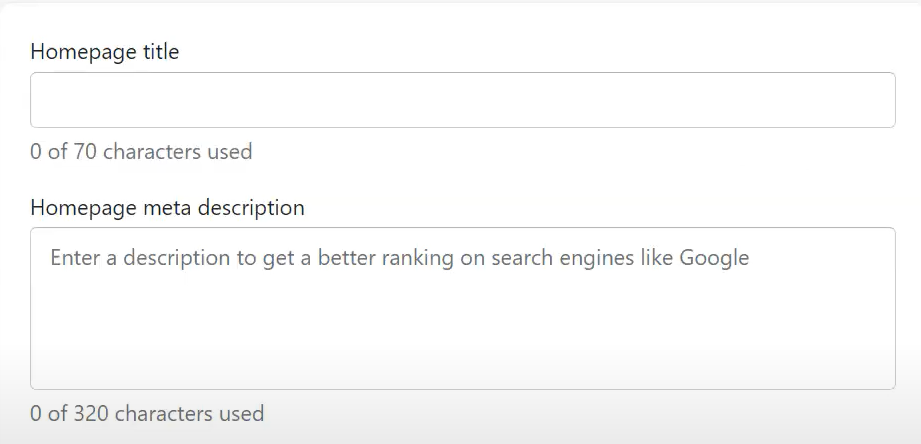
- Save the changes
Alt Tags: Making Images Accessible for Bots & Visually Impaired People
Alt (alternative) tags are text descriptions of media items that describe an image when the media does not load. Screen readers also use alt tags for visually impaired users. Alt tags can improve website SEO as well. Google uses them alongside computer vision algorithms and page content to understand an image's subject. Avoid keyword stuffing, as it may make your website appear to be spam and create a negative user experience. Instead, include useful information and relevant keywords in your alt tag.
Google offers an image search service that lets users search the web through images. When users select an image in Google image search and follow the link to your website, your website traffic will increase. Images are part of your website content, so using them correctly is crucial to digital marketing strategies. Because %20 of Google traffic is for images, you can benefit from Google image traffic by optimizing your images for SEO.
URL Structure: Making Your URLs More Understandable
A URL (Uniform Resource Locator) is a website's address. Google uses URLs as search and sorting parameters, which makes URL optimization crucial for SEO. To help more users find your URL online, plan your website's main categories and include related keywords in the URL. These keywords should relate to your services and popular search results. SEO-friendly URLs should contain target keywords. Below are a good and a bad example of an SEO-friendly URL, respectively:
- https://www.example.com/shop/white-women-sneakers
- https://www.example.com/shop/home/category/accesories/itemnumber-201829745aujs.2
SEO-friendly URLs are crucial to clickthrough rate because short URLs with relevant keywords will rank higher in search results and increase CTR. To change a page URL in Shopify:
- Go to the “Shopify Admin”
- Click the product page you want to edit
- Scroll down to the bottom of the page
- Click “Edit Website” SEO
- Change URL from the URL and handle section
- Save the changes
Redirect the old URL to the new one with a 301 redirect, a permanent redirect that sends search engines and users to a website's new URL. Check old URLs with httpstatus.io
Rich Snippets: Bringing More Content to SERP Results
Rich snippets are enhanced search results that give users more information about a web page's content. Search engines such as Google use snippets to show extra data, including ratings, reviews, and images. This draws attention and encourages users to click through to the website. Rich snippets are not a ranking factor, but research suggests users are more likely to click on websites that use them because they provide more information and indicate whether the website is relevant to the search.
You can use schema.org to decide how to format rich snippets for SEO. There are many types of Rich Snippets, so you can choose the one that fits your website. For example, a Shopify product page can use 5-star rating reviews from customers and product markup that includes the price and product image.
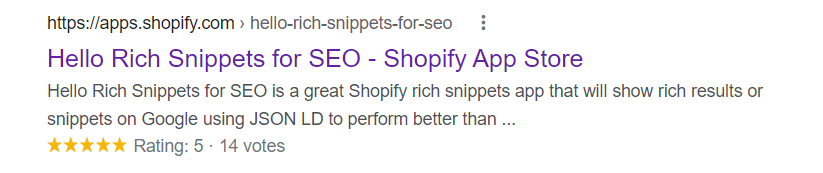
Rich Snippets apps from Shopify App Store include:
- Hello Rich Snippets for SEO
- Schema Plus for SEO
- JSON‑LD for SEO
- Schema & Breadcrumbs
- SEOKart
Delivering Better User Experience: More Traffic, More Conversion, More Sales
User experience describes a website user's overall experience of user-friendliness, page speed, and SEO-friendliness. A good user experience can lead to more website traffic, a higher conversion rate, and more sales. This article explains the best strategies for delivering a better user experience across your Shopify stores.
Shopify CRO: Increasing Conversion Rate & Experience to Rank Higher
E-commerce user experience is how customers feel when they visit your website. Providing a good experience can help you gain loyal customers and increase website traffic and CTR. According to a study by Forrester, a good user experience rate could improve conversion rates by up to 400%.
Conversion rate is the percentage of your website's visitors who complete the desired goal. A high conversion rate indicates that users want your services and that your e-marketing strategy is successful. Conversion rates also help you measure the success of marketing campaigns and identify the right promotional channels for the user experience. To calculate the conversion rate, divide your website's total number of conversions by its total number of visitors during a given time frame, then multiply the result by 100.
(Total conversion number/total visitors) x 100
To optimize conversion rates, find the current conversion rate of a single page and create conversion rate optimisation experiments. To create a CRO experiment, set up a destination goal and an event goal. A destination goal tracks URLs on your website, while an event goal tracks users who complete a particular action on your website.
To increase conversion rates, improve the user experience of your landing page, as these pages are designed to motivate users to take a specific action. You also need to optimize your landing page for SEO because it will have the greatest impact on your customers. Run A/B tests to make the page more appealing to users.
To motivate users to purchase items from your website, you need to improve your website's conversion rates. The points below are the best e-commerce CRO strategies adopted by successful businesses:
- Offer free shipping options for some shopping amounts.
- Create coupon or discount codes for a limited time.
- Determine a competitive price for your market.
- Use chatbots and live customer services to assist your customers 7/24 online.
- Design your website layout to help users easily find the products they are looking for.
- Include customer reviews about products.
- Maintain a good product return policy.
- Use high-quality images on your product pages to help users better visualize the product they are going to purchase.
Clear product images increase an e-commerce website's conversion rates. This is supported by research, which found that product images make it easier for people to purchase.
CRO is important to your e-marketing strategy and website SEO. Follow these CRO best practices:
- Place the most crucial parts of your website on your landing page or at the top of your main page so visitors see its highlights. Use graphics, images, and engaging text to attract their attention.
- Provide a free trial and information without requiring users to sign up, reducing their hesitation to share private information with third parties.
- Use SSL certificates to earn customers' trust by showing that their information is handled safely on your website.
- Research your website to identify different visitor types and detect user-experience problems.
- Understand your market dynamics and develop e-commerce and e-marketing strategies accordingly.
Shopify offers its users the best apps for improving e-commerce performance. Here are the 3 best apps for boosting your Shopify conversion rates:
- Nudglfy
- Candy Rack
- Fast Checkout
SEO Friendly Design for Shopify Websites
An SEO-friendly web design makes your web pages easy and efficient to crawl, helping them achieve higher results in SERP. This can attract users who are likely to be interested in your products, optimize your CRO, and earn visitors' trust in your design, leading to more positive reviews.
Follow these steps to create an SEO-friendly web design:
- Ensure that your website is mobile-friendly
- Use sitemaps
- Have a clear URL structure
- Make your content indexable
- Do not forget to add alt tags and image names
Content Marketing: Essential Content Strategies for Shopify
Content marketing involves creating and sharing relevant, consistent content to identify your target audience and understand what they want. A successful strategy can use many formats, from blogs, e-mails, e-books, and guides to videos, infographics, and podcasts. Four of the most widely used online content types are:
- Blogs: Blogs are well suited to online marketing because they are inexpensive and easy to use. They can increase website traffic and search engine rankings.
- Infographics: These visual graphics present statistics and other relevant information. Businesses that create infographics seem to increase online sales rates and expand their customer base.
- Podcasts: Podcasts are audio content focused on specific topics. According to statistics, the podcast advertising search rate has increased to 642% in the past decade, and 62% of the podcast listeners consider purchasing new products and services after hearing a podcast advertisement.
- Videos: Videos are visual and creative, and they can leave a lasting impression on the audience. Statistics show that in 2022 86% of businesses use videos as marketing tools and 86% of website owners suggest that video marketing has increased their website traffic.
Creating Keyword Research for E-Commerce Blog
To encourage a customer to buy your products or services, you first need to know how to reach them. Then you need to understand what your target audience needs, how they search for that need, and why they choose one product or service over another. Strong keyword research can provide this information.
Keywords are crucial for SEO because they tell search engines what your content is about and can increase website traffic. They are the words and phrases users enter into search engines such as Google to find a specific result. Many online tools can help you find relevant keywords that may improve your search engine rankings.
- Google Keyword Tool: This online tool helps users find the most searched keywords on a topic by matching the frequency of the relevant keywords or phrases used to find data or information.
- Google Trends: This online tool helps users compare different keywords and the search volume of a keyword across a specific timeline or location.
- SEMrush: This SEO marketing toolkit provides information about how many users search for a keyword, how popular the keyword is, and similar keywords you can use.
- Long Tail Pro: This premium keyword tool offers detailed keyword data, including how your website ranking compares with other businesses using those keywords.
Best Practices from E-Commerce Blogs
E-commerce blogs can significantly increase website traffic and search engine ranking when done correctly. Here are some best practices for getting more users to click through to your e-commerce blog:
- Keep your blog up to date. Search engines rank new and updated websites higher in search results.
- Use internal links to increase sales by informing customers about your products and helping them find the products they need.
- Show customers that they can reach you by allowing comments.
- Give detailed information about your products or services, and feature your best offerings to help users decide.
- Use eye-catching images and design to draw users' attention.
- Add a search bar to help users find relevant blog posts.
- Offer relevant, detailed information about your services or products so users visit your website not only to purchase but also to learn.
- Show empathy for your customers by sharing your story, your vision, and the reasons they should choose you.
- Write SEO-friendly blog content to increase your website ranking.
Using Blog for Increasing the Organic Traffic for Shopify Stores
You can reach new customers and help both loyal and potential customers find good content when they search for topics related to your products or services. Do keyword research to find the most useful blog post ideas so you can optimize your posts to appear on the first page of the SERP. The comments section below your blog posts can also help you learn what questions your target audience asks and what further information they want about your products or services.
How to Use the Keyword Research to Create Blog Post Ideas
You can find the keywords to use for attracting your target audience and building a good keyword strategy for an SEO-friendly blog. Think about the topics most relevant to your business and identify what potential customers want to know. Then enter these topics into keyword research tools to find the most-used keywords related to that topic. Avoid using too many keywords, and decide which ones are most relevant to your context.
How to Use Competitor Analysis in Your Industry to Create Post Ideas
Observing competitors' activities is a crucial part of SEO because it helps you find keyword information and avoid duplicate content. Audit your competitors' websites to shape your content marketing strategy and identify the differences and similarities between your site and theirs. You can also use competitor analysis to see what users look for on a given topic and improve your website content accordingly, and to create blog posts on topics your site currently lacks.
Off-Site SEO: Creative Link Building Ideas for Shopify
Just as in many other fields, creativity is a key part of building a successful Shopify store. To help explain why link building matters, why it should be approached creatively, and how it supports Shopify SEO, we created this explanatory content.
What Is Link Building and Why Is It That Important for Shopify Websites?
Link building is an SEO technique that focuses on building backlinks, meaning links to your website from other websites. It is crucial for improving search engine rankings because links are one of the main signals search engines use to assess the relevance and value of a webpage and determine its ranking. Here are three types of backlinks:
- Editorial/Natural Backlinks: Other website owners link to your website because they think it is relevant to their context.
- Outreach/Manual Backlinks: A website owner reaches out to another website owner and asks them to add a link to their page for marketing purposes and to reach a larger audience.
- Non-editorial/Self-created Backlinks: A website owner asks another to write content for their website and include a link to their website.
A solid link building strategy matters for Shopify websites for the reasons below:
- Search engine algorithms discover new web pages through links, so having more than one backlink to your page can help Google index your website faster and show it higher in search results.
- Search engines evaluate the number, relevance, and quality of a website's backlinks to determine whether it can rank on search engine result pages and how prominently it should appear. Backlinks from relevant and trustworthy websites can therefore increase website traffic and improve search rankings.
- Link building strategies can help businesses find relevant partners in the same market and improve brand visibility and credibility.
Finding the Competitors’ Backlinks and Earning Similar Ones
To move ahead in e-commerce marketing, you should use strategies that differ from your competitors'. Website owners often focus on SEO to increase website traffic and rank higher in search results. Backlinking is also a crucial SEO element, but many websites still do not use it.
You can outperform your competitors with a competitor backlinking strategy. This means analyzing the backlinks of relevant websites to understand the number, types, and quality of backlinks you should use. To do this, determine the target keywords that affect your website's search engine ranking, then use those keywords to differentiate yourself from competitors and include them in your backlinks.
To find your main competitor, do a related Google search by typing related: [URL of your website] and reviewing the results. Then use online backlink checker tools such as SEMrush to see which competitors appear at the top and analyze their backlinks so you can shape your own.
Which SEO Tools Can Be Used for Creating a Link Building Strategy?
You can build links for your web pages manually, or you can use user-friendly tools to create a link building strategy that supports an SEO-friendly website. Here are some of the most popular tools for link building:
- Ahrefs
- Linkody
- GroupHigh
- BuzzStream
- JustReachOut
- Moz Link Explorer
- NinjaOutreach
- Link Prospector
- BuzzSumo
- cognitiveSEO
Content Marketing Strategies for Shopify Websites
Content marketing helps you build an SEO-friendly website by creating relevant, influential content that ranks higher in search results. Developing a content marketing strategy for your Shopify store is therefore crucial for visibility. To run a successful content marketing strategy, choose the channels you will use to reach customers and help them find your store, such as your online store pages, social media accounts, blog posts, or email campaigns. After deciding where to post your content, determine the content types that will offer the best user experience. You can create written content, videos, or images to reach your potential customers.
Finally, set your business goals and create content to match them. You might create content to increase brand awareness, sales volume, product demand, or customer loyalty, and then build content relevant to each goal.
It also helps to offer varied content on your website to reach more people online and rank higher in search results, since Google values updated content for search rankings. You can plan your content with a calendar, publish regularly, and give your customers something new.
International SEO for Shopify: Using Hreflang Properly to Have Good SEO
SEO is the backbone of Shopify, so without good SEO, Shopify stores may not perform as well as expected. There are many ways to achieve good SEO, and one of them is using the hreflang attribute. In this section, we explain how to use hreflang properly so you can improve your SEO and help your Shopify store succeed.
How to Create International Strategies for Multi-Country Shopify Stores
Shopify is an e-commerce platform that lets retailers from different countries sell their products online in various markets. Online retailers from nearly 175 countries use Shopify to expand their reach. Because Shopify merchants have customers from many countries, offering content in multiple languages is crucial for increasing sales in different regions. To run a successful e-commerce operation across countries, you should build international strategies for your multi-country Shopify stores.
First, determine where most of your products are purchased to understand which countries are good targets for expansion. To run multiple Shopify stores, you can register separate domains for different countries, such as .com.tr for Turkey and .ca for Canada. Next, duplicate your Shopify store manually or with online tools such as Rewind Copy so all your products appear across your various websites. Localize your product prices to support selling in multiple countries and currencies. You can also use IP-based redirection to send users to their local website. For instance, if your main website is based in the USA but a customer is visiting from Turkey, you can redirect them to your Turkey shop, where they see prices in their own currency along with appropriate shipping options. Finally, choose the countries you want to sell in by updating Google Search Console so Google features your website across the relevant language rankings.
International SEO Definition
International SEO is the process of optimizing your website for multi-national and multi-language businesses so it ranks across multiple countries or languages, and it requires specific implementation. With international SEO, you optimize your website to attract users not only from your own country but also from other languages and countries. To do this, use user-friendly URL structures for the countries you want to target, and create content in the languages of your target countries to serve your multi-national users properly. If possible, work with a translator to support a good experience for your international customers.
What Is Hreflang? Why Do We Need to Use It?
Hreflang is an HTML attribute for websites that offer content in multiple languages, and it is a key part of SEO optimization. It is used to specify the geographical targeting and language of a page that includes multiple-language content. Hreflang tells Google about the different language variants of your website and helps ensure that all of them can rank in search results.
X-default tags specify the default page of your website that Google recommends to users when your other language variants are not appropriate for them. Google shows the version of your website that best matches signals such as the user's location, language, and search keywords. In other words, Google looks for language codes, and if your website has no matching language variant, it falls back to the x-default version. Hreflang tags matter for SEO because they help Google feature your different language versions in the SERP, which can increase website traffic.
International Store Settings in Shopify
The most important part of building international strategies for your multi-country Shopify stores is configuring the right international store settings in Shopify. To succeed in international e-commerce on Shopify, you need to optimize your website for international markets, which includes establishing unique URLs for different countries. Setting up international domains means having distinct website addresses that offer a localized experience.
If you want to use only your primary domain for all of your international shops, follow these steps:
- Go to your Shopify admin page and select “Settings/Markets”
- Go to the “Other Markets” section and find the market you want to establish, then select “Manage”.
- Go to the “Domains and Languages” section, then select “Manage”.
- Go to the “Market Domains and Subfolders” section and select “Primary Domain Only”.
Here are the steps to establish domains or subdomains for your Shopify store:
- Go to your Shopify admin page and select “Settings/Market”.
- Go to the “Other Markets” section, find the market you want to establish, and select “Manage”.
- Select domain or subdomain from the “Market Domains and Subfolders” section.
After establishing international domains, set your international pricing and shipping. Here are the steps:
- Go to your Shopify admin page and select “Settings/Payments”.
- Select “Manage” on the “Payments” section.
- Click “Edit” next to the country you want to edit in the “Countries/Regions” section.
- Click “+” to increase and “-“ to decrease price adjustment on the “Price Adjustment” section.
To set up international shipping methods, go to the “Shipping” settings on your admin page and review your shipping prices and international shipping options to reach more customers in different countries.
How to Add Hreflang into Shopify in Template Editor
Add the hreflang attribute to your multi-language Shopify store to tell Google that you serve multiple countries and languages. You can add the hreflang tag using Shopify's templating language. For two store web pages with the same URLs on different domains, you can add the hreflang tag by changing the "mystore.com" portion of your liquid code to your primary domain name for that country.
How to Check Your Hreflang Implementation Is Correct or Not
To build international SEO-friendly websites, make sure your hreflang tags are set up correctly. You can check your hreflang implementation with online tools such as Sitebulb and Screaming Frog. A third-party tool for hreflang validation lets you check all hreflang variations across multiple domains, confirm whether hreflang links are redirected or broken, and verify that the syntax is correct.
Migration to Shopify: From a Different Platform to Shopify without Losing SEO Traffic
If you currently run an e-commerce website on another platform, you need to transfer your product information and content to Shopify without losing data or SEO traffic. A Shopify migration covers not only website data such as images and product content, but also customers, orders, and website rankings. You can migrate manually or use a third-party store migration app offered by Shopify. For a manual import, use CSV files, which separate information with commas and allow data to be transferred between programs.
Migration of Your Old Website to Shopify Store
When you migrate to Shopify, you move content such as products, blog pages, data, and customer transactions from your old platform, so you need a plan. First, evaluate your current data and decide what to migrate to Shopify. Once you have chosen, decide how to migrate this data and in what order. Start by setting up URL redirects for your current customers to reduce the risk of losing them. To do that:
- Log in to the website platform you are migrating from.
- Go to “URL Redirects” in account settings.
- Enter your current URL in the form and the new Shopify URL there.
- Do this for all the URLs you want to migrate.
- Go to the Shopify admin page and click the “Settings-Apps” and “Sales Channels”.
- Select “Navigation- URL Redirects”.
- Select “Create URL Redirect” and enter the old URL you want to redirect customers from.
Adopting an SEO migration strategy is crucial when moving your website to Shopify and protecting your current SEO traffic. While migrating your e-commerce site, make sure all URLs redirect correctly to the new page. Carrying over everything Google has indexed matters, since letting a URL fall to a broken 404 page can badly affect your SEO and search rankings.
Without a well-established, qualified data migration plan, you risk a budget deficit and malfunctioning data operations. Unsuccessful data migration can also produce inaccurate data and unreliable figures without a solid system behind them.
A strategic data migration plan includes these steps:
- Get detailed information about your data through an audit to catch issues that could interfere with the migration process.
- Resolve the issues the audit identifies using third-party applications and software.
- Back up your data before migration so nothing is lost if something goes wrong during the process.
- Run tests and track data quality to make sure all the necessary data reaches the new domain and the same user experience is preserved, which helps you keep your position in search rankings.
- Create a 301 redirect, a permanent redirect that tells users and search engines about the new URL. Without a 301 redirect, Google will keep featuring your old website in search rankings, which can cost you customers. There is no single way to set up 301 redirects, since it depends on your server and content management system. You can use third-party applications such as Easy Redirects 301 & 404 SEO and Repairer: 404/301 SEO Redirect from the Shopify App Store.
Shopify Apps: Best Apps to Boost Your Shopify SEO
Shopify is an e-commerce platform that lets merchants from different countries build and run a company across various channels, including web pages and online marketplaces. Merchants from 175 countries use Shopify to reach larger audiences and grow their sales. Running a successful online store means following certain rules, and creating an SEO-friendly website is one of the most important. That is not as easy as it sounds, since it involves many technical requirements that often need a specialist. Fortunately, Shopify offers numerous apps to help you boost your store's SEO.
Most Performing SEO Extensions from Shopify App Store
Good products and relevant content on your Shopify page are not enough on their own to increase your website traffic. You also need an efficient strategy for growing organic traffic to your online store. The Google algorithm ranks web pages in search results according to their relevance to a specific search topic, so as a shop owner, make sure your text, images, videos, and meta tags are relevant and SEO compliant. Shopify offers apps that help you build and track a good SEO strategy. Here are some of the most popular apps from the Shopify marketplace:
- AVADA SEO Suite: This app helps users optimize images and alt tags to work well with the Google search algorithm.
- SEO Booster: SEO Booster offers features such as SEO keyword suggestions, alt text updates, and automatic reports on your SEO strategy.
- Nada: This app helps you reserve out-of-stock products and keep them active without 404 errors, which would otherwise reduce organic traffic over time.
- SEO Manager: This app offers features such as real-time feedback on broken links, search analytics, and tools to control how your website appears on search engines.
- SEO Image Optimizer: Images matter a great deal for website traffic, but not every website owner takes advantage of them. SEO Image Optimizer automatically optimizes the images and alt tags on your website to increase organic traffic to your Shopify store.
- Plug in SEO Optimizer: This app runs regular tests on your website to confirm that elements affecting SEO, such as titles, blog posts, headings, and meta descriptions, are working correctly, and it alerts you to SEO issues in your Shopify store.
- AMP by Amplify Me: This app lets you convert your Shopify store into an Accelerated Mobile Page.
- Image SEO: This app lets you customize your images and alt text and helps Google understand your website content.
- JSON-LD for SEO: You can attract more users through snippets, which are reusable code chunks that give search engines detailed information about your content and help users decide whether to visit your Shopify store. Google needs a good amount of data for your snippets to appear in search results, and this app generates the snippet code to help prevent errors.
- Smart SEO: This app automatically runs key SEO processes such as generating meta tags and alt tags, fixing broken links, and editing sitemaps.
In short, SEO is an essential process for improving the quality and quantity of organic traffic to a website, and Shopify is a strong choice for e-commerce businesses that want to optimize their online stores for search engines such as Google and Bing.
Shopify is an all-inclusive e-commerce platform that lets merchants build, grow, and run their companies, with 1.75 million businesses using it around the world. The Shopify app store also has over 3200 applications that help shop owners personalize their stores and improve website traffic. With 44% of users starting online shopping through a search engine and 37.5% of all e-commerce website traffic coming from search engines, optimizing your online store for search engines is crucial for increasing visibility, turning users into customers, and building brand awareness.
